An orphaned OST has lost its Outlook profile or mailbox, so Outlook refuses to open it. A standalone converter reads the .ost directly and saves the mail to a PST.
An OST can become orphaned when an employee's Exchange account is deactivated or a profile is removed during repair. IONOS notes that opening an OST requires an active account linked to the same profile. Outlook's Import/Export wizard does not accept .ost files.
Pick your case:
Mailbox still active: Outlook can download the mail again.
Account works, but you are removing it: export first via File > Open & Export > Import/Export > Export to a file.
Account already deleted: convert the .ost, which holds the only copy.
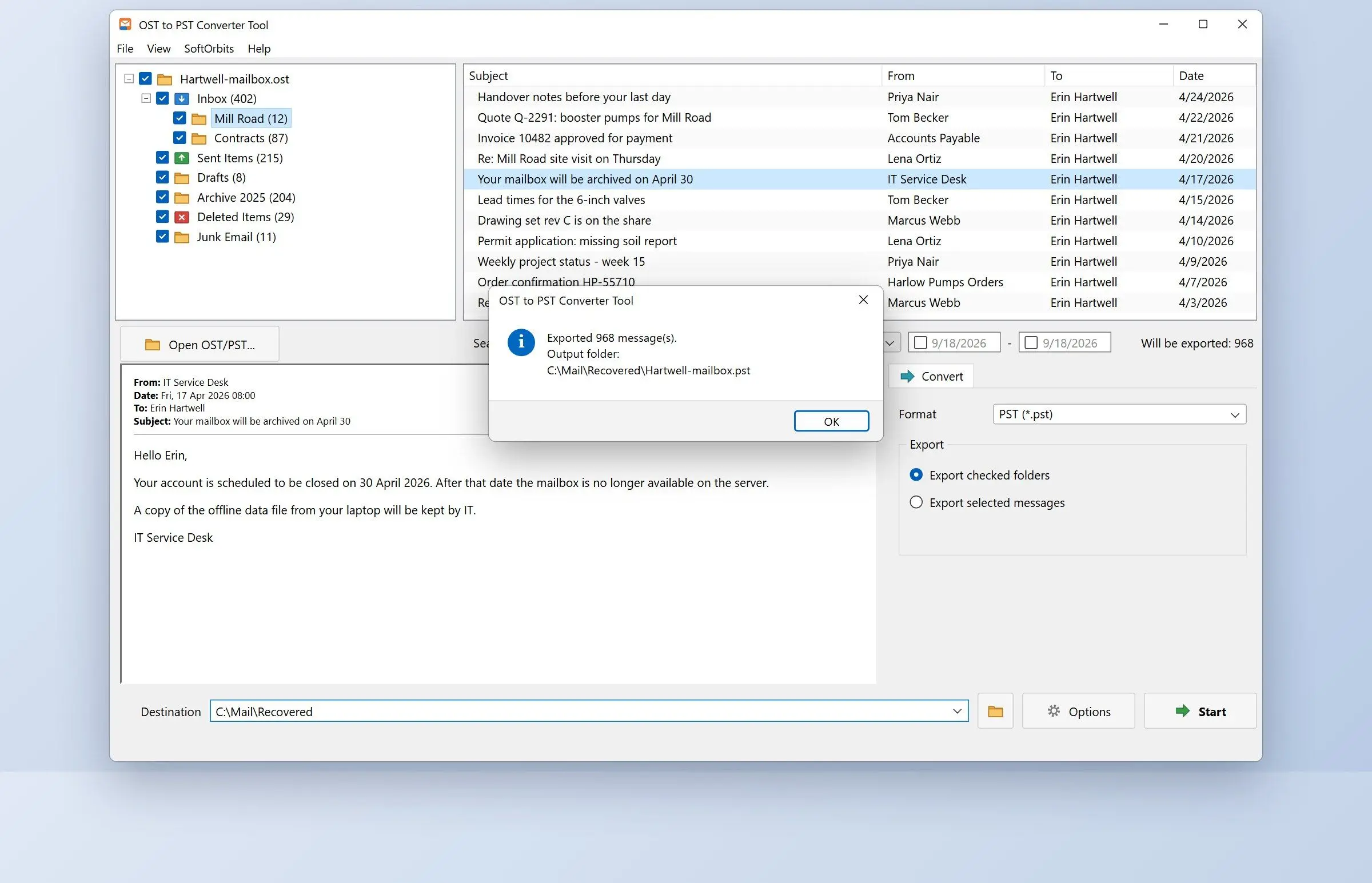
OST to PST Converter Tool uses its own parser, without Outlook or Exchange. You see the folder tree and a preview of each message. The program writes a Unicode PST with the same folders, readable in Outlook 2016 and later. It handles one .ost per run. Stopping midway leaves no half-written PST.
Keeps email readable on a plane, with the original on the server
Grows with the mailbox and slows Outlook past 10 GB
Leaves few repair options once the mailbox is deleted
Where is the OST file located?
TL;DR
In Outlook 2013 and later, the OST is in C:\Users\YourName\AppData\Local\Microsoft\Outlook. AppData is hidden by default. Typing the path into Win+R or the Explorer address bar is quicker than clicking through folders.
Press Win+R, paste this line and press Enter:
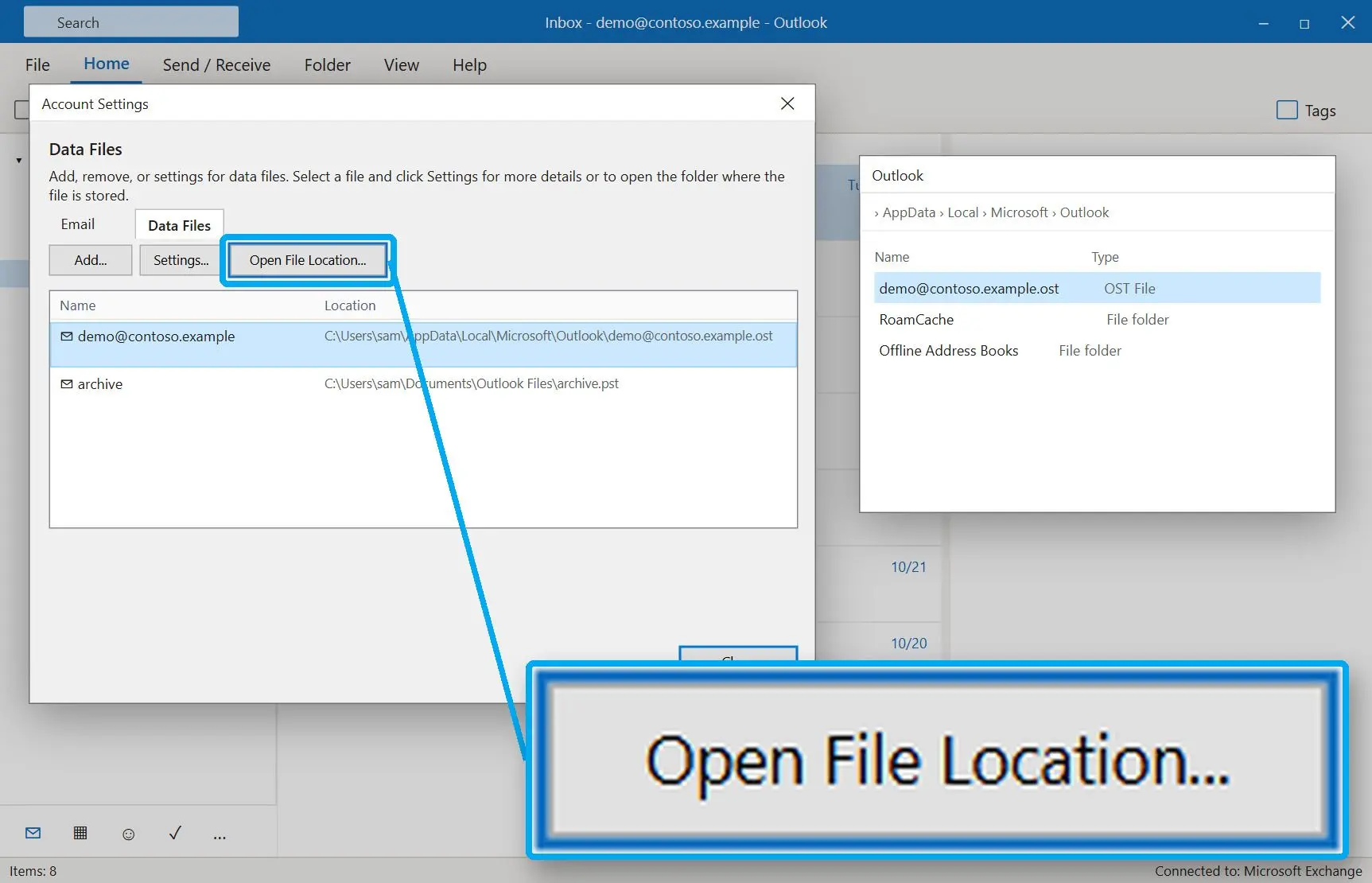
%LOCALAPPDATA%\Microsoft\Outlook In Outlook, go to File > Account Settings > Account Settings. Open the Data Files tab, select the account and click Open File Location. This tab shows the actual path, including locations set by older builds or a ForceOSTPath registry entry.
Why is my OST file so large, and what is the size limit?
TL;DR
The OST holds everything your sync window downloads, including years of attachments. Since Outlook 2010, the default cap is 50 GB regardless of server mailbox size.
50 GB
default maximum size of a Unicode OST or PST, set by the MaxLargeFileSize value of 51,200 MBSource
At the cap, Outlook stops sending and receiving. Even with a 100 GB Exchange Online mailbox, the client limit is 50 GB. Old ANSI-format files stop at 2 GB.
10 GB
OST size at which short pauses begin on most hardware; from 25 GB they come more oftenSource
For a safe fix, move the mail slider from All to 1 year in the Exchange account's settings and recreate the OST. A registry change can raise the cap, but admins who tried it warn that files past 50 GB corrupt far more often. For an oversized archive, reduce PST file size.
Is it okay to delete an OST file?
TL;DR
Yes, if the mailbox still exists on the server. Outlook downloads a fresh copy at the next start. If the account is gone, deleting the file deletes the mail.
Rename before deleting, for example to Outlook.ost.old. If Outlook refuses to start with "The set of folders cannot be opened", rename the file back and repair the profile first.
Microsoft's advice that an OST needs no backup assumes a live mailbox. Before cleaning up an old laptop, check that the account can still sign in. A deleted employee account's .ost may hold the last copy of their mail.
What can you do if an Outlook OST file is corrupted?
TL;DR
If the mailbox is still on the server, recreate the OST. Repair or conversion matters only when the damaged OST holds the only copy.
Rule out a lock first: OneNote sometimes holds the file open, causing "Cannot open .ost file. Must connect to Microsoft Exchange". To recreate it, close Outlook, rename the .ost and restart. The Inbox Repair Tool (scanpst.exe) is built around PST files; use it to repair a PST file. For an orphaned OST, work on a copy. Results depend on how much of the file is readable.
Is an OST file encrypted, and who can read it?
TL;DR
Outlook opens an OST only in the profile that created it. Other software can read a standard OST without that profile, so treat it as readable mail.
Vendor guides describe the OST as encrypted with a key from the MAPI profile. The open-source libpff library used by our converter reads a standard .ost without a profile. Anyone who can copy the file from AppData can read it. Protect your Windows sign-in and turn on BitLocker for laptop drives.
An OST file is Outlook's offline copy of a server mailbox. See how it differs from PST, where it is stored, size limits, and how to open an orphaned OST.
Yes. With a working account, use Export to a file > Outlook Data File (.pst) in Outlook. For an orphaned OST, OST to PST Converter Tool reads the file directly and writes a PST.
Recreate it as described above, or create a new profile under Control Panel > Mail > Show Profiles. Outlook builds a new OST and downloads the mailbox.

 OST to PST Converter Tool