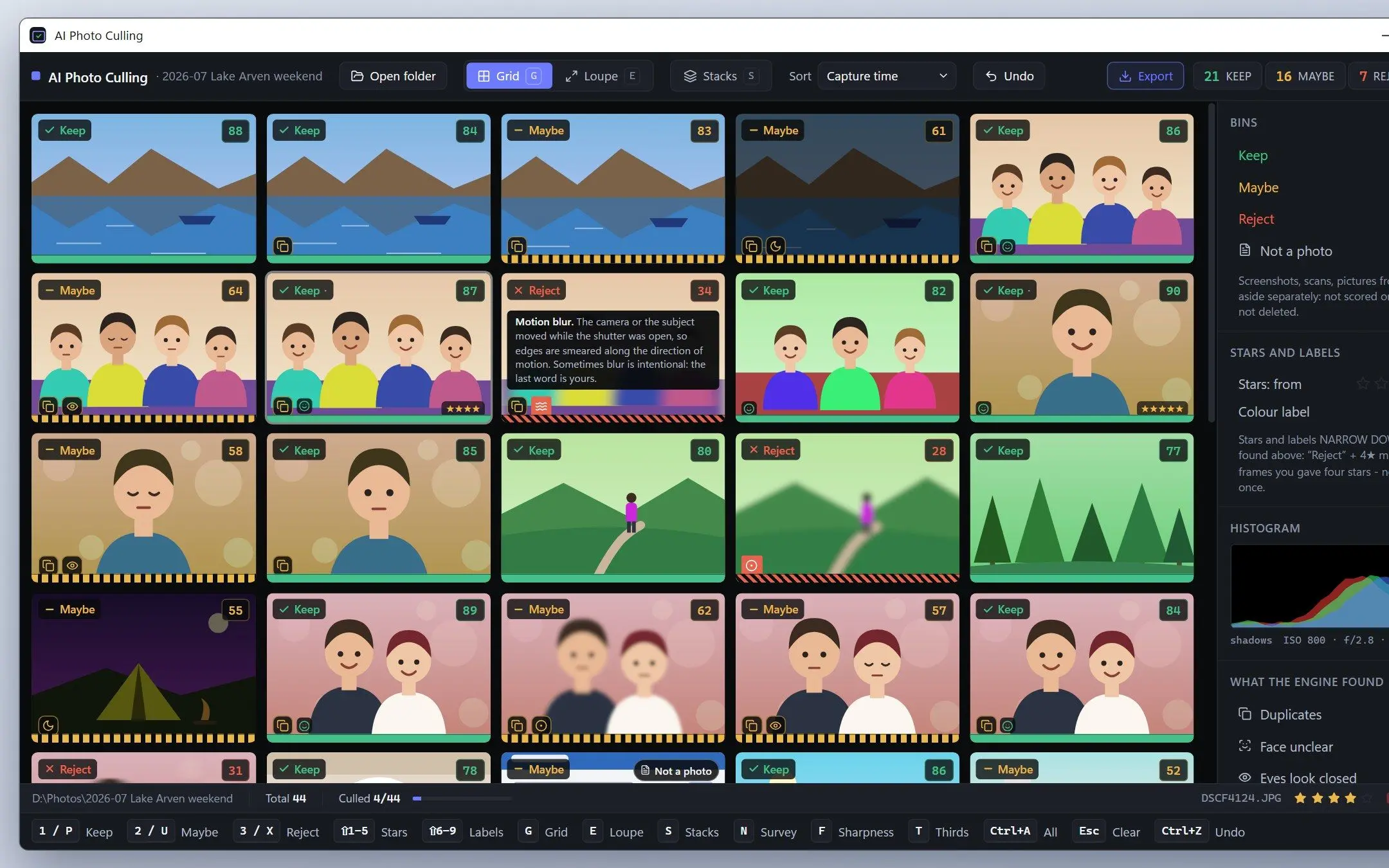
You will:

  1. 1️⃣ Compare seven culling tools by where their AI runs and what each one flags.
  2. 2️⃣ See dated monthly, yearly and lifetime prices side by side.
  3. 3️⃣ Pick a tool for your shoot, from a family archive to a paid wedding.
AI Photo Culling Screenshot.
️ Eugene - CEO at SoftOrbits, Candidate of Technical Sciences, has more than 16 years of expertise in software development, photo and multimedia applications, enhancing and transforming digital images and videos.
📅 Last updated on:  2026-11-16

If you return from a two-week trip with 2,400 RAW files, most photo culling software targets wedding photographers on a Mac and charges by the month. Some uploads your shots for AI processing. Your choices narrow if you want to sort locally on Windows. We ranked seven tools by where their AI runs and what they flag, with prices checked on November 16, 2026.

We make AI Photo Culling, ranked first here. Information about the other six comes from vendor pages and independent reviews; we did not buy their licenses.

Windows 11 / 10Free trial, no sign-up

What you will learn
Apply in 20 min Saves 3 hBeginner

Which AI photo culling software flags bad shots without uploading them?

TL;DR

AI Photo Culling, the Windows app we make, scans a folder and marks weak frames with reason icons, including soft subjects and closed eyes. Each shot gets a 0-100 score, bursts fold into stacks, and you choose the keepers.

Open a folder to start analysis with default settings. Results fill the grid as it works, with no wizard. The AI models run on your computer; your memory card's contents stay on the drive.

Blur is measured on the subject: a soft face against a sharp tree gets flagged where a whole-frame check would pass it. Exposure checks also read the subject, catching a dark backlit face even when the histogram looks fine. Screenshots and scanned pages go on a separate Not a photo shelf.
A series needs both close timestamps and similar content. A river and a road shot three seconds apart stay separate. In a burst of nine, the program marks up to three candidates only when it can narrow the set; three clean frames get no chip. HDR exposure brackets are protected from rejection for bad exposure.

Use Lightroom's keys: P to keep, X to reject and 1-5 for    . S folds stacks; Ctrl+Z undoes the last step. Reject marks a frame and moves it to _Rejected. Deleting files requires a separate confirmation. You can copy keepers to _Selected; ratings go into XMP sidecar files that Lightroom and Capture One read, including for CR3 files.

Culling by hand
  • Zoom to 100% on each frame to check focus
  • Flip through a burst of nine to find two keepers
  • Lose an evening to one trip
VS
With AI Photo Culling
  • Reason icons on every thumbnail before you zoom in
  • Bursts folded into stacks with candidates marked
  • Review the Maybe and Reject piles, then export keepers

 AI Photo Culling grid with reason icons for blur and closed eyes and a burst collapsed into one stack..

AI Photo Culling
AI Photo CullingSort a trip's RAW files in one pass, with soft focus and closed eyes flagged before you choose.

How the seven culling tools compare at a glance

ToolBest forWhere the AI runsPrice (dated)Windows
AI Photo CullingTrips and family archivesOn your PCFree download, paid license key (see product page)Yes
AftershootWeddings, culling plus editingOn your PCAI Culling from $10/month, 30-day trial (Nov 16, 2026)Yes
Excire Foto 2027Lifetime license with a catalogOn your PC$249 lifetime (Nov 16, 2026)Yes
Narrative SelectPortraits, eyes and focusOn your PCLite from $10/month billed yearly, AI scoring from $20 (Nov 2026)Yes, some features arrive later
Photo MechanicFast manual culling, captionsNo AI culling$14.99/month, $149/year, $299 perpetual (Nov 2026)Yes
Lightroom ClassicAdobe subscribersInside Lightroom ClassicAdobe planYes
FilterPixelFree start if uploads are fineCloud4 free projectsDesktop client

Prices come from vendor pages checked on November 16, 2026, except Photo Mechanic and Narrative Select figures, which come from Narrative's November 2026 comparison. Check before buying; plans change.

How we picked and judged the culling tools

TL;DR

We ranked local AI processing first and equal Windows and Mac features second. What each tool flags came next, followed by yearly cost and supported files.

We considered tools that rank for this search and those photographers name in forum threads, keeping those with a Windows version.

  • Where the AI runs. Local processing ranked above cloud upload.
  • Windows parity. We checked vendor notes for features released on Mac first.
  • What it flags. Soft focus and closed eyes first, followed by other documented checks.
  • Price over a year. Monthly, yearly and lifetime prices compared over 12 months.
  • Formats and output. RAW and HEIC support, star ratings and XMP.
Our judgments of the other six also draw on patterns in user comments. We name the source of every speed figure; we did not run timing tests.

The 7 best photo culling software tools for Windows, reviewed

1. AI Photo Culling: best for trip photos and family archives on Windows

AI Photo Culling suits you if you shoot a lot and edit a little, from holiday trips to ten years of family folders. It reads 25 RAW extensions and everyday formats including JPEG and HEIC. This card describes how the program works.

Pros:

Flags soft subjects, closed eyes and dark backlit faces with icons

Groups bursts by time and similarity, keeping unrelated shots apart

Protects HDR brackets from rejection for bad exposure

Uses Lightroom keys: P, X and 1-5

Copies keepers to a folder with star ratings in XMP

Cons:

New 1.0 release with no independent user reviews yet

Paid license key; see the product page for the price

You make the final keeper choice, so allow a short review pass

2. Aftershoot: best for wedding and event shooters who edit in the same app

Aftershoot is photography culling software that combines culling with editing and retouching. Aftershoot's homepage says it processes images locally on Windows or Mac and never stores them on its servers. Working photographers are split on its picks: some like the flat yearly fee for the editing module, others say they still trim its selections by hand.

 Illustration: Aftershoot culling view grouping similar wedding shots with selected keepers highlighted..

Pros:

Runs on Windows and macOS

30-day free trial without a credit card

Culling, editing and retouching under one subscription

Cons:

Subscription only, with no one-time option

Its homepage requires 8 GB of RAM and a relatively recent CPU

Some users report odd picks and re-check every set

Our read: the strongest all-in-one choice for paid shoots. For a hobbyist taking two trips a year, it offers more than you need.

3. Excire Foto 2027: best for a lifetime license with a searchable catalog

Excire Foto runs AI locally, groups similar shots and lets you search your library. Excire's own roundup lists a $249 lifetime license and says you edit in a separate program. It also ranks Excire first, so weigh the source.

Pros:

Lifetime license instead of a monthly fee

Groups similar shots and manages years of photos

Cons:

Editing requires another program

We found no independent user reviews we could verify

Most public comparisons come from the vendor

If you want to pay once and tag and search a decade of photos, Excire comes closest in this list.

4. Narrative Select: best for portraits where eyes and focus decide the shot

Narrative Select checks eyes and focus on faces and groups frames into scenes; you stay in control of each call. Its Select page says photos stay on your computer. It also says People Filter and Close-Ups reached Mac first, with Windows support on the way, and tells Windows users to convert HEIC to JPEG. One wedding photographer called it best for people pictures but had not tried it on travel work.

 Illustration: Narrative Select scene view with eye and focus checks on portrait close-ups..

Pros:

Eye and focus checks on faces

A free version, with paid plans from $10 a month billed yearly

Cons:

Some new features reach Mac before Windows

HEIC files need conversion on Windows

AI scoring requires the Standard plan, from $20 a month

5. Photo Mechanic: best for fast manual culling and metadata

Photo Mechanic is an established choice for manual culling, and the AI tools in this list work as a Photo Mechanic alternative when you want automatic flags. Narrative's comparison calls it a manual tool with no AI culling; keep the source in mind. The same page lists $149 a year or $299 perpetual with one year of updates, as of November 2026. A monthly plan costs $14.99.

 Illustration: Photo Mechanic contact sheet with star ratings and color labels applied by hand..

Pros:

Fast full-screen previews for picking by eye

Metadata and IPTC captions for press and sports work

Perpetual, monthly and yearly licenses

Runs on Windows and Mac

Cons:

No AI culling, per Narrative's comparison

Some users found the increase to $299 steep

One user called the subscription steep for an interface that barely changes

In our reading of the reviews, it remains the fastest way to cull by eye in a manual workflow.

6. Lightroom Classic: best if you already pay for Adobe

Lightroom Classic has long offered flags and    , with P to pick and X to reject, as Adobe's help page on flags and ratings explains. In October 2025, Adobe's community team marked the long-running AI culling request as addressed by the Adobe MAX release. One early user said it mainly targets portraits and headshots for now; Excire's reviewer found it too lenient in a wedding test.

Pros:

Culling, catalog and editing in one program

AI-assisted culling added in October 2025

- Flags and    carry into editing in the same catalog

Cons:

Requires an Adobe subscription plan

Users say AI culling mostly targets portraits so far

You must import into the catalog before culling

If you subscribe to Adobe, you can try it on a portrait session at no extra cost. It may offer less for landscapes and travel.

7. FilterPixel: best free start if cloud processing is fine

FilterPixel's free culling page says all processing happens in the cloud through a Mac or Windows desktop client. It looks for closed eyes, motion blur and exposure problems.

Pros:

Four free projects, no card required

One free Deep Cull project of up to 1,000 photos

Desktop client on both Mac and Windows

Cons:

All AI processing happens in the cloud

The free plan ends after four projects

The free tier described in its docs is larger than most paid trials, which surprised us.

Does culling software run on your PC or upload your photos?

TL;DR

Four of the seven tools say their AI runs on your computer; Lightroom Classic culls inside its desktop catalog. FilterPixel processes photos in the cloud, as does Imagen AI, which we left out of the ranking.

Processing location affects your wait and who holds a copy of your photos. Burst shooters often object to uploading thousands of frames just to sort them and want local processing. On a home connection, uploading a card of RAW files can take longer than culling it.

Aftershoot says it never stores images on its servers; Narrative says photos stay on your computer during culling. Read the current policies before committing a client's wedding. Photo Mechanic has no AI, so it has nothing to upload.

Is AI culling accurate enough, or will it miss your best shots?

TL;DR

Use AI picks as a first pass. Reviewers report near-perfect suggestions on large archives, but working photographers still re-check every set and sometimes abandon the AI picks.

A Fstoppers review of Aftershoot called its suggested culls near perfect on an archive of 80,000 frames. Readers disagreed: they check every set and cull further because it misses key shots. One photographer abandoned AI selection for a few jobs and culled by hand.

Excire's roundup says Lightroom Classic rejected tack-sharp frames as out of focus and missed half-closed eyes in a 1,000-photo wedding test. Excire ranks itself first, so weigh that account. Every program here can make errors in both directions when checking blur and blinks.

589
RAW portrait files in one reviewer's culling test: the cloud tool Imagen finished in 5 minutes, against 15 minutes for the same set by hand
Source

Speed claims need the same care. Excire's own roundup reports 1,000 wedding photos culled in three minutes, which is the vendor's test on the vendor's hardware.

Some photographers select keepers without rejecting anything and dislike AI that throws frames out. Others doubt they could skip checking every frame anyway.

Do not empty the Recycle Bin or delete a reject folder until you have reviewed the rejects. A soft-looking frame may be the only shot of a moment.

What does AI culling actually check?

TL;DR

Focus comes first: volume shooters call it their top reason for rejecting a shot. Closed eyes, exposure and near-identical burst frames follow.

Blur checks measure either the whole frame or the subject. Eye checks need a face detector, so they help with people rather than landscapes. Exposure checks flag dark or blown frames; better checks measure the subject.

A duplicate photo finder finds copies of the same file across folders. Culling software groups similar frames taken seconds apart for you to choose between. Excire and Aftershoot also group similar shots.
You still judge expression and timing in every program here.

Subscription or one-time license: what does culling cost over time?

TL;DR

Compare the same period: a $10 monthly plan costs $120 a year, close to half of Excire's $249 lifetime license.

The tools in this list sell in different ways. Aftershoot and Narrative Select are subscriptions. Photo Mechanic offers monthly, yearly and perpetual options, and the perpetual one includes a single year of updates. Excire sells a lifetime license. AI Photo Culling uses a license key, with the current price on the product page.

Hobbyists often complain about subscription fatigue: you may go a month without taking your camera out and still pay. When Photo Mechanic's perpetual license rose to $299 in 2024, a wedding blog reader said $130 would have been an easy yes and $300 was a lot more money.

Compare every price over 12 months. Check whether yearly billing is up front and whether a lifetime license includes updates after year one.

Which RAW and phone formats can culling tools open?

TL;DR

Check support for your camera's raw extension and your phone's HEIC files before buying. Format support varies more than feature lists suggest, and Windows sometimes trails Mac.

25
RAW file extensions read by AI Photo Culling, from Canon CR3 to Fujifilm RAF. PNG and WebP open too, next to JPEG and phone HEIC
Source

Narrative Select's product page lists Canon CR3 and Sony ARW support but requires HEIC-to-JPEG conversion on Windows. Windows needs Microsoft's HEIF Image Extensions to display HEIC in Photos. A program with its own HEIC reader skips that requirement.
If your program cannot read your Sony files yet, use an ARW to JPG converter to make previews for culling. Return to the original ARW files to edit your keepers.

Which culling tool fits your workflow and kind of shoot?

TL;DR

Can your photos leave the PC? Do you edit in the same program? Those answers usually narrow the decision to one or two tools.

Follow the first branch that fits.

  • Photos must stay on your PC, you shoot trips or family events on Windows, and you want misses flagged while you choose keepers: our AI culling software.
  • You shoot paid weddings most weekends and want culling and editing on one bill: Aftershoot.
  • You want to pay once and search a growing library: Excire Foto 2027.
  • You shoot portraits where eyes decide, ideally on a Mac: Narrative Select.
  • You cull by eye on deadline and need IPTC captions: Photo Mechanic.
  • You already pay for Adobe and shoot mostly people: try Lightroom Classic's built-in culling first.
  • You want to try AI culling for free and accept uploads: FilterPixel.

For a parent with ten years of mixed phone and camera folders, HEIC support and local processing narrow the choice. With 2,000 travel frames, you need burst stacks more than an editing suite. If you are a second wedding shooter handing files to a lead photographer, ask which program the studio uses before buying.

After the cull: edit and ship the keepers

AI Photo Culling writes star ratings to XMP sidecars for ten common RAW formats, so your editor sees them on import.

Is there good free culling software?

TL;DR

Yes, with conditions. FilterPixel offers four free cloud projects, Narrative Select has a free version, and Aftershoot offers a 30-day trial without a credit card.

AI Photo Culling is a free download. You can run the full analysis on your photos before buying, including scores, reason icons and burst stacks.

For manual culling, you may already own what you need: Lightroom Classic's flags and    come with any Adobe plan that includes it.Test a free tier on a shoot you have already culled. Compare its picks with yours; within an hour, you will know whether to trust it on new work.

Tools we left out and why

  • PhotoCuller. The PhotoCuller site says it culls offline for a one-time price but runs only on Mac, iPad and iPhone, excluding Windows.
  • Imagen AI. It combines cloud culling with a personal editing profile. We could not verify current prices, and uploading conflicts with our preference for local processing.
  • Android gallery and phone culling apps. These tidy a phone's camera roll; this guide covers camera folders with RAW files on a PC.

Sources

AI Photo Culling AI Photo Culling
Seven photo culling software tools for Windows compared: local vs cloud AI, blur and closed-eye checks, RAW support, free plans and dated prices.
AI Photo Culling Screenshot.


🙋Frequently Asked Questions

Use two passes: let software automate the tedious first sort by flagging soft and blinking frames, then review the Maybe pile and choose keepers. Edit those, using noise reduction software for high-ISO shots, for example.

Consider the lifetime or perpetual options above, or AI Photo Culling with its Windows license key. If you leave Adobe, pair your choice with a beginner-friendly photo editor.

For free photo culling software on Windows, try FilterPixel's four free projects through its Windows client, with the AI working in the cloud, or run the full AI Photo Culling trial analysis described above.

Phone gallery apps can mark favorites. To use these desktop programs, copy your phone's HEIC files to your PC and cull them alongside camera files.

Often, for press and sports work where you pick by eye and caption on deadline. If blur and blinks account for most rejects, AI can flag them first.

Choose open outputs. XMP star ratings and plain folders of keepers and rejects remain usable when you switch programs; a proprietary catalog may not transfer.

Most programs only mark or move files. In AI Photo Culling, Reject moves a frame to _Rejected, and deleting to the Recycle Bin requires a separate confirmation. If you removed the wrong frames, try photo recovery software before writing new files to that drive.