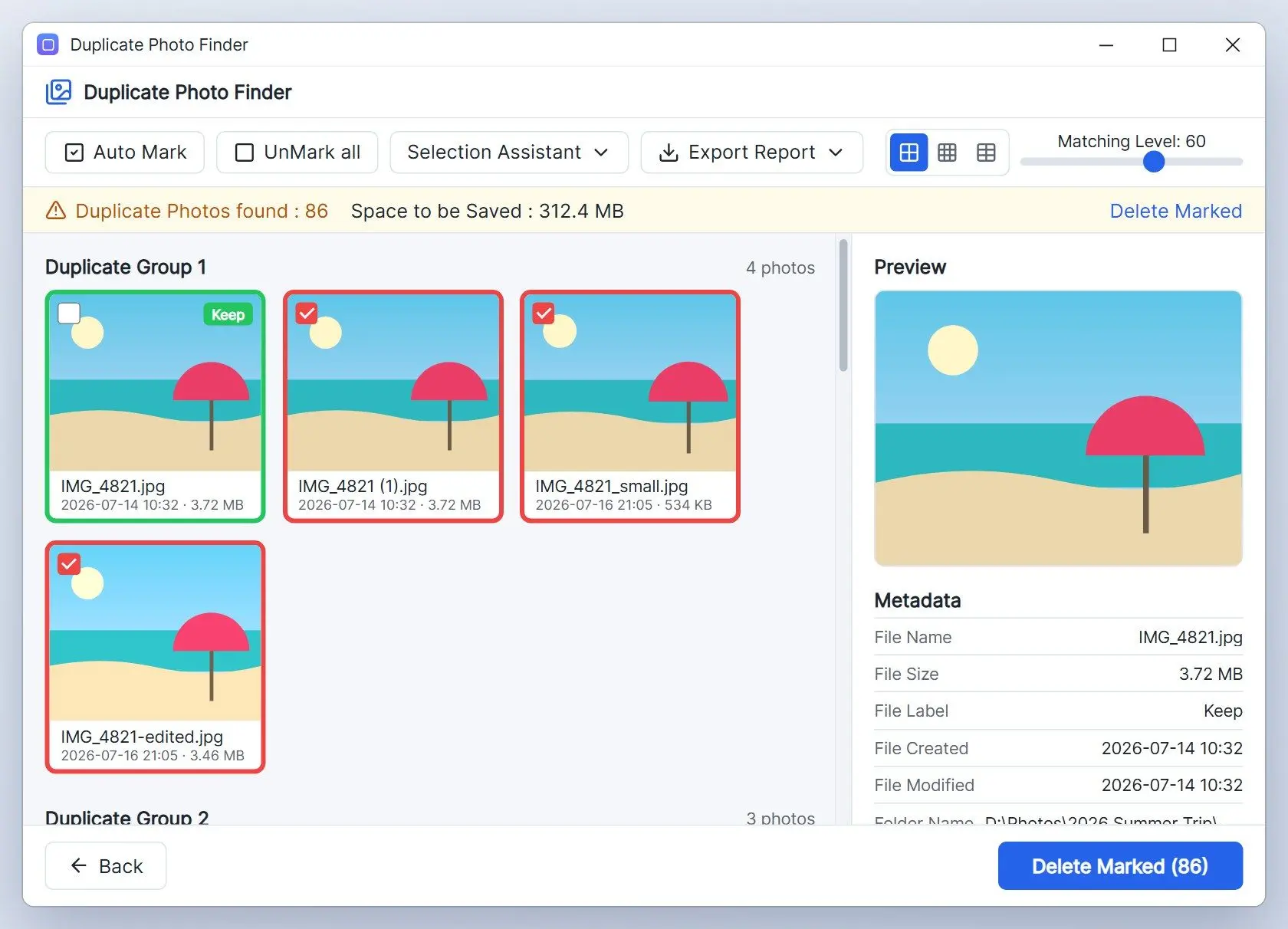
1. Duplicate Photo Finder: best for large libraries where the app picks the keeper
Older freeware leaves you with thousands of pairs and no way to act on them together. Our app puts every copy of a picture in one group and marks the best frame, so you confirm a group instead of a pair.Pros:
Marks the keeper in each group, resolution first
Matches rotated and mirrored copies in all 8 orientations
Reads camera RAW, HEIC and WebP next to JPG and PNG
Finds blurry shots and exact duplicate videos in separate modes
Cons:
Deletes only 15 files per session until you buy a license
Is a newer release with few independent reviews so far
Verdict: Choose our app if your library runs into the thousands and you want the app to suggest which copy stays.
2. Czkawka / Krokiet: best free open-source cleaner
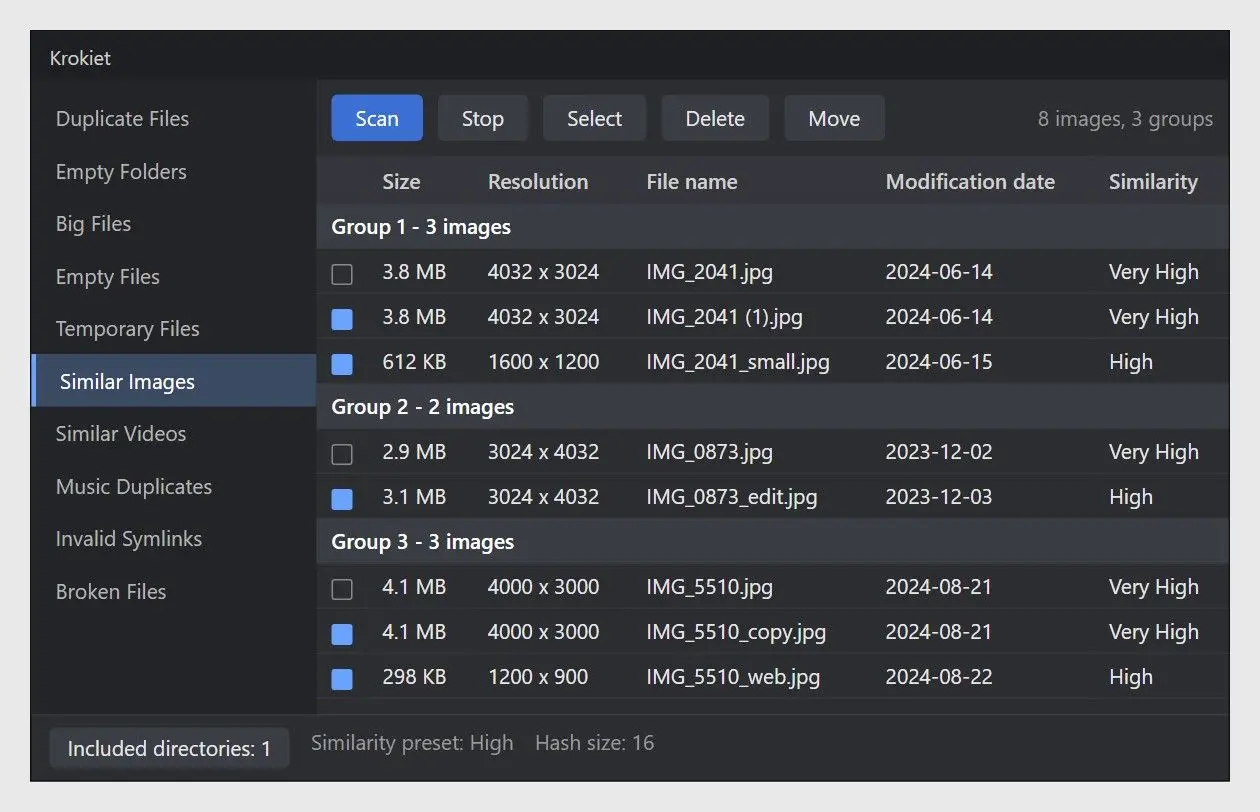
Czkawka is the open-source tool people often move to from older finders, and one Hacker News commenter switched from dupeGuru for its comparison view and speed. The project now ships a newer interface called Krokiet. The Czkawka README says version 12.0 is the last release of the old app and points new users to Krokiet. Its Similar Images tool finds pictures that differ in resolution or carry watermarks, and Similar Videos does the same for clips, a job our duplicate video finder guide covers in more depth. The README also states that the app has no internet access and collects no statistics.
Pros:
Free and open source, with no ads or upsell
Finds similar images and similar videos in one app
Runs on Windows and Linux, with macOS and Android builds too
Works offline and collects no usage data, per the README
Cons:
Two interfaces under one project confuse first-time downloads
Lists no rule for picking which copy to keep
Bundles many tools beyond photos, so the menu feels busy
Our take: The best free pick here for anyone comfortable judging each group by eye.
Verdict: Choose Czkawka or Krokiet if price decides it and you are happy to choose keepers yourself.
3. dupeGuru: best for protecting a master photo folder
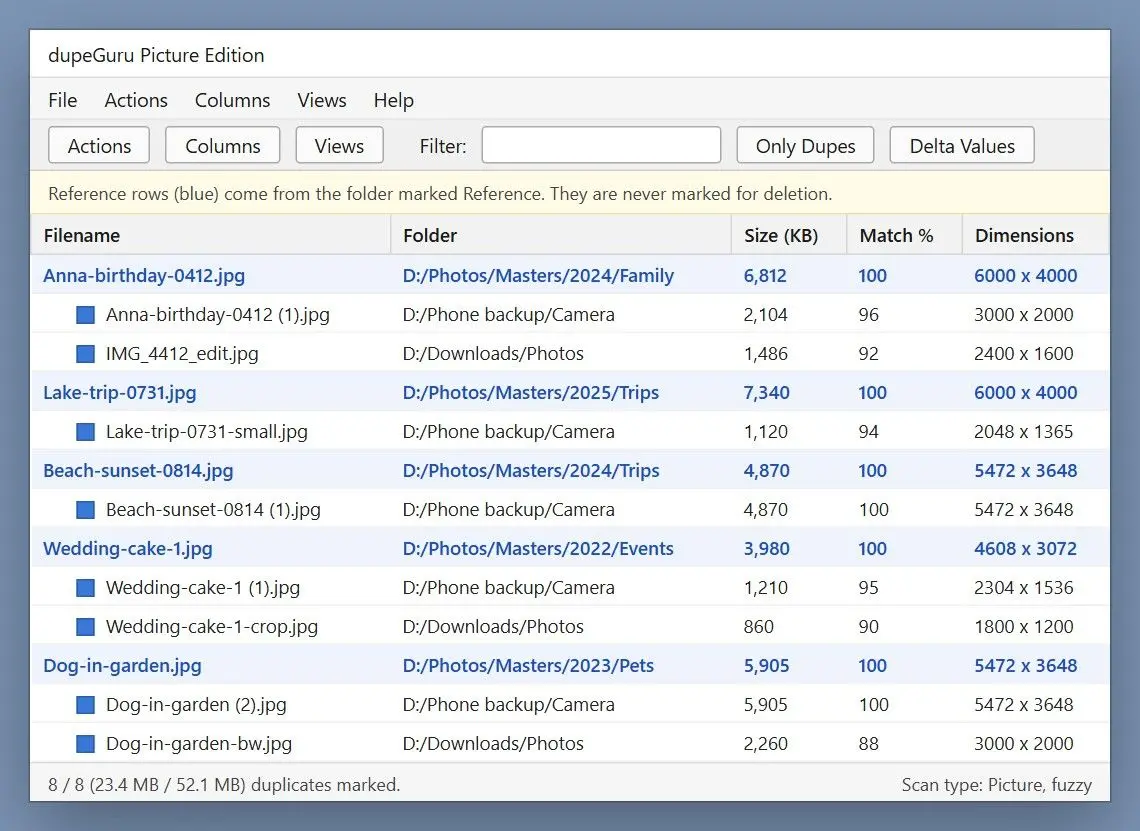
dupeGuru uses a reference folder. Mark your master archive as reference, and dupeGuru matches other folders against it without selecting files inside it for deletion. Its project site describes a Picture mode that "can scan pictures fuzzily" to find similar shots, and you can delete, move or copy whatever it finds. The project is community-run. Its repository asks for volunteers for macOS and Linux upkeep, and issue tracker holds recent crash reports on Windows, including a WinError 64 crash filed in August 2026.
Pros:
Protects a reference folder from deletion while matching against it
Finds similar pictures with a fuzzy Picture mode
Moves or copies duplicates instead of deleting them
Cons:
Shows open crash reports on Windows in its 2026 issue tracker
Relies on volunteer maintainers, per the project's own README
Offers no automatic pick of the best frame
Our take: The reference folder keeps edited exports safe while you clear out old camera dumps.
Verdict: Choose dupeGuru if you already keep a curated master folder and want everything else checked against it.
4. Duplicate Cleaner: best for assisted selection
Duplicate Cleaner from Digital Volcano comes in a free edition and a paid Pro. The vendor lists similar-image matching for resized, rotated and edited photos, camera RAW support. Its Selection Assistant helps pick which files to remove. In a Windows 11 help thread, one user called the free edition more polished than older freeware. In 2015 PCWorld found that the free version treated photos as plain files, with image matching reserved for Pro. Check the vendor's current comparison before you count on the free edition for similar photos.Pros:
Selection Assistant helps pick the files to delete
Matches resized, rotated and edited photos, per the vendor
Sends duplicates to the Recycle Bin or moves them
Cons:
Kept image matching in Pro during PCWorld's 2015 test
Changes pricing and edition limits, so check before buying
Verdict: Choose Duplicate Cleaner if you want to write your own selection rules and are open to paying for Pro.
5. AntiDupl.NET: best for unusual image formats
AntiDupl.NET is a free, MIT-licensed project on GitHub that compares pictures by content and also flags damaged images. Its README lists 18 formats, reaching WebP and HEIC as well as newer AVIF and JXL files. Photoshop PSD is on it too. Reviews show the trade-off. Downloadcrew found the interface "isn't quite as intuitive as it should be" and warned that its similarity algorithms are not entirely reliable, so every result deserves a look before deletion.Pros:
Reads 18 formats, HEIC and AVIF among them
Flags defective images alongside duplicates
Comes free and open source under the MIT license
Cons:
Takes time to learn, per Downloadcrew's review
Produces similar matches that need careful review
Verdict: Choose AntiDupl.NET if your folders hold AVIF, JXL or PSD files that other finders pass over.
6. VisiPics: best for a simple photo-only freeware
VisiPics still gets recommended in Windows help threads for its plain, old-school look and zero price. The VisiPics site describes software built only for finding duplicate pictures and says the latest version was released in 2013. Its Auto Select mode keeps the higher-resolution file or the smaller one, depending on your setting, and results appear while the scan runs. A review by a competing vendor found the scan slow and warned that Auto Select misfires on folders with many similar shots.Pros:
Stays free and focused on pictures only
Keeps the higher-resolution or smaller file with Auto Select
Shows results while the scan is still running
Cons:
Has had no new version since 2013
Misjudges folders of similar shots in Auto Select mode
Verdict: Choose VisiPics if you want a free photo-only tool and can live with software last updated in 2013.
Which alternative fits your photo library?
Match the tool to the library. A family archive with thousands of copies needs an automatic keeper, while a small one-off cleanup can stay with the older freeware.
✔️ The family archive.
Years of phone backups, cloud downloads and old laptop folders now sit on one drive. You want the app to choose the keeper and a Recycle Bin safety net behind it. Start with a duplicate photo cleaner that groups copies and marks the best one, such as our own app.
✔️ The open-source user.
You want no license and code you can inspect, maybe on Linux as well. Krokiet is the pick, and dupeGuru is the backup if its reference folder appeals to you.
✔️ The photographer with a master folder.
Edited exports live in one curated place and camera dumps pile up elsewhere. dupeGuru's reference folder keeps the masters out of every deletion.
✔️ The format collector.
Layered PSD files sit next to newer AVIF or JXL exports. AntiDupl.NET reads more of them than most finders, so review its matches by eye.
✔️ The occasional tidier.
A few hundred JPGs from one trip need sorting. The older freeware is fine for this, and its portable build avoids the installer question.
 Duplicate Photo Finder