๏ธ Eugene - CEO at SoftOrbits, Candidate of Technical Sciences, has more than 16 years of expertise in software development, photo and multimedia applications, enhancing and transforming digital images and videos.
๐Ÿ“… Last updated on:  2026-06-08

The best noise reduction software for Windows in 2026: 8 photo denoisers compared on quality, GPU needs, price, and RAW or JPEG support.

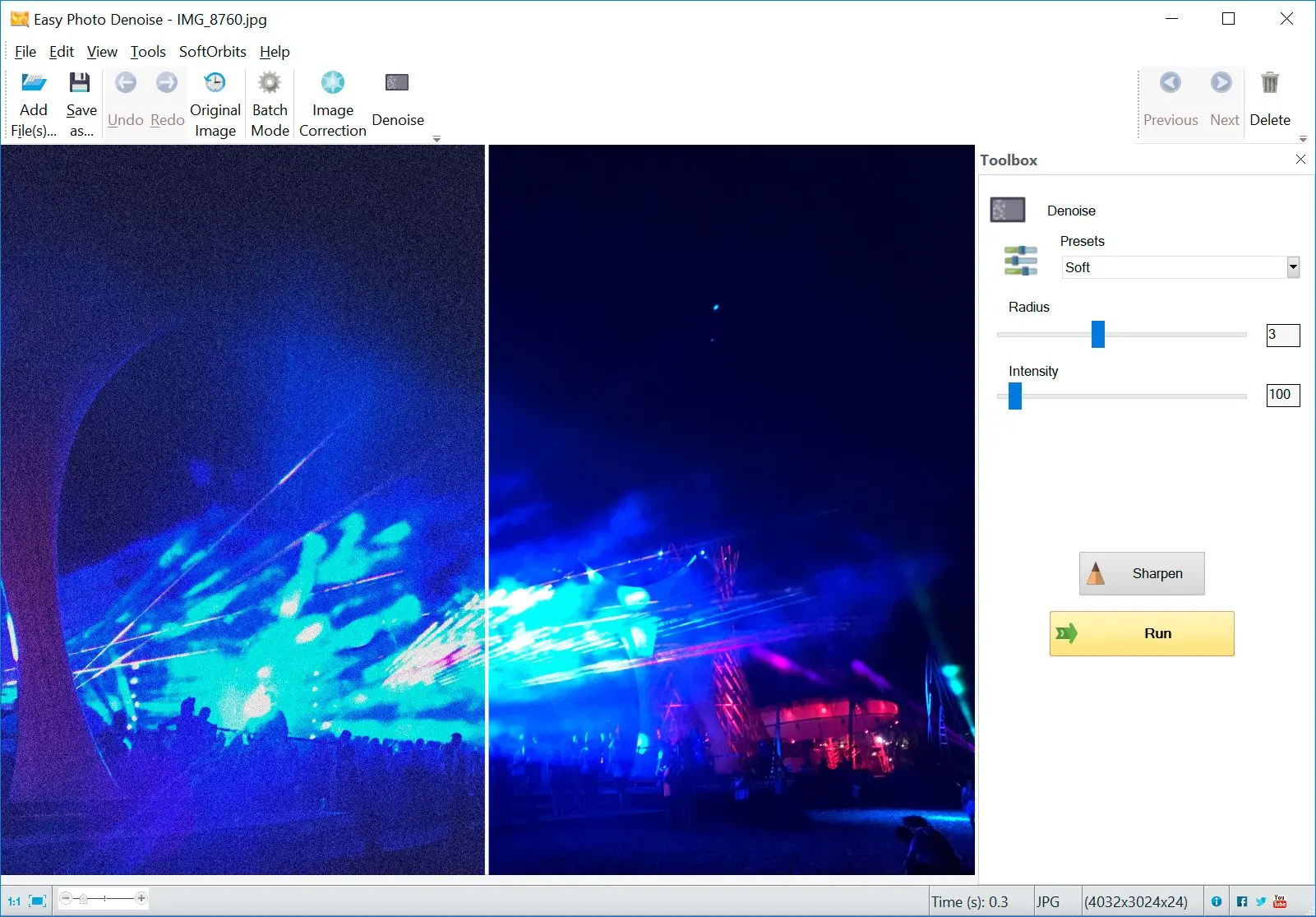
Easy Photo Denoise Screenshot.

Every photographer hits the same wall. You push the ISO to save a shot in bad light, and the picture comes back grainy. The best noise reduction software cleans up that high-ISO mess while keeping the detail you actually shot for. This guide ranks eight photo denoisers for Windows. Some are heavy AI engines that want a gaming graphics card. One is a lightweight tool that runs on an old laptop with nothing special inside. We are talking about image noise here, not audio noise cancellation, so every pick is dedicated photo noise reduction software for Windows.

You will:

  • See which denoiser fits your hardware and your budget
  • Learn what each tool can and cannot do, with honest limits
  • Pick the right one without paying for a subscription you do not need
Disclosure: SoftOrbits makes Easy Photo Denoise. We ranked every tool below against the same yardstick, our own included, so you can compare before you download.

Quick comparison: 8 noise reduction tools at a glance

ToolBest forLicenseNeeds GPU?RAW / JPEG
SoftOrbits Easy Photo DenoiseOld/low-end Windows PCsOne-timeNoRAW in, JPEG out
DxO PureRAW 6Best RAW qualityOne-timeYes (RTX 6GB+)RAW only
Topaz Photo AIAll-in-one AISubscriptionYesRAW + JPEG
ON1 NoNoise AIValue AI denoiserOne-timeYes (4GB VRAM)RAW + JPEG
Lightroom AI DenoiseExisting subscribersSubscriptionYesRAW + JPEG
Luminar NeoCreative editingOne-time or subYesRAW + JPEG
Neat ImageProfiled CPU denoiseOne-timeNoRAW + JPEG
darktable / RawTherapeeFree and offlineFreeNoRAW + JPEG

What causes photo noise (and what software can fix)

TL;DR

Photo noise has two parts. Luminance noise is the grainy texture in the brightness channel. Chroma noise is the colored speckle that ruins shadows and skies. High ISO makes both worse, and good software removes the speckle while protecting edges.

Digital noise is the random speckle that appears when your camera amplifies a weak signal. Shoot at ISO 6400 in a dim room and the sensor has to guess at the missing light. That guess lowers the signal-to-noise ratio and leaves grain behind. The grain comes in two flavors. One is luminance noise, the gritty film-like texture in the brightness channel. The other is chroma noise, the patchy color blotching that looks worst in deep shadows and flat skies. A denoiser has to smooth both without turning eyelashes and fabric into plastic. The cheap approach is a blur that softens everything. The good approach is edge-aware processing that can tell grain apart from the real detail. Softness is a different problem from grain, by the way, and a tool that fixes blurry shots works on sharpness rather than noise. Push a denoiser too hard and you trade one flaw for another. Over-smoothing leaves skin and skies looking waxy, which is a complaint you see again and again in real comparison threads.

How we tested and ranked these denoisers

TL;DR

We judged each tool on five fronts. Quality at high ISO mattered most, followed by hardware needs and the licensing cost. After that came file support and the everyday workflow. No tool wins on all five, so your PC and budget decide the pick.

We did not chase a single "best" score, because the right denoiser depends on what you own and what you shoot. Five criteria carried the ranking:

  • Noise quality. How cleanly it removes luminance and chroma noise at high ISO without smearing detail.
  • Hardware needs. Whether it demands a dedicated GPU or runs happily on integrated graphics.
  • License and cost. A one-time purchase versus a subscription, and what it adds up to over a few years.
  • File support. RAW only or RAW plus JPEG. Standalone app or plugin.
  • Workflow. Batch support, plain ease of use, and whether it runs offline.

Where we point to quality differences, we lean on hands-on community comparisons instead of marketing copy. A long side-by-side on the pixls.us photography forum and a detailed roundup at Fstoppers shaped several of the verdicts below.

The 8 best noise reduction tools, reviewed

1. SoftOrbits Easy Photo Denoise - Best for older or low-end Windows PCs

This is our pick for the largest and quietest group of readers. They run an everyday Windows laptop with no gaming GPU, and they just want cleaner photos without a monthly bill. Easy Photo Denoise uses classic denoising math (Median, Bilateral, and Non-Local Means) rather than a heavy neural network. That choice is the whole point. It runs on the CPU, works offline, and never checks for VRAM. You add files or a folder, pick a preset from Light to Strong, sharpen afterward if you like, and process in batch. It reads RAW and writes JPEG. It is honest about what it is. This is a fast, buy-once cleaner, not a deep-learning detail rebuilder.
 SoftOrbits Easy Photo Denoise presets Light to Strong on Windows.

Pros:

Runs without a dedicated GPU, on integrated graphics and older laptops

One-time license with no subscription, ever

Batch folders driven by simple Light-to-Strong presets

Optional sharpen step after the denoise pass

Cons:

Classic algorithms cannot recover extreme high-ISO detail the way DxO or Topaz can

The Strong preset can soften fine texture if you overdo it

Windows only, and it exports to JPEG rather than a full RAW pipeline

Verdict: Choose Easy Photo Denoise if you want a buy-once cleaner that runs without a graphics card on Windows. Have a strong GPU and want the absolute best quality? The next two picks rank higher there.

2. DxO PureRAW 6 - Best pure RAW noise reduction quality

DxO PureRAW is the quality benchmark most reviewers reach for. Its DeepPRIME engine produced the cleanest RAW output in the Fstoppers testing, with fewer artifacts than its rivals. The catch is scope. It only processes RAW files, so JPEG shooters are out of luck, and it leans hard on a capable graphics card. The official store lists an NVIDIA RTX with at least 6 GB of VRAM as the minimum, and recommends more for speed. It sells as a one-time purchase, around $139.99 new on the DxO store.

Pros:

Top-tier RAW denoise quality with clean, natural detail

Buy it once, with no subscription

Works as a standalone app and as a Lightroom plugin

Cons:

RAW files only, with no JPEG support

Wants a recent dedicated GPU with 6 GB or more of VRAM

Verdict: Choose DxO PureRAW 6 if you shoot RAW on a capable GPU and want the cleanest result going.

3. Topaz Photo AI - Best all-in-one AI

Topaz folds three jobs into one app. It denoises, sharpens, and upscales, which is why a lot of photographers keep it in the bag. The quality reputation is real, but two things have hurt it lately. First, Topaz ended perpetual licenses in October 2025 and went subscription only, starting around $199 a year. Second, reviewers keep flagging quality quirks. The Fstoppers test noted a slow analysis phase and "fake    " creeping into night-sky shots. On the pixls.us comparison, one user was "least impressed by Topaz" and found noise artifacts in the background.

Pros:

One workflow that denoises, sharpens, and enlarges

Strong AI quality on typical high-ISO shots

Opens both RAW and JPEG files

Cons:

Subscription only since October 2025, with no buy-once option

Needs a capable GPU to run at a usable speed

Reported artifacts in night-sky and fine-texture scenes

Verdict: Topaz Photo AI earns its keep when you want one app for cleanup and upscaling and do not mind paying yearly.

4. ON1 NoNoise AI - Best value AI denoiser with JPEG support

ON1 NoNoise AI is the value pick among the AI tools. It denoises RAW and JPEG alike, runs standalone or as a plugin, and still sells a one-time license instead of forcing a subscription. In the pixls.us thread, one tester rated ON1 the best of the bunch on a real-world photo, though "the difference isn't very significant" against the free tools. The recurring knock is blotchy artifacts in smooth gradients like skies, plus a 4 GB VRAM minimum listed on the ON1 product page.

Pros:

Opens both RAW and JPEG, standalone or as a plugin

Buy-once license still on offer

Quick to process and good value among AI tools

Cons:

Blotchy artifacts can show up in skies and smooth gradients

Requires at least 4 GB of VRAM

Verdict: Choose ON1 NoNoise AI if you want AI cleanup for both RAW and JPEG without a subscription.

5. Adobe Lightroom AI Denoise - Best if you already subscribe

Already paying for Adobe's Photography Plan? Then Lightroom's AI Denoise is right there, with no extra purchase, working non-destructively inside your catalog. That convenience is the entire pitch. The downsides are speed and stagnation. The SilentPeak Photo roundup measured 10 to 20 seconds per image. A commenter in the Fstoppers review claimed Adobe "hasn't updated their AI noise reduction algorithm since April 2023." There is no buy-once option either, and the entry plan runs about $9.99 a month for existing members, with new subscribers paying more.

Pros:

Bundled into the existing Photography Plan at no extra cost

Non-destructive, right inside the Lightroom catalog

Opens RAW and JPEG

Cons:

Slow, at roughly 10 to 20 seconds per image

Subscription only, with no buy-once license

Algorithm reportedly stale next to DxO

Verdict: Already subscribed? Lightroom AI Denoise is the obvious call, with no reason to leave Adobe just for noise.

6. Luminar Neo - Best for creative editing with denoise built in

Luminar Neo is a creative editor first and a denoiser second. Noise reduction is one tool among many here, so it suits photographers who want stylized edits and relighting alongside cleanup. It sells both a one-time desktop license and a subscription, with some capabilities offered as paid extension packs. As a dedicated denoiser it is fine rather than exceptional, so judge it on the whole package.

Pros:

A full creative editing suite, not only noise reduction

A one-time purchase option exists

Opens RAW and JPEG

Cons:

Noise reduction is a side feature, not the core focus

Some capabilities cost extra as paid packs

Verdict: Choose Luminar Neo if you want creative editing plus cleanup in one tool and care more about looks than specialist denoising.

7. Neat Image - Best traditional, non-AI CPU denoiser

Neat Image is the veteran of profiled denoising. Rather than guess with a neural network, it builds a noise profile for your exact camera and ISO, then strips that signature out. It is tuned for the CPU, runs standalone on Windows, and sells a one-time license. The tradeoff is automation. You get the most from it by feeding it a camera profile, which is more manual than a single-button AI pass. For people who distrust AI smoothing and want repeatable control, that extra step is a feature.

Pros:

Profiled, predictable cleanup with fine manual control

Tuned for the CPU, with no GPU dependency

Buy-once license, standalone on Windows

Cons:

More hands-on than the automatic AI tools

Best results need a proper camera noise profile

Verdict: Choose Neat Image if you want precise, profile-based control and prefer a traditional approach over AI.

8. darktable and RawTherapee - Best free and open-source

This free, open-source pair covers anyone on a zero budget. Both run on the CPU and cost nothing at all. RawTherapee can punch well above its price. In a direct test on Topaz's own sample images, the photographer behind the Marc R Photo blog found the RawTherapee output "sharper" and "much better," and concluded that skill with the tool matters more than the price tag. The cost is the learning curve, and at very high ISO the community agrees the AI tools still pull ahead. darktable's profiled denoise can over-smooth too, leaving subjects "waxy" if you lean on it.

Pros:

Costs nothing, open-source code, runs fully offline

Works on the CPU with no GPU required

Genuinely capable in skilled hands

Cons:

Steep learning curve and no automatic mode

Quality trails the AI tools at very high ISO

Verdict: Reach for darktable or RawTherapee when the budget is zero and you have the patience to learn the workflow.

Do you need a GPU? Noise reduction without a dedicated graphics card

TL;DR

The big AI tools want a discrete graphics card, and without one they crawl. If your PC has only integrated graphics, reach for a processor-based tool. Easy Photo Denoise, Neat Image, and the free RawTherapee all qualify.

This is the single biggest mismatch we see. The AI engines were built around graphics cards. DxO recommends an RTX-class GPU with 6 GB of VRAM, and ON1 lists a 4 GB minimum. Run either on a laptop with integrated Intel graphics and it slows to a crawl. Users on the DPReview forums reported waits of 1.5 to 2.5 minutes for one image on machines without a discrete card. A strong GPU buys you the best quality, no argument. But if you do not have one, no need to upgrade the hardware just to clean up grain. The classic, processor-based tools were designed for exactly this case. Easy Photo Denoise runs on the CPU and so does Neat Image, and the free pair does the same, with no VRAM check at startup. You give up a little high-ISO quality in exchange for software that actually runs on the computer you own.

Subscription vs one-time: which denoisers you can buy once

TL;DR

Topaz and Adobe are subscription only now. On the AI side you can still buy DxO PureRAW and ON1 NoNoise outright. Neat Image and Luminar Neo keep one-time options too, and so does our own Easy Photo Denoise. The free pair costs nothing at all.

Licensing has quietly turned into the deciding factor for a lot of photographers. The change that stung most was Topaz ending its perpetual licenses in October 2025. The app is now subscription only at around $199 a year. Adobe never sold a buy-once option in the first place; Lightroom comes only as a monthly subscription. Prefer to pay once and own the tool? The field is still healthy. DxO PureRAW 6 ships as a one-off buy, and ON1 NoNoise and Neat Image do the same. Luminar Neo keeps a perpetual option, and our own Easy Photo Denoise is a buy-once tool too. At the very bottom of the cost curve, darktable and RawTherapee are free forever. Add up three or four years of subscription fees and the pay-once tools often work out cheaper, especially if you only clean up photos now and then.

RAW vs JPEG: what each tool can actually open

TL;DR

DxO PureRAW is RAW only. Almost everything else opens both RAW and JPEG, and Easy Photo Denoise reads RAW while exporting JPEG.

The file types a tool accepts can rule it out before quality even enters the picture. DxO PureRAW is RAW only by design, which is great for camera shooters but useless if your archive is full of JPEGs or phone shots. Reviewers call that limit out plainly. Most of the others, Topaz and ON1 and Lightroom and Neat Image, handle RAW and JPEG without complaint. Easy Photo Denoise reads RAW files and writes finished JPEGs, which suits the common case where you clean up a noisy shot and hand off the result. If your noisy files are old scans or damaged prints rather than camera RAW, that is a different job entirely. It sits closer to a dedicated old photo restoration tool than to a high-ISO denoiser.

How to choose the right noise reduction software

TL;DR

Match the tool to your PC and your wallet before anything else. No graphics card or a buy-once budget points to Easy Photo Denoise, Neat Image, or free RawTherapee. A strong GPU points to DxO for quality, or Topaz for an all-in-one.

Work down three questions in order. Start with your hardware. If you have no dedicated graphics card, skip the heavy AI tools and reach for CPU-based denoise software for Windows, because the best engine on earth is useless when it takes two minutes a frame. Move to your budget model next. If subscriptions annoy you, cross off Topaz and Adobe and look at the pay-once or free camp. Finish with your files and your workflow. RAW shooters chasing maximum quality should look hard at DxO, while anyone who wants cleanup and sharpening and upscaling in one place is the target for Topaz or Luminar. Most everyday Windows users on modest hardware who just want to pay once land on our Easy Photo Denoise, and you can pair it with a tool to enlarge the cleaned-up file when a bigger print calls for it.

Want a wider set of fixes beyond grain? The full SoftOrbits photo toolkit bundles several editors together.

Easy Photo Denoise

The best noise reduction software for Windows in 2026: 8 photo denoisers compared on quality, GPU needs, price, and RAW or JPEG support.
Easy Photo Denoise Screenshot.

Easy Photo Denoise Easy Photo Denoise
The best noise reduction software for Windows in 2026: 8 photo denoisers compared on quality, GPU needs, price, and RAW or JPEG support.
Easy Photo Denoise Screenshot.


๐Ÿ™‹Frequently Asked Questions

For pure RAW quality on a capable PC, DxO PureRAW 6 leads most hands-on comparisons. For older or low-end Windows machines without a graphics card, SoftOrbits Easy Photo Denoise is the practical pick, because it runs on the processor and costs nothing extra each month. There is no single winner. The best tool depends on your hardware, your budget, and whether you shoot RAW or JPEG.

Yes. Processor-based tools such as Easy Photo Denoise and Neat Image, along with the free RawTherapee, run without a graphics card. The AI tools are the ones that grind to a halt on integrated graphics.

Yes. darktable and RawTherapee are both free, with open code, and need no internet connection to run. They take longer to learn than a one-button AI tool, but skilled users get genuinely good results, especially below very high ISO.

You can still buy DxO PureRAW 6 and ON1 NoNoise AI outright. Neat Image and Luminar Neo sell one-time licenses as well, and SoftOrbits Easy Photo Denoise is buy-once. Only Topaz Photo AI and Adobe Lightroom lock you into a subscription.

Most open both. Topaz and ON1 handle JPEG, as do Lightroom and Neat Image, plus our own Easy Photo Denoise on the output side. DxO PureRAW is the notable exception, since it processes RAW files only.

Use a lighter setting and edge-aware processing rather than a blunt blur. Begin with a mild preset, check skin and fine texture at 100 percent, and raise the strength only as far as you must. Over-smoothing is what creates that waxy, plastic look.

Several can, Easy Photo Denoise and DxO PureRAW and ON1 among them. Batch mode applies the same denoise settings across an entire shoot, which saves real time on event or travel work.

ReferencesFstoppers - The best AI noise reduction software, testedpixls.us forum - darktable vs ON1 vs Topaz denoise comparisonSilentPeak Photo - Best noise reduction softwareCG Channel - Topaz ends perpetual licensesDxO PureRAW 6 - pricing and system requirementsON1 NoNoise AI - product pageMarc R Photo - RawTherapee vs Topaz DeNoise