In this guide, you will:

  1. 1️⃣ Compare AllDup with four alternatives for photos and general files.
  2. 2️⃣ Check whether AllDup is safe and free, and where its settings confuse people.
  3. 3️⃣ Run an AllDup scan and remove duplicates while keeping originals.
Duplicate Photo Finder Screenshot.
️ Eugene - CEO at SoftOrbits, Candidate of Technical Sciences, has more than 16 years of expertise in software development, photo and multimedia applications, enhancing and transforming digital images and videos.
📅 Last updated on:  2026-11-23

The AllDup duplicate file finder gives you control over mixed files, but you have to work through a crowded window of options. For family photos, Duplicate Photo Finder needs fewer decisions.
We make Duplicate Photo Finder, so it comes first in our ranking. We list its limits alongside AllDup's. We ran no speed tests; competitor claims come from documentation, published reviews or user reports.

Free version finds every duplicateWindows 11 / 10, 64-bitJPG, HEIC and 25 RAW formats

What you will learn
Apply in 10 min Saves 2 hMedium

AllDup vs 4 alternatives at a glance

Claims supported only by the vendor are marked as vendor-reported.
ToolBest forPhoto matchingPricePlatforms
Duplicate Photo FinderPhoto folders with few settingsExact and similar, including HEICFree edition deletes 15 files per session; license removes the limitWindows 10/11 x64
AllDupFull control over any file typeExact and similar (dHash)FreewareWindows 7 to 11
CzkawkaOpen source, several operating systemsExact and similarFreeWindows, Linux, macOS, FreeBSD
dupeGuruFuzzy file name matchingFuzzy Picture modeOpen sourceLinux, macOS, Windows
Cisdem Duplicate FinderOne vendor across desktop and mobileSimilar photos (vendor-reported)Check vendor siteWindows, Mac, Android, iOS (vendor-reported)

How we evaluated AllDup

TL;DR

We ranked programs by the settings you face before a first clean result and the protection for your originals. We ran no timed scans, so speed did not affect the order.

  • Settings before the first result, our lead criterion for a cleanup today
  • Protection for originals: Recycle Bin use, a kept copy in each group and a usable preview
  • Photo matching beyond byte-identical copies
  • File types and comparison rules
  • Starting cost and verifiable claims
For AllDup, we used the vendor's manual, PCWorld articles from 2013 and 2024, Cisdem's review for release details, and user reports dated 2014 to 2023. We used the project pages for Czkawka and dupeGuru. Cisdem's details are its own claims. "Our read" gives our judgment from these sources, not hands-on tests.

4 AllDup alternatives reviewed, plus AllDup itself

The ranking favors photo cleanup that needs little setup and carries a low risk of losing originals.

1. Duplicate Photo Finder - best for photo folders with few settings

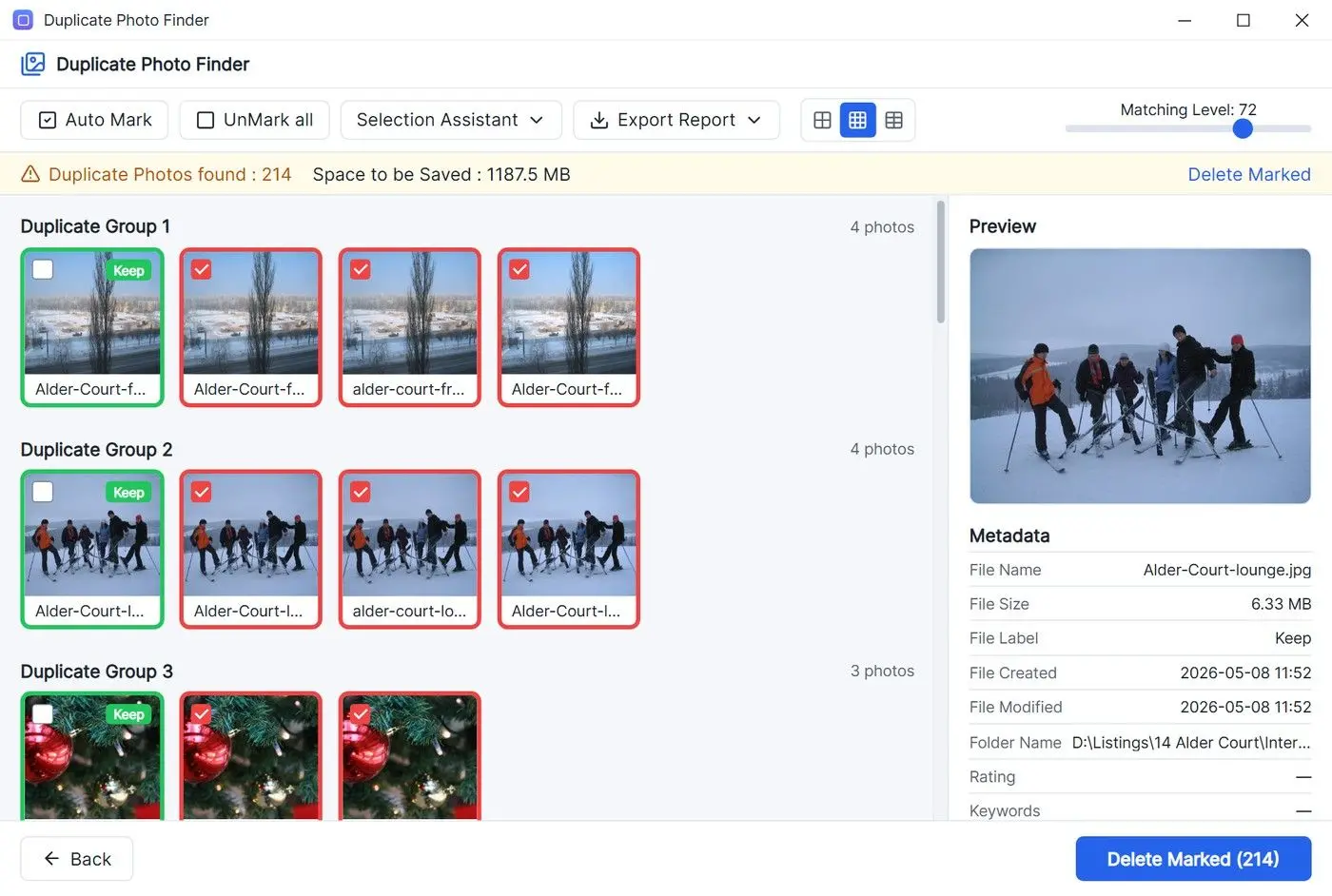
 Duplicate Photo Finder listing exact copies of phone backup photos, with extra copies selected for the Recycle Bin..

Duplicate Photo Finder suits phone backups copied twice, camera cards imported into three folders and unsorted burst shots. Add folders, pick one of three scopes, from Photos up to All Files, and choose a match method. Review the resulting groups.

You can check JPG, PNG, TIFF, WebP, HEIC and more than 30 RAW formats, including CR2 and NEF. The 16 supported video formats use exact matching only. In each group, the program suggests the best shot based on resolution, sharpness, size and date.

Pros:

Starts a scan after you add folders and choose the scope and match method

Groups look-alike pictures in Similar mode

Confirms byte-identical copies with file size and SHA-256

Sends removed files to the Recycle Bin and always keeps at least one per group

Shows every result for free before you buy

Cons:

Deletes up to 15 files per session in the free edition; a license removes the limit

Needs the HEIF/HEVC codec in Windows to read HEIC photos

Runs only on 64-bit Windows 10 and 11

Our read: we built it for home photo libraries. AllDup's wider range of file criteria makes it the better choice for a sysadmin cleaning a file server.

2. AllDup - best for full control over any file type

You can search inside RAR and ZIP archives and save search profiles for repeat jobs.
Users keep raising the interface as a problem. One called it "way too many buttons."

Pros:

Matches by content, name or size

Finds similar pictures with dHash and an adjustable Match percentage

Searches compressed archives

Exports results to TXT or CSV

Free to use, with no ads

Cons:

Crowds the main window with toolbars and settings

Puts the picture preview behind two toolbar icons

Requires care with rules like "all files except the smallest"

Runs only on Windows

Our read: AllDup has the deepest rule set here. Choose it for mixed drives of documents, archives and installers; we would steer someone with one messy Pictures folder elsewhere.

3. Czkawka - best free open-source option

Czkawka also finds empty folders. Its repository code, including the GTK interface and CLI, is MIT-licensed; the Krokiet and Cedinia front ends use GPL-3.0. Our Czkawka review covers Krokiet on Windows.

Pros:

Free and ad-free, per the project page

Runs on Windows and Linux, plus macOS and FreeBSD

Checks for similar videos and same music as well as photos

Cons:

Retired its GTK interface at version 12.0 in favor of Krokiet

Uses different licenses across components

Had no independent user reports available for this review

Verdict: Choose Czkawka for open-source software or work across operating systems.
Our read: the free alternative we would check first, based on its documentation.

4. dupeGuru - best for messy file names

dupeGuru scans file names or content. Its fuzzy matching helps in music and document folders where you saved the same file under slightly different titles.

The project page names Mac OS X and Linux in one paragraph but lists Windows downloads elsewhere. Confirm the current build before relying on it. Our dupeGuru review examines safety and photo results.

Pros:

Matches file names fuzzily

Finds near-copies alongside exact images in Picture mode

Runs on Linux, macOS and Windows, per the project

Cons:

Gives conflicting platform details on its page

Lists Windows downloads without a release date

Had no user reports in the sources we could open

Our read: useful for messy names. Photo cleanup is a secondary job for it.

5. Cisdem Duplicate Finder - best for one vendor across devices

Cisdem Duplicate Finder is commercial software. The vendor promotes Windows and Mac versions alongside Android and iOS ones, and advertises similar-photo detection across different file formats. Cisdem also publishes a top-ranking AllDup review; read that comparison as a sales page.

Pros:

Covers computers and phones, per the vendor

Offers eight selection rules such as Select Newest, per the vendor

Finds similar photos across resolutions and crops, per the vendor

Cons:

Gives no price on the review page we read

Relies on vendor claims for every feature listed here

Had no independent reviews in our research

Verdict: Consider Cisdem for your PC and phone, and confirm the price before buying.
Our read: we did not buy a license. These are the vendor's claims, and we cannot judge quality from them.

What is the AllDup duplicate file finder and what can it compare?

TL;DR

AllDup is a freeware duplicate finder for Windows 7 through 11, made by MTSD. You get seven search methods and four folder comparison modes.

 files with unrelated names can be identical..

The four comparison modes check across all source folders, inside each folder, between different source folders, or inside each folder and its subfolders. Comparing between folders is useful when merging two backups.
The AllDup product page lists removal to the Recycle Bin or a backup folder. You also get a log, an Explorer context-menu entry and an interface in more than 20 languages. Mac owners need a cross-platform program from the ranking.

Is AllDup safe and really free?

TL;DR

AllDup costs nothing, and PCWorld reported no ads or in-app purchases in 2024. Download it from alldup.de and keep deletions reversible: removing the wrong copy is the bigger risk.

There is no subscription. PCWorld called the absence of ads and limits unusual among duplicate removers found through search.
Skip download-catalog copies, which we did not audit. The newest release we found was 4.5.72, dated 17 December 2025; a later build may be available.
Choose the 22.35 MB installer or the 28.13 MB portable build. The AllDup portable version suits a USB stick or a machine where you prefer to avoid installation.

Why does the AllDup interface feel so confusing?

TL;DR

AllDup puts nearly every option on screen at once. Complaints span a 2013 review and current write-ups, though the most quoted numbers come from a much older version.

56 buttons
across six toolbars in AllDup 3.4.18, counted in PCWorld's 2013 review. Later releases may differ

 AllDup main window with its two toolbars, the Source Folders list and the Comparison method options..

Cisdem, a rival vendor, warns that beginners may find the main window confusing. A 2016 user report describes it as crowded at first but useful after learning the layout.
After a scan, selection rules such as "select all files except the smallest file" decide which copies you remove. PCWorld warned that these require logical thinking. Apply the wrong rule across a large result set and you can send a good original to the Recycle Bin.

Starting a photo scan in AllDup
  • Add your source folders
  • Pick a comparison method
  • Enable Find similar pictures and choose dHash
  • Set a Match percentage and any filters
VS
Starting a photo scan in Duplicate Photo Finder
  • Add your folders and pick a scope such as Photos
  • Pick Exact or Similar
  • Start the scan and review the groups

Can AllDup find similar photos?

TL;DR

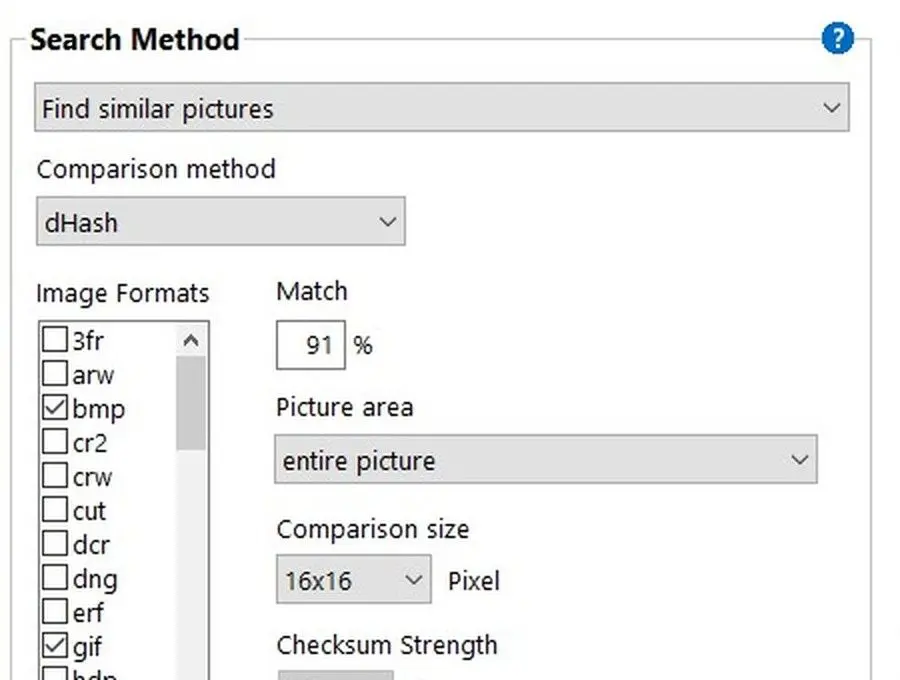
Yes. Find similar pictures uses dHash and a Match percentage you set, letting you find look-alike shots as well as byte-identical copies.

92%
is the starting Match percentage recommended for dHash by the author of PCWorld's AllDup photo guide. Adjust this reviewer's setting to your photos

 AllDup Search Method panel with Find similar pictures, the dHash comparison method and a Match percentage of 91..

Exact matching checks for identical bytes, usually with a hash such as SHA-1 or SHA-256. Similar matching can catch burst frames, resized exports and re-saved copies. Lower the threshold and you catch more, including shots you meant to keep.
A 2017 user review of version 4.0.42 reported a missed rotated picture, calling it an edge case. AllDup's manual now lists Detect picture modifications for rotated and flipped pictures and marks it as slower. Enable it and test one rotated sample before a full scan.

Why did AllDup miss some of my duplicates?

TL;DR

Check the search method and selected folders. Content and name searches return different sets; a two-folder comparison only checks those two folders.

A 2014 user review of version 3.4.24 complained that AllDup "didn't find all my duplicates." It gave no cause, so it tells you little about the current build.

In a 2023 thread on the vendor's forum, a user comparing two folders by SHA-1 thought AllDup was skipping known duplicates. They had selected the wrong folders. This was the only report we could trace to a cause.

Check that both folders appear under Source Folders and that the comparison mode includes the pair you want. A resized photo has different bytes, so a content search will skip it.

How to use AllDup to find and delete duplicates

TL;DR

Add folders, choose a comparison mode and search method, and review the groups before moving files. Your first run takes eight steps.

  • Install AllDup from the official site, using the installer or the portable build
  • Click Add folder and add drives or folders under Source Folders
  • Choose a Comparison method below the folder list
  • In Search Method, tick your criterion, or Find similar pictures with dHash for photos
  • Set a File Filter or Folder Filter to include or exclude paths as needed
  • Click Start Search and wait for the groups
  • Review each group and mark extra copies by hand or with a Select rule
  • Open File Manager, choose the Recycle Bin or a move action, and confirm

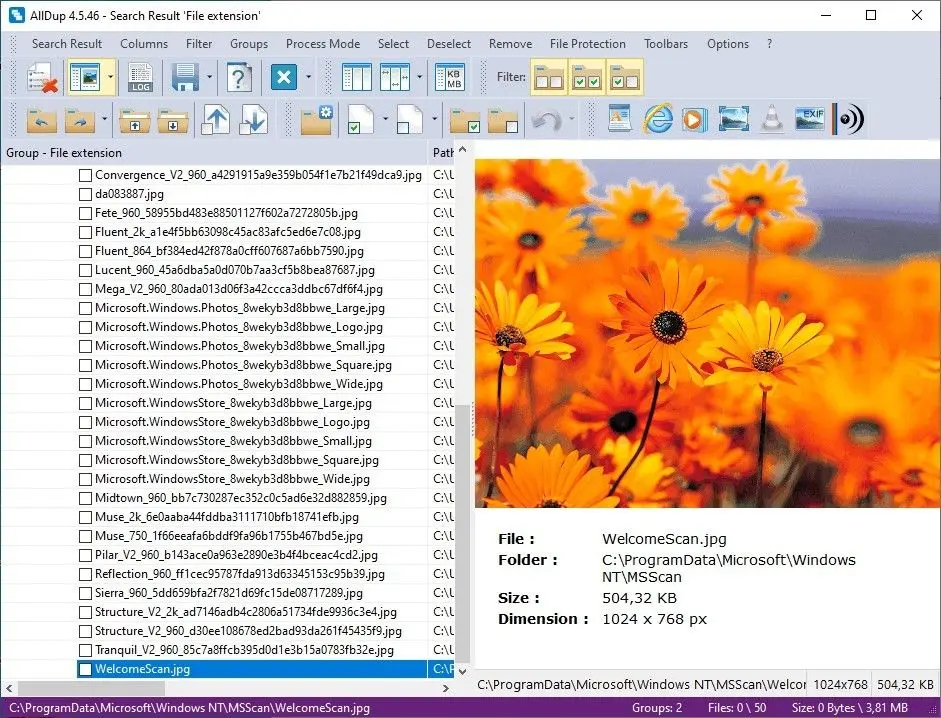
 AllDup Search Result window with the file list, check boxes for marking files and a picture preview..

The manual's search options page lists file owner and hard link count, along with picture dimensions and MediaInfo data such as duration or bitrate. Enable these only as needed: the manual marks them as slower. It also describes Low CPU priority and a cap on duplicates found, useful for long jobs.

Thousands of photos can take a while to scan. Start with one folder and check the groups before widening the search.

Is it safe to delete everything a duplicate finder flags?

TL;DR

No. Review every flagged group and send removals to the Recycle Bin so you can undo a mistake.

Similar-photo searches can flag a different burst frame or an edit you want to keep. Exact matches carry less risk, but an app or album may still need a copy at its current path.
PCWorld's 2024 guide enables the preview through the Image Viewer and File Preview icons, then double-clicks a group to show photos side by side. Open a file in its own viewer when a group looks close.

Avoid permanent deletion on your first pass. Wait a few days of normal use before emptying the Recycle Bin or AllDup backup folder. Back up irreplaceable photos before a large cleanup.

Our guide to find and delete duplicate photos on Windows gives a walkthrough you can use across programs.

Who should use AllDup, and who should pick something else?

TL;DR

Choose AllDup for rules across mixed file types. Duplicate Photo Finder needs fewer decisions for photo libraries; Czkawka suits open-source and multi-OS use.

The family photo keeper

Review Duplicate Photo Finder's free results before deciding on a license. After cleanup, photo organizer software helps keep the library sorted.

The power user with mixed drives

AllDup suits backup merges and comparisons based on dates or attributes. Saved profiles speed up repeat jobs once you know the settings.

The open-source user

Start with Czkawka; consider dupeGuru for near-identical file names.

The owner of several devices

Cisdem advertises programs for your Windows laptop, Mac and phone. Those are vendor claims.

Duplicate finders we also considered

  • VisiPics is a free image finder users call old-school; reports were too thin to rank it
  • Users recommended Duplicate Cleaner Free without details we could verify
  • EaseUS duplicate tools appear in a promotional block in PCWorld's photo guide; we found no independent test
  • ImageMagick compare scripts suit developers but require command-line knowledge
  • Duplicate Photos Fixer Pro is outside this ranking and covered in our Duplicate Photos Fixer Pro review

Sources

Duplicate Photo Finder Duplicate Photo Finder
AllDup duplicate file finder review: what it compares, whether it is safe and free, how it handles similar photos, and four alternatives for Windows.
Duplicate Photo Finder Screenshot.


🙋Frequently Asked Questions

Cisdem's review calls it safe when downloaded from the official site. Cisdem sells a rival program, and we did not audit the installer. Your larger risk is deleting the wrong copy.

Yes. PCWorld reported no ads, in-app purchases or usage limits in 2024.

Reclaiming disk space, merging backup folders and removing repeated photos. It works with every file type, including archived files.

Your folders, comparison mode and search method determine the duplicate groups. You mark extra copies to move, rename or delete.

Search, pick the spare copies by hand or with a Select rule, and use File Manager to send them to the Recycle Bin.

The manual lists Detect picture modifications for rotated and flipped pictures, with slower scanning. A 2017 review of version 4.0.42 reported a miss; test a rotated sample first.
Use a similar-picture mode, such as AllDup's dHash or Similar in Duplicate Photo Finder, and review each group.

The free edition shows every duplicate and deletes up to 15 files per session. A license lifts the deletion limit.