Download Krokiet. The older Czkawka GTK interface ended at version 12.0, and the README tells new and existing users to switch.
Czkawka is the umbrella name. The newer Slint interface is the one the author recommends. No new GTK binaries are planned, though download sites still carry it. You will also see the command-line version and the shared core library, named with _cli and _core suffixes.
The author of a hands-on blog review found several versions for a single operating system. On Windows, only the build with "krokiet" in its file name worked for him. In this review, the Windows version means that build.
How to install Czkawka on Windows 10 or 11
Download the Windows build from the project's GitHub releases and run it. It is a portable exe for Windows 10 and 11: there is no installer, and Windows 10 is the minimum supported version.
In a January 2026 project discussion, a user asks why it is so hard to figure out how to install Czkawka. The main obstacle is the naming:
- Open the Czkawka releases page and expand Assets under the latest release.
- Download a file starting with windows_krokiet_on_. For release 12.0.2, the skia_opengl build is suggested for newcomers.
- Move the .exe to a folder you can find again, such as Documents\Tools. That file is the whole program.
- Double-click it. If Windows Defender stops it, click More info, then Run anyway.
- Install ffmpeg if you need Similar Videos. The photo and file tools work without it.
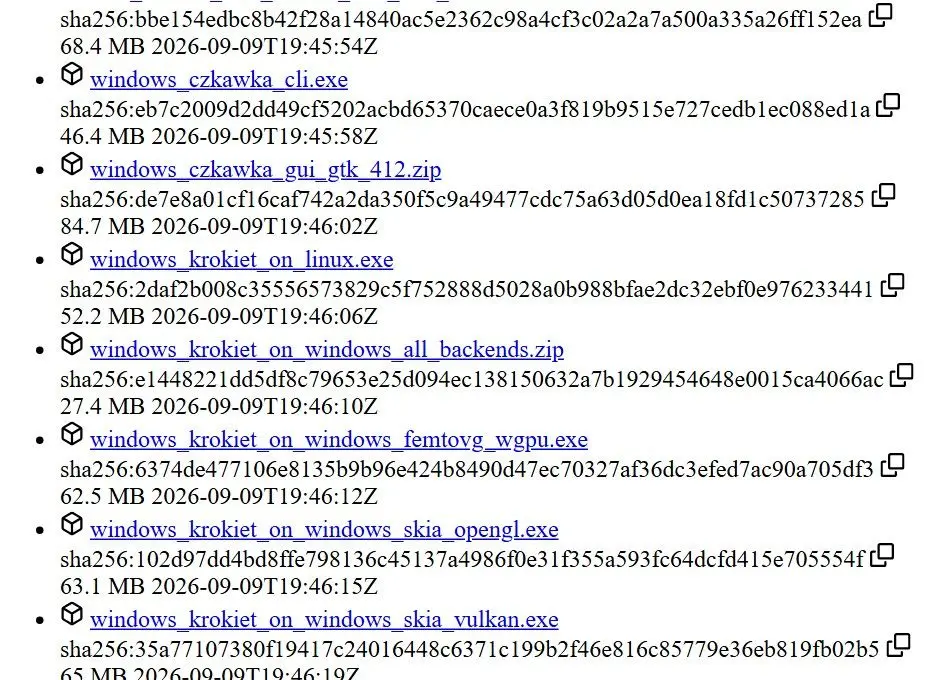
If the app opens to a black or blank window, the FAQ points to the GPU driver or rendering backend as the usual cause. Try another build from the same release, then update the graphics driver. The builds use different rendering backends.
One walkthrough warns that a scan started at the root of a drive can take a very very long time, so start with Pictures or a single backup folder. The same tutorial suggests you keep it recursive to include photos in subfolders.
Krokiet GUI usage: how do you find duplicate and similar photos?
For exact copies, use Duplicate Files, which finds duplicate files by hash; for resized or recompressed ones, use Similar Images. Apply a Select rule to mark extras, then check each group before deleting.
Duplicate Files groups files by size, compares a prehash of their first and last 4 KB, then calculates a full hash for those still matching. An explainer video on the engine calls reading a giant file end to end just to compare it a waste of disk bandwidth, and the prehash is the shortcut around it. There is no byte-by-byte comparison after the hash.
One tutorial maker argues for leaving the method on hash, since comparing content is literally the purpose of a hash. Name or size matching alone can pair files with different contents.
The Czkawka GUI manual gives these Similar Images defaults: hash size 16, Mean hash type and a maximum difference of 10 on a scale from 0 to 40. Raise the difference to include more loosely related shots; lower it for near-twins. Supported formats include JPG, PNG, RAW, WebP and JXL. GIF and ICO files are skipped.
After scanning, open Select and choose All except newest, All except oldest or, for similar images, a resolution rule. Clicking a row does not mark it: tick its checkbox, press Space or use the Select popup. When you press Delete, the dialog counts groups with every file marked. Check those groups before proceeding.
Pick a first target you have been wanting to clear up. One creator started with a videos folder of old stream recordings he always forgot to delete, a sensible place to learn the tool because the stakes are low.
Use Move for your first cleanup. Send marked files to a review folder, browse your library for a week, then delete that folder.
 Duplicate Photo Finder