Quick answer:

  1. 1️⃣ A mixed folder that must print in your order: Batch Printing Software prints it in one queue.
  2. 2️⃣ Rare formats or different printer settings per file: Print Conductor 12 is worth it if you can learn its 206 options.
  3. 3️⃣ A few files of one type: select them in File Explorer, right-click and choose Print (up to 15).
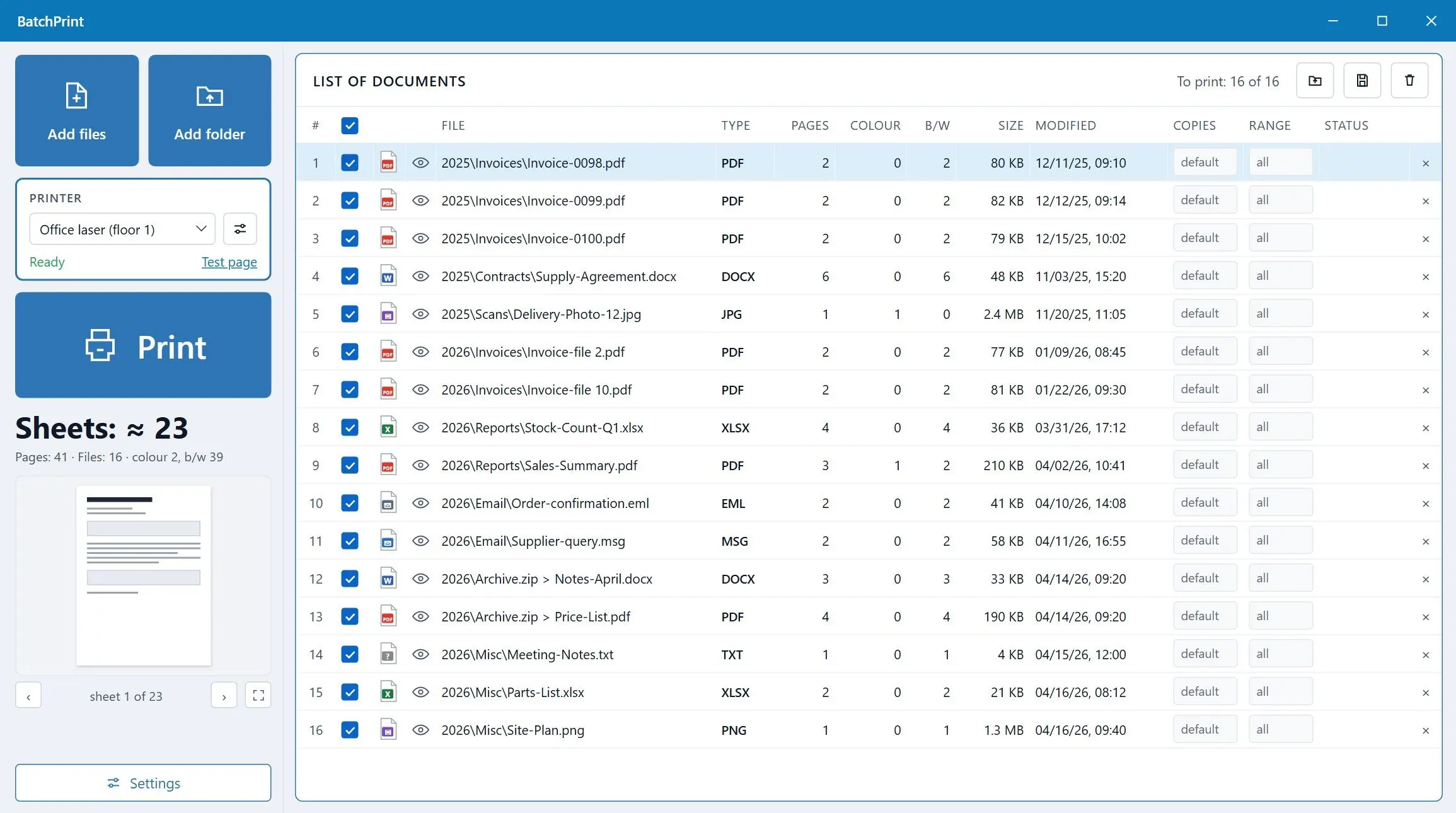
Batch Printing Software Screenshot.
️ Eugene - CEO at SoftOrbits, Candidate of Technical Sciences, has more than 16 years of expertise in software development, photo and multimedia applications, enhancing and transforming digital images and videos.
📅 Last updated on:  2026-11-20

Two Windows programs lead this review: Print Conductor from fCoder and our own Batch Printing Software. Both print a whole folder without opening each file.
We make Batch Printing Software, which sits at #1 below for printing a mixed folder in the order you set. Claims about the fCoder program are dated and come from the vendor's pages or my trial install in August 2026.

What you will learn
Apply in 10 min Saves 2 hEasy

Print Conductor and 4 alternatives at a glance

The rows rank programs from the largest mixed batch with the least setup to the smallest. Format counts are the vendors' figures, checked on November 20, 2026. Prices change too often to include here.
ToolBest forFormatsKeeps file orderTrial and price
Batch Printing SoftwareA mixed folder printed in the order you setAbout 50 extensions; DOCX and XLSX print with no Office installedYes, in the queue order; one job for the whole batch is an optionFree trial with 10 files per batch and 100 in total; price on the product page
Print ConductorUnusual formats with different printer settings per fileOver 90 document types (vendor); Word, Excel and email files print through its own engine, Visio and Project files need those appsYes, with Single print jobTrial for testing and evaluation; price on the vendor site
2PrinterPrinting from a script or a scheduled taskFiles matched by a source path, such as *.pdf (vendor example)Follows the command you writePrice not checked
FolderMillPrinting whatever lands in a shared folderNot checked for this reviewNot checkedNot checked either
Windows File ExplorerA handful of files of one typeWhatever the default app can printNo, each file is a separate jobBuilt into Windows

How we judged batch printing tools

TL;DR

The ranking rests on two things: how many files you can print in one run and whether they reach the printer in the order you set. Everything else comes after those.

  • Files per run: what caps a batch, from a trial limit to File Explorer's 15-file limit
  • Print order: whether files reach the printer in your chosen order or the Windows spooler can shuffle them
  • Formats without extra apps: which file types print without Word, Excel or Outlook installed
  • Trial and license: what you can test before paying and what the trial adds to printouts
  • Per-file settings, such as a separate printer or page range for one item

Batch Printing Software's limits come from our own code. I installed the Print Conductor trial in August 2026, read its format list and settings tree, and checked what it adds to a printed job. We did not time print jobs or test duplex and paper trays across printers, so we make no speed claims. Our assessments of 2Printer and FolderMill come from fCoder's pages, without hands-on testing.
Our take marks the team's opinion of our product. My take marks my opinion as the reviewer of the other programs.

Programs like Print Conductor, reviewed

1. Batch Printing Software - best for printing a mixed folder in order without opening each file

 Batch Printing Software queue with mixed PDF, DOCX and JPG files, duplex and 2 pages per sheet set, sheet count on the Print button..

Add a folder to Batch Printing Software and print it in one pass, in queue order. It reads roughly 50 file extensions. PDF and images are there, so are text files and web pages. XPS and RTF are covered too, plus ZIP archives and email in EML and MSG.

Email prints without Outlook. Word and Excel files (DOCX and XLSX plus their macro versions) use a built-in reader when Microsoft Office is missing, but lose headers and footers. With Office installed, Word takes over and prints them in full. Visio and AutoCAD drawings need those programs installed. If the PC cannot print a file, the program skips it and gives a reason.
In the queue you set duplex and N-up (several pages on one sheet). Page ranges and copies sit there too, next to the printer and paper tray. The list stays responsive up to 15,000 files. The Print button shows the sheet count before you start, so you can spot a 300-page job on screen. For an all-PDF batch, print multiple PDFs at once compares the other routes.

The trial has no time limit and needs no sign-up. The program is new and has no public user reviews yet.

Pros:

Prints a mixed folder in the order of the list

Prints Word and Excel files on PCs without Microsoft Office

Handles EML and MSG email without Outlook installed

Shows the sheet count on the Print button before the job starts

Cons:

Caps each trial batch at 10 files, fewer than File Explorer's 15

Adds a report page to every batch until you buy a license

Drops headers and footers when DOCX prints without Office

Needs Visio or AutoCAD installed for those drawing formats

Our take: knowing we make it, weigh our view accordingly. For PDF contracts mixed with spreadsheets and scanned JPGs, it is the shortest route we know from folder to sorted stack.
Verdict: Choose Batch Printing Software if your batches mix file types, run past 15 files and must print in order.

Free trial, no time limitWindows 11 / 10, 64-bitWord and Excel print without Office

2. Print Conductor review - best for the widest format list and per-file printer settings

 Print Conductor main window with a list of documents queued for printing and the printer settings panel..

The program comes from fCoder Solutions, based in Poland. Drop files or folders into its list, choose a printer and press Start. It prints without opening each document on screen. Its home page claims support for over 90 document types.

Per-item settings are its strongest part. The SoftwareOne product listing describes Item settings that override the page range or paper tray for one file. You can also set copies and grayscale per file. In August 2026, I counted 42 sections and 206 options in the settings tree. Expect some reading before your first big job.
Independent opinion is thin. The G2 and Capterra profiles in search results did not open for this review; the vendor's testimonials are hand-picked. An older reply in an Adobe forum thread about printing many PDFs on Windows 7 recommended Print Conductor. The writer had switched to it the month before.

Word documents print through the native Word API, which the vendor calls the fastest route. Without Office, the program uses its own engine. The vendor's format list marks DOC, DOCX, XLSX, CSV, EML and MSG as printable by the internal engine; Visio and Project files need those programs. An early AddictiveTips review found that PDF printing required Adobe Acrobat at the time. Current versions use built-in PDF engines, and version 12 added an optional AsposePDF engine.

Pros:

Supports over 90 document types by the vendor's count

Keeps file order with Single print job

Gives each file its own page range, tray or copies

Added a PDF engine and silent install in version 12

Cons:

Needs Visio or Microsoft Project installed for those file types

Leaves prices off its main pages, while listings disagree

Leaves changed printer defaults behind for some users, per its FAQ

Takes time to learn with 206 options

My take: an office printing the same forms every week can set it up once. For one folder of PDFs, the settings take a lot of reading.

Verdict: Choose Print Conductor for rare formats or different printer settings per file.

3. 2Printer - a Print Conductor alternative for printing from a script or a scheduled task

The vendor's release note for 2Printer 7.0 pitches it at Print Conductor users who prefer a command line. A call names a source path and printer, such as 2printer.exe -src "C:\Input\*.pdf" -prn "Office printer". You can put that line in a batch file or a Windows Task Scheduler entry.
Search results yielded no independent reviews. Everything here comes from the vendor's announcement.

Pros:

Runs from batch files and scheduled tasks with no window open

Comes from the same vendor as Print Conductor

Suits repeat jobs where the same folder prints every night

Cons:

Requires learning command syntax before printing

Offers little for a one-off job at a desk

Lacks independent reviews in current search results

My take: the IT person sets it up once. Nobody else in the office should have to touch it.
Verdict: Choose 2Printer when a script should start the print run.

4. FolderMill - a Print Conductor hot folder alternative for files that land in a shared folder

With fCoder's FolderMill, you set up a watched folder and rules to print or convert files dropped into it. Nobody needs to open a print dialog. Searches for a Print Conductor hot folder tend to lead here, because that program works from a list you build by hand.

My take: a shared scanner folder or an order inbox that prints all day makes better use of FolderMill than any other program here.

Pros:

Prints files automatically when they arrive in a watched folder

Suits shared office workflows where many people send files

Pairs with 2Printer and the batch printer from the same vendor

Cons:

Needs folders and rules set up before printing

Is too much for a single folder printed once

Was not tested or price-checked for this review

Verdict: Choose FolderMill if files arrive all day from several people and should print without anyone at the keyboard.

5. Windows File Explorer - best for a few files of one type

 Windows 11 File Explorer with several PDF files selected and the Print command in the right-click menu..

Select files, right-click and choose Print. On Windows 11, look under Show more options if needed. Windows opens each file in its default app and prints from there.

Pros:

Needs no install and costs nothing

Handles a handful of same-type files in seconds

Uses each file's own app, so the layout matches what you see

Cons:

Stops at 15 files per command

Sends separate jobs, so file order can shift

Drops the Print option for PDFs on some setups

Opens an app per file, which is slow on long lists

My take: for three invoices on a Friday afternoon, it beats every program here. Past a dozen files, I would not bother.
Verdict: Use File Explorer for a short list of same-type files when order does not matter.

Why can't Windows print more than 15 files at once?

TL;DR

File Explorer passes Print to at most 15 selected files, opening each in its own app. A batch printer reads the whole list and sends it to the printer in order, often as one job.

A UCLA IT knowledge base and answers on Microsoft Q&A both give the limit as 15 files per right-click command.

15
files is the most Windows File Explorer will send to print with one right-click Print command
Source

Some users report that Print vanishes when a PDF is selected because the PDF reader has not registered a print command with Windows. On Windows 7, several files printed together only when all had the same type. Someone sending 150 report cards from Acrobat to an office copier got only the first two files.

Right-click Print in File Explorer
  • Up to 15 files per command
  • Each file opens in its own app and becomes a separate job
  • Selections with PDFs can lose the Print option
VS
A batch printing program
  • Hundreds or thousands of files in one list
  • Files go out in the order you set, one by one or as one job
  • Mixed file types in the same queue

Word has extra options to print multiple Word documents at once.

What does fCoder's trial limit, and what does a license cost?

TL;DR

fCoder calls the download a trial version for testing and evaluation. My August 2026 install printed with every feature and added a report page. Check the vendor's order page for the license price, since third-party listings disagree.

The vendor's open pages do not spell out the trial terms. An unlicensed copy adds a report page at the end of every batch, but lets you test a full-size run. Try a short batch before sending 200 files to a shared printer.

fCoder leaves prices off the pages that appear in search. The SoftwareReview listing gives an undated starting price and has no written user reviews yet. Its price differed from the Commercial License figure we noted in August 2026. Get the current price from fCoder and check whether your use counts as commercial.
Batch Printing Software's trial enables every feature but caps batches at 10 files and 100 files in total. After that, it allows 1 file per batch. Each batch includes one report page.

Which formats does Print Conductor print, and which need Office installed?

TL;DR

fCoder says the program supports more than 90 document types. Word, Excel and email files use its own engine without Office; Visio drawings and Project plans still need the matching Microsoft app installed.

90+
document types Print Conductor supports, by the vendor's own count on November 20, 2026
Source

You can print PDF and Microsoft Office formats. Images, plain text, HTML pages and email go through as well. AutoCAD DWG and DXF drawings use the internal engine. The vendor's format list marks Word and Excel files as printable without Office, and the same goes for CSV and email.

The vendor's home page counts over 90 document types. My August 2026 install, already version 12, listed 58 entries. One document type can cover several extensions, which accounts for the different counts. For a specific format, open it in the current trial and print a page.

How do you keep files in order when you batch print?

TL;DR

Send the batch as one print job. Separate jobs reach the Windows print spooler one at a time, and the spooler can change their order.

The Print Conductor FAQ says the Windows print spooler can rearrange documents under default settings. Turn on Single print job to send the whole list as one job. The vendor's PDF tips page also warns that the spooler can shuffle files.

Batch Printing Software sends the next file only when the printer queue is empty, so it can keep print order as you listed it. You can instead select One print job for the whole batch. Move a file up the queue to move it up the printed stack.

What do users of fCoder's batch printer complain about?

TL;DR

The vendor's FAQ covers four recurring complaints. Some jobs are reported as printed and never come out, and printer defaults stay changed afterwards. Whole folders throw unsupported file type errors, and thousands of separate files print slowly.

The most serious complaint in the FAQ is a batch marked as printed while the printer stays silent.

One user changed paper size from A4 to A3 for a batch and found A3 still set as the default afterwards. Use per-item settings to help avoid changing the printer's defaults.
Whole folders can hold shortcuts or system files you did not mean to print. Print Conductor returns an unsupported file type error for these. Filter the folder by type before adding it to the list.
Printers struggle with hundreds or thousands of separate files because each becomes another job to process. Use Single print job for these runs. Users have also requested a built-in PDF printer to merge files into one PDF; the FAQ confirms this is a common request.

Before a large batch, print the first three or four files. Check the layout and paper tray, then compare the sheet count with what the program reports.

Every batch printer depends on the same printer driver and spooler.

Is Print Conductor safe to use?

TL;DR

Yes, as far as public facts go. fCoder Solutions is a registered Polish company with years of release history. Version 12 added a strict processing mode for documents with client data.

Download the installer from fCoder's site. Six of the top ten search results for its name are download portals, which put another party between you and the developer.

Version 12 added Process files locally only, described by the vendor as a strict processing mode. Turn it on for contracts or medical forms. The version's silent install lets IT staff deploy it without clicking through a setup wizard on each PC.

What changed in version 12 since the 2018 reviews?

TL;DR

Version 12, released May 29, 2026, added an optional AsposePDF engine for PDF, XPS and HTML. It also brought grayscale and blank-page options before printing plus a silent install. PAGES, DJVU and OFD files became printable in the same release.

The only editorial review still ranking for the name covers version 6.0 from January 2018.

Grayscale saves color toner on drafts and internal copies. Another new option starts each document on the front of the paper when you send the stack as one duplex job. Inserted blank pages provide separators where you need them.

Which batch printing tool fits your job?

TL;DR

Choose by who presses Print and how often. A mixed folder needs a different approach from standard office forms or a nightly script. Three files on a Friday need no extra software.

For a weekly folder of PDFs, spreadsheets and scanned receipts, Batch Printing Software gives you one queue, a fixed order and a sheet count before printing.

For school report cards sorted by student name, both Batch Printing Software and fCoder's program with Single print job preserve order. Test ten before sending three hundred.
In a legal or accounting office, Print Conductor's per-item settings and 90+ document types justify the learning time when you need rare formats and different trays per document.
Choose 2Printer for a nightly run from a fixed folder. FolderMill fits a shared inbox receiving files from several people all day.

Also considered: tools we looked at and left out

  • BulkPrinter AlternativeTo lists it as a Windows batch printer for PDF, Office and image files, but the listing did not open and we found no official page to check
  • AcroTeX PDF Print Monitor. Watches a folder and prints PDF files only, ruling it out for mixed batches
  • Total PDF Printer PDF-focused, with a Capterra profile we could not open; too narrow for folders containing Office files
  • SilentPrint, Batch and Print Pro, Printstation. We found only listings and could verify no official page, so none received a card

Batch Printing Software Batch Printing Software
Print Conductor review for 2026: formats, trial, print order and user complaints, plus 4 alternatives for batch printing many files on Windows.
Batch Printing Software Screenshot.


🙋Frequently Asked Questions

A batch printer saves the most time when you print many files. Choose Batch Printing Software for mixed folders in a set order, or Print Conductor for unusual formats with individual tray settings.

The vendor calls the download a trial version for testing and evaluation. In August 2026, it printed with full features and a report page. Removing that page requires a paid fCoder license.

File Explorer handles up to 15 files through right-click Print. A batch printer takes longer lists or whole folders and prints in order without opening each file.

Select files in File Explorer, right-click and choose Print. The limit is 15 files of a type Windows can print. A batch printer is faster for mixed types or longer lists.

Open windows require a Print dialog per document. Close them, select the files in their folder and add them to a batch printer for one pass.

Open Command Prompt in that folder and run dir /b > files.txt. Open files.txt in Notepad and print it. Add /s to include subfolders.

The review above covers four alternatives to Print Conductor. Batch Printing Software handles mixed folders in a set order, and FolderMill prints whatever lands in a shared drop folder. 2Printer suits scripts, while File Explorer is enough for a handful of same-type files.

Its FAQ lists this complaint. Watch the Windows print queue as the first files go out. Before trusting a large batch, compare the sheets in the tray with the program's report.