Why a Desktop Oil Painting App Beats a Free Online Tool
Free online converters are convenient, but they fall short the moment you want to keep the result. Many only soften and smear the photo, so the output reads as a cheap filter rather than a painting. The free tiers also cap the export size and stamp a
watermark across the image, which ruins it for a print or a gift. And to use them at all, you upload your photo to someone else's server - a hard no for a lot of people when the shot is of family, children, or a wedding.
A desktop tool fixes the first two outright: real brush strokes and canvas texture, plus a full-resolution file with no watermark. The upload problem just goes away, because the painting happens on your own PC.
Control the Brush Instead of Living With One Look
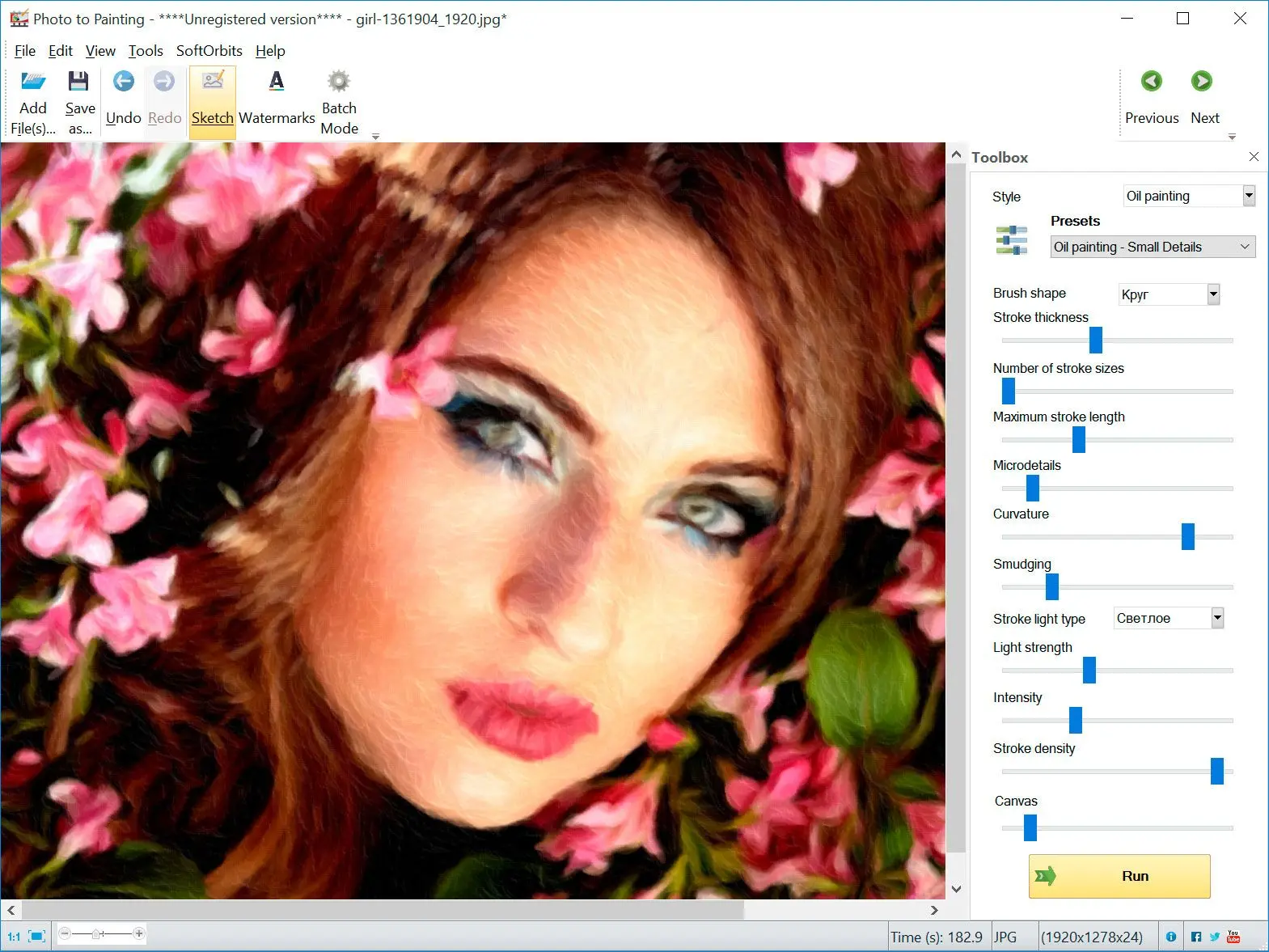
The difference between a real painting effect and a photo filter is control. A common complaint about automatic tools is that they distort faces and lock you into a single style. This software gives you three controls that change how the paint sits on the image:
✔️ Stroke Size
sets how thick the brush strokes are, from fine detail to bold, loose strokes.
✔️ Microdetails
keeps or smooths the fine texture, so a portrait can stay sharp while a landscape goes painterly.
✔️ Stroke Density
controls how much of the canvas the paint covers, from light, sketchy coverage to a fully worked surface.
Start from a preset, then move these three until the result looks the way you want. The same presets also cover a softer watercolor look, so you are not locked into oil.
Built for Prints, Canvas, and Gifts
Because the export keeps the full resolution of your source photo, a sharp original has the detail to print on canvas without going soft. That matters if you sell on a print-on-demand store or a marketplace: you can batch many product or portrait shots in one run instead of converting them one at a time. You can also add your own signature or watermark on the way out, instead of having one forced on the image. Working from an old family photo? Run it through our
old photo restoration software first, then paint the cleaned-up version.
How It Compares to Free Oil Painting App Downloads
If you searched for a free download, you have probably run into FotoSketcher and GIMP. Both are genuinely free, and for a single image either one can do the job.
FotoSketcher is a free Windows program that turns photos into paintings and sketches with slider-based effects. It is a good place to start. Where it gets thin for some users is batch work and fine, repeatable stroke control across a large set of images.
GIMP is a free oil paint app, open-source editor with an Oilify filter tucked into its effects menu. It can produce an oil look, but the learning curve is steep, and it is built for editing rather than one-pass photo-to-painting conversion.
So where does a paid tool fit? If a free oil painting app download already nails the one picture you need, use it. Picture to Painting Converter earns its license when you are converting many photos at once, printing the result, or you want the three stroke controls and presets to behave the same way every time, all offline and without a forced watermark.
Prefer a pencil look instead of paint? Our photo to sketch converter turns the same shots into line drawings, so the same photos can go from painted to sketched using two tools from the same family. You can even fold a batch of them into a single photo mosaic.