Quick answer:

  1. 1️⃣ Old prints with scratches and faded color on Windows: Photo Retoucher repairs the damage and restores faces.
  2. 2️⃣ One or two blurry portraits in a browser: restorePhotos.io is worth it while the free limit lasts, which catalogs put anywhere from 1 photo in total to 10 a month.
  3. 3️⃣ Quick phone edits for social media: Remini, if you accept smoother faces and a subscription.
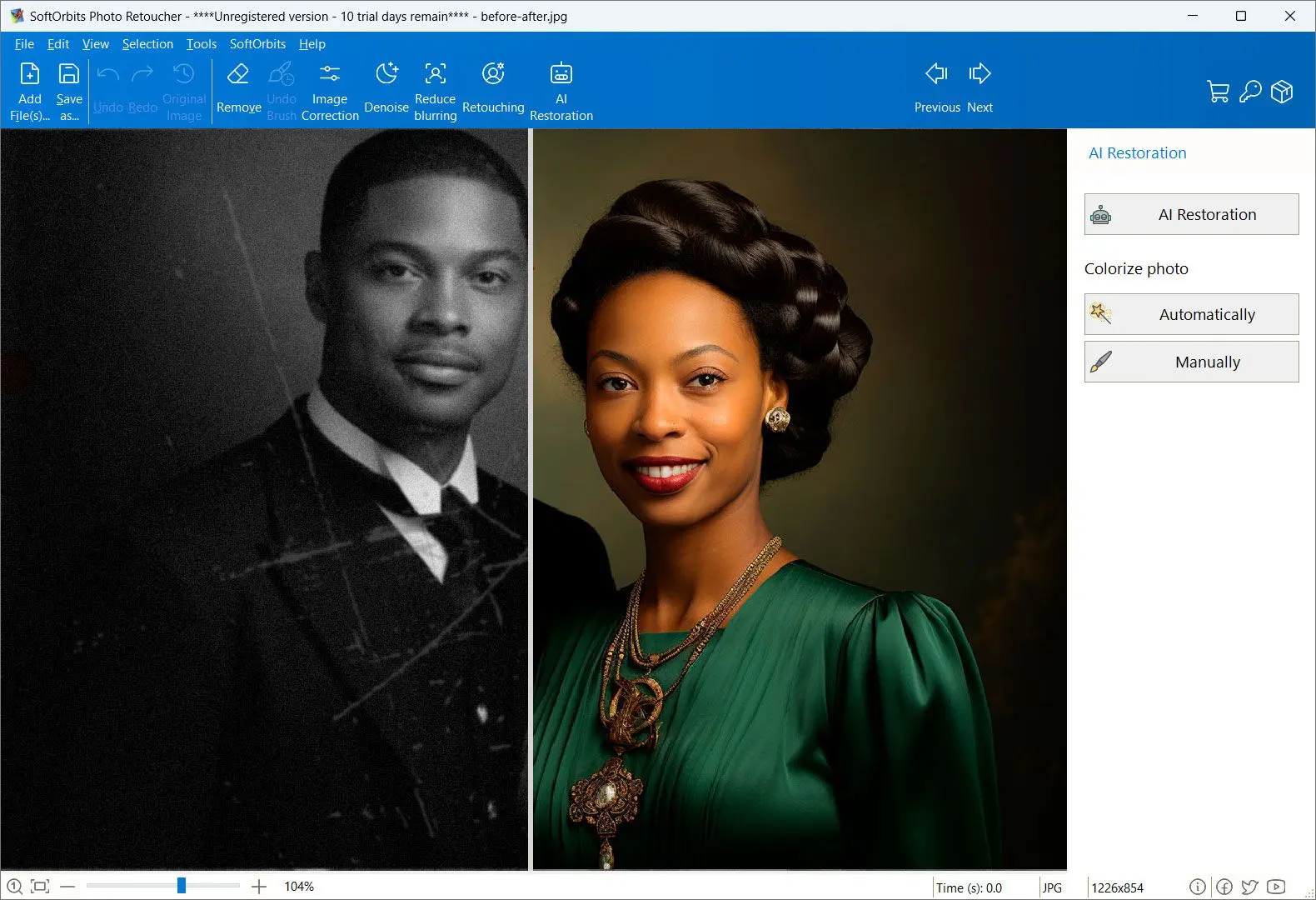
Photo Retoucher Screenshot.
️ Eugene - CEO at SoftOrbits, Candidate of Technical Sciences, has more than 16 years of expertise in software development, photo and multimedia applications, enhancing and transforming digital images and videos.
📅 Last updated on:  2026-11-18

Most restorePhotos.io review pages repeat the homepage's "100% free" claim. When we checked on 18 November 2026, it also offered 60% off "all plans" with a discount code. Catalog sites quoted three different free limits.
We make Photo Retoucher, a Windows program for restoring old photos, and rank it first below. Our restorePhotos.io facts come from its homepage and public code, with gaps filled by catalog listings and user reviews.

What you will learn
Apply in 10 min Saves 2 hBeginner

Is there a restorePhotos.io alternative that fixes the whole photo?

TL;DR

Photo Retoucher restores faces and colorizes black-and-white prints on Windows. It detects and fills scratches, with manual brushes for anything the AI misses. You can run every step in the trial and buy a license only to save the results.

A torn corner or a crease across the background stays unchanged in restorePhotos.io. Photo Retoucher's scratch detector masks the damage and fills those areas from the surrounding texture. A separate step adds color to monochrome prints.

The program finds each face, restores it at high resolution with a dedicated model and pastes it back in place. You can restore a group photo face by face.
You can correct AI mistakes with Object Remover, Concealer, Clone Stamp, Deblur and Painting. A water stain on someone's cheek may need that manual work: an automatic pass cannot know what was underneath.
For a folder of scans, tick the face and scratch options and select the folder in batch mode. The program applies the same operations to every file. It uses your graphics card through Microsoft DirectML when the driver supports it; on the processor alone, the job takes longer than on a cloud service.

The installer is about 153 MB. AI models download on first launch, which needs an internet connection.

restorePhotos.io
  • One automatic pass on the face
  • Scratches and background damage stay
  • No strength or area control
VS
Photo Retoucher
  • Face restoration plus scratch fill and colorization
  • Manual brushes for what the AI missed
  • Batch mode for a folder of scans

 Photo Retoucher on Windows showing a creased sepia portrait on the left and the restored version on the right with the crease and scratches removed..

Photo Retoucher
Photo RetoucherRestore faces, fill scratches and colorize old prints on Windows, then fix the rest by hand.

RestorePhotos.io and two alternatives at a glance

ToolBest forWhat it restoresManual controlPriceWhere it runs
Photo RetoucherDamaged prints and batches of scansFaces, scratches, colorClone Stamp, Concealer and Object RemoverFree trial; saving needs a licenseWindows desktop app, files stay on your PC
restorePhotos.ioOne blurry face portraitFaces only (GFPGAN)NoneFree tier; limit quoted as 1 photo to 10 a monthBrowser, processed in the cloud
ReminiQuick enhancement on a phoneBlurry photos and facesLimitedSubscription; check the store listingPhone app, processed in the cloud
The online services' free limits and prices change often, and sources disagree. Confirm them on the vendor's page before paying.

How we reviewed restorePhotos.io

TL;DR

We put price and value first: how much you can restore before paying, and how much damage one run repairs. Quality on heavily damaged faces came next.

We scored each program on five criteria, in this order:

  • Free restores, upload size cap and clarity of limits
  • Cost after the free allowance, and whether pricing is published
  • Coverage of faces, scratches, background and color
  • Quality on badly damaged faces and changes to the person's identity
  • Manual control and what happens to uploaded files

The first two carry the most weight because they determine whether the free allowance covers a family archive.
Our Photo Retoucher assessment draws on its source code and product notes, plus what users report. For restorePhotos.io and Remini, we used public code and model release notes, along with catalog listings and app store reviews. We did not upload family scans to either service or run timed or side-by-side tests. The cards contain no star ratings.

RestorePhotos.io and the alternatives reviewed

1. Photo Retoucher: best for damaged prints where scratches and color matter as much as the face

 Photo Retoucher AI Restoration panel with Remove Scratches, Unblur and Denoise and Restore Faces ticked on an old school portrait..

Photo Retoucher reviewers mostly use it for small unwanted objects and old photos. A SoftwareSuggest reviewer who had used it for about half a year found it far easier than Photoshop and said it deleted small objects cleanly. Other users on the site report lag and a dated interface; one says the skin-smoothing tool blurred the whole picture.

You get several AI steps in one window, including a CodeFormer-based face restoration model. Files stay on your PC.

Pros:

Repairs faces, scratches and color in one program

Lets you correct AI mistakes with Clone Stamp, Concealer and Object Remover

Processes folders in batch mode

Opens TIFF, camera RAW files (NEF, CR2, ARW, DNG) and JPG

Cons:

Runs on Windows only

Shows trial results; you need a license to save

Needs about 153 MB, plus AI models downloaded on first launch

Can invent colors in badly damaged areas

Feels laggy and dated to some users, per review sites

Verdict: Choose Photo Retoucher for scans with creases or faded color around faces, or a box of prints.
Our take: Batch mode gives it an advantage over a web restorer when you have a folder to process instead of one face to upload.

Windows 11 / 10Free trial, no sign-up

2. restorePhotos.io: best for one blurry face portrait when you want a result in a browser tab

 restorePhotos.io before and after demo on its homepage: an original blurry portrait next to its restored version..

restorePhotos.io sends uploads to GFPGAN, an open-source face restoration model from Tencent ARC. The restorePhotos.io homepage claims over 869,000 happy users; Durable's catalog page says over 300,000. Treat both as marketing numbers.

One catalog reviewer notes how little user feedback exists, and our forum search found almost nothing naming the service. A 2023 AlternativeTo comment says it worked well until an upload-limit message appeared, followed by a 24-hour wait after roughly ten uploads.
Pick a file, wait and download the result. You have no settings or way to correct a face that comes out wrong.

Pros:

Restores blurry faces in your browser without an install

Publishes its full code on GitHub under the MIT license

Uses a single upload button

Costs nothing for a first test on one portrait

Cons:

Restores faces only; backgrounds and small faces in group shots stay rough

Gives you no way to set how hard the fix works or where it applies

Needs a constant internet connection

Gives inconsistent free limits across the site and catalogs

Has no published data-retention policy we could find

Verdict: Try restorePhotos.io for a single blurry head-and-shoulders portrait without tears.
Our take: Based on the code and model release notes, we would use it to preview what AI does with a grandparent's portrait before paying. For a print you plan to frame, choose a program that lets you correct the result.

3. Remini: best for quick enhancement on a phone when you accept a subscription

Remini appears most often alongside restorePhotos.io, including on AlternativeTo's alternatives list. Its App Store reviews split sharply: some reviewers praise the enhancer, while others say a relative's face came out like a china doll. Some report a six-hour wait after a handful of free edits.

Pros:

Sharpens blurry photos in a few taps on your phone

Gets strong praise from many users for the enhancer

Appears on most lists of restorePhotos.io alternatives

Cons:

Makes some faces look smooth and doll-like

Imposes long waits between free edits, per user reviews

Lets you barely adjust how strong the effect is

As KnowledgeAgent said in a video review: "There is also limited manual control, meaning users cannot fine-tune enhancement strength or selectively edit specific areas, which may frustrate advanced users."

Verdict: Choose Remini for quick, shareable phone edits if accuracy matters less to you.
Our take: You accept the same tradeoff as restorePhotos.io, with your camera roll attached and a subscription to manage.

Is restorePhotos.io really free, and what does it cost?

TL;DR

Partly. The homepage says "100% free" while advertising a discount on "all plans". Catalogs quote three different free limits. No page we could read gives a paid price.
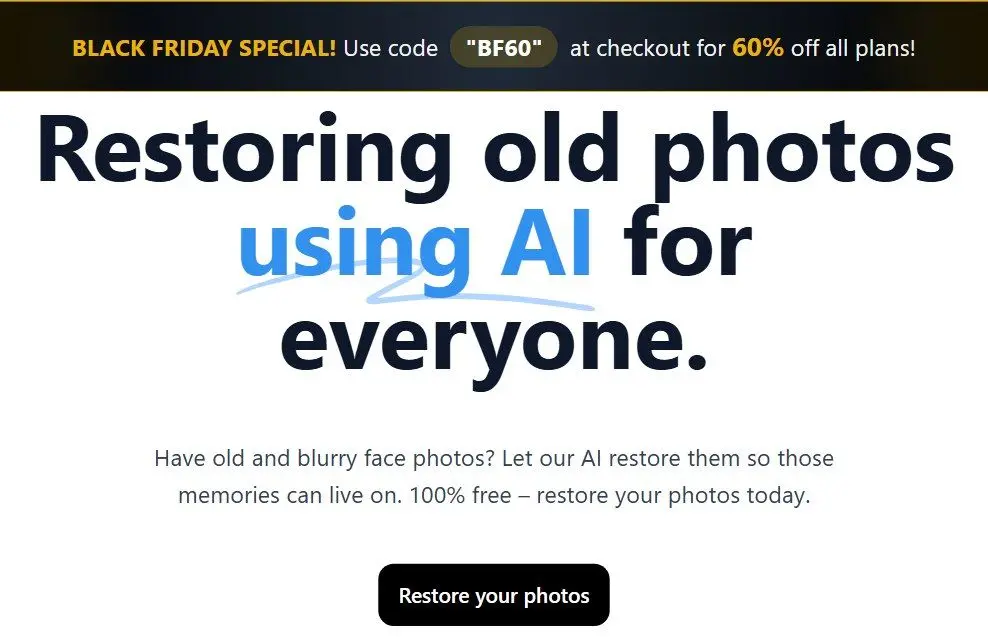
 restorePhotos.io homepage with the 100% free headline under a Black Friday discount banner..

Sources on 18 November 2026:

  • restorePhotos.io homepage: "100% free", alongside Black Friday code BF60 for 60% off all plans
  • SimilarLabs: one free photo for new users, then paid credits
  • Best AI Tools: up to five free photos every day
  • Tools for Humans: a free limit of 10 photos per month with a 1 MB upload cap

10 a month
free restorations with a 1 MB upload cap, per one AI tools catalog; other listings say 1 photo in total or 5 a day
Source

If you scan prints, the 1 MB upload size limit may matter more than the count. A 4x6 print scanned at 600 dpi and saved as JPG usually exceeds it. Shrinking the file for upload discards detail the model needs.
The public code includes Google sign-in and a Redis store from Upstash for signing users in and rate-limiting uploads. Operators usually set these limits and can change them, which may explain the three catalog figures.
Catalog reviewers quote conflicting paid prices, and we could not read a pricing page on the site. For one or two portraits, the free allowance covers it. With a box of prints, you also have to upload and download each face separately within the current limit.

How good are restorePhotos.io before and after results on old and damaged faces?

TL;DR

GFPGAN works best on blurry face photos at low resolution, the case it was built for. It guesses at heavy damage, and its release notes acknowledge that restored faces can drift from the real person.

Tencent ARC released GFPGAN under the Apache 2.0 license. Its developers list "slight change on identity" as a known V1.3 drawback and say V1.2 produced some unnatural outputs. Catalog reviews of restorePhotos.io omit this, though it matters more than anything else when you restore a relative's face.

In a forum thread about a 1930s portrait, photographers described AI-restored faces as smooth as porcelain, like early phone beauty filters. One did not want false memories built from an average of thousands of faces. In another thread, two AI services produced visibly different faces from the same photo. The models generate plausible features where the scan lacks them.
If a face is a few pixels wide or half hidden by a stain, any face model will invent missing parts. Before printing, compare the result with another photo of the person. If the eyes or jawline look like a cousin's, keep the original and repair it by hand.

4.4k
GitHub stars and 689 forks for the restorePhotos code (MIT license), as of 18 November 2026
Source

What restorePhotos.io leaves unfixed beyond the face

TL;DR

You get one automatic face-restoration pass with no settings. Landscapes, small faces in group shots, torn backgrounds and color stay unchanged.

The Tools for Humans catalog's "skip if" note advises against the service for landscapes, group shots or any manual control. Open issues on the project's GitHub page report practical problems:

  • The content filter can block an ordinary photo; one issue reports this false positive
  • Files saved as .jfif, a JPEG variant some Windows programs produce, have failed to process
  • You cannot dial back an over-smoothed face
  • Group shots give uneven results because small faces have too few pixels for the model

An unchanged result may mean the model missed the face. Users of other restoration filters report this on dark or faded scans. Brighten your scan with image brightener software, then upload it again.

Is it safe to upload family photos to restorePhotos.io?

TL;DR

We found no sign of malicious activity or published policy on upload retention. Assume your uploads are copied to third-party servers.

The site's policy and terms pages returned a 404 error on 18 November 2026. An automated security scan of the domain reports the same gap: "No Privacy Policy found."
The public code stores images through Bytescale, runs the face model on Replicate and hosts the program on Vercel. Privacy of uploaded photos depends on the retention rules of each company. restorePhotos.io does not identify the settings it uses or say whether the live site still matches its GitHub code.

Some profile sites display compliance badges for the service. We found no supporting documents and left those badges out of this review.

Keep your original scan as the master copy and save the AI version under a new name. Skip ID photos and medical images: there is no stated rule for how long the servers keep them.

Why does restorePhotos.io say "too many photos" or "no generations left"?

TL;DR

You have used your account's free allowance. One user waited a full day before uploads worked again. You can also switch to a paid plan.

An issue on the open-source project is titled "Plus de générations", French for no generations left. A related request asks the program to block uploads when the allowance runs out, suggesting it accepts a photo before reporting the limit. An issue opened in June 2026 describes a restore stuck in a never-ending loop.

These reports concern the public code, which may differ from the live site, but match the earlier AlternativeTo comment.

  • Wait for your allowance to reset; further uploads only use what remains
  • If a restore spins for more than a few minutes, reload the page and try once more
  • Shrink refused uploads below 1 MB
  • Convert .jfif files to standard .jpg before uploading

Who should use restorePhotos.io, and who should skip it?

TL;DR

Try it for a single blurry portrait when a free online result is enough. Choose another program for torn prints and group photos, for color work, or when a whole box of scans is waiting.

Stop at the first line that matches your photo:

  • One blurry head-and-shoulders portrait without tears? Try restorePhotos.io. Keep the free result if it looks like the person.
  • A sharp face that looks like someone else? Stop re-running it. Repair it by hand in a program with manual control, or keep the original.
  • Scratches, creases or stains across the face or background? Use Photo Retoucher to fill scratches and retouch what remains.
  • Use Photo Retoucher's colorization step for black-and-white prints. For a colorize-only web option, read our Palette FM review.
  • Use Photo Retoucher's batch mode for dozens of scanned prints.
  • For phone edits and social media, Remini fits if you accept smoother faces.
  • Already designing in Canva? Our Canva Restore Old Photos review covers its built-in option.

Also considered: photo restoration tools we left out

  • HitPaw promotes HitPaw FotorPea in the only in-depth restorePhotos.io article we found in search results. We found no independent user reviews; our HitPaw FotorPea review covers it.
  • LetsEnhance is an online enhancer whose Restorer section promises damage repair and recovered detail. It lists no prices, and we had no user reviews to check those claims.
  • Adobe forum users report that Photoshop's Photo Restoration neural filter sometimes misses faces. Others said in early 2025 that a change had weakened it. A Photoshop subscription is hard to justify for one box of prints.
  • You can run restorePhotos from GitHub, but its README warns that setup instructions are incomplete since sign-in was added. You need your own Replicate account and API key.
  • We left PhotoGlory and VanceAI out to focus on face restorers. See our PhotoGlory review for the first.

Sources

Photo Retoucher Photo Retoucher
Our restorePhotos.io review covers the real free limits, how GFPGAN handles damaged faces, what happens to uploads and which alternatives fix whole photos.
Photo Retoucher Screenshot.


🙋Frequently Asked Questions

Versions with image generation can produce a restored-looking copy from your uploaded scan and request. They guess at missing detail, like any face model. Compare the face with another photo before keeping it.

For scratches, creases or faded color, a desktop restorer with manual tools such as Photo Retoucher gives you the most control. For one blurry face, try restorePhotos.io.

If you mean restorePhotos.io, it sharpens blurry faces in your browser for free. Backgrounds and scratches stay unchanged, and sources disagree on the free limit.

You can get a sharp face in seconds, but models such as GFPGAN guess missing features. Heavy damage can leave you with a face that looks like someone else.

We found no independent security audit. App store users complain about subscription costs, waits between edits and doll-like faces. Remini processes photos in the cloud; upload only images you are comfortable sharing.

Your free allowance has run out. One user reported a 24-hour wait. Wait for the reset or switch to a paid plan.

Saving requires a license. You can test every step on your scans, including the face step and scratch fill, and see the finished result before paying.