After reading, you will be able to:

  1. 1️⃣ Learn what the free HitPaw tier exports and what it holds back.
  2. 2️⃣ See where HitPaw leaves soft patches and how buyers rate the price.
  3. 3️⃣ Pick between HitPaw and four alternatives for photos or video.
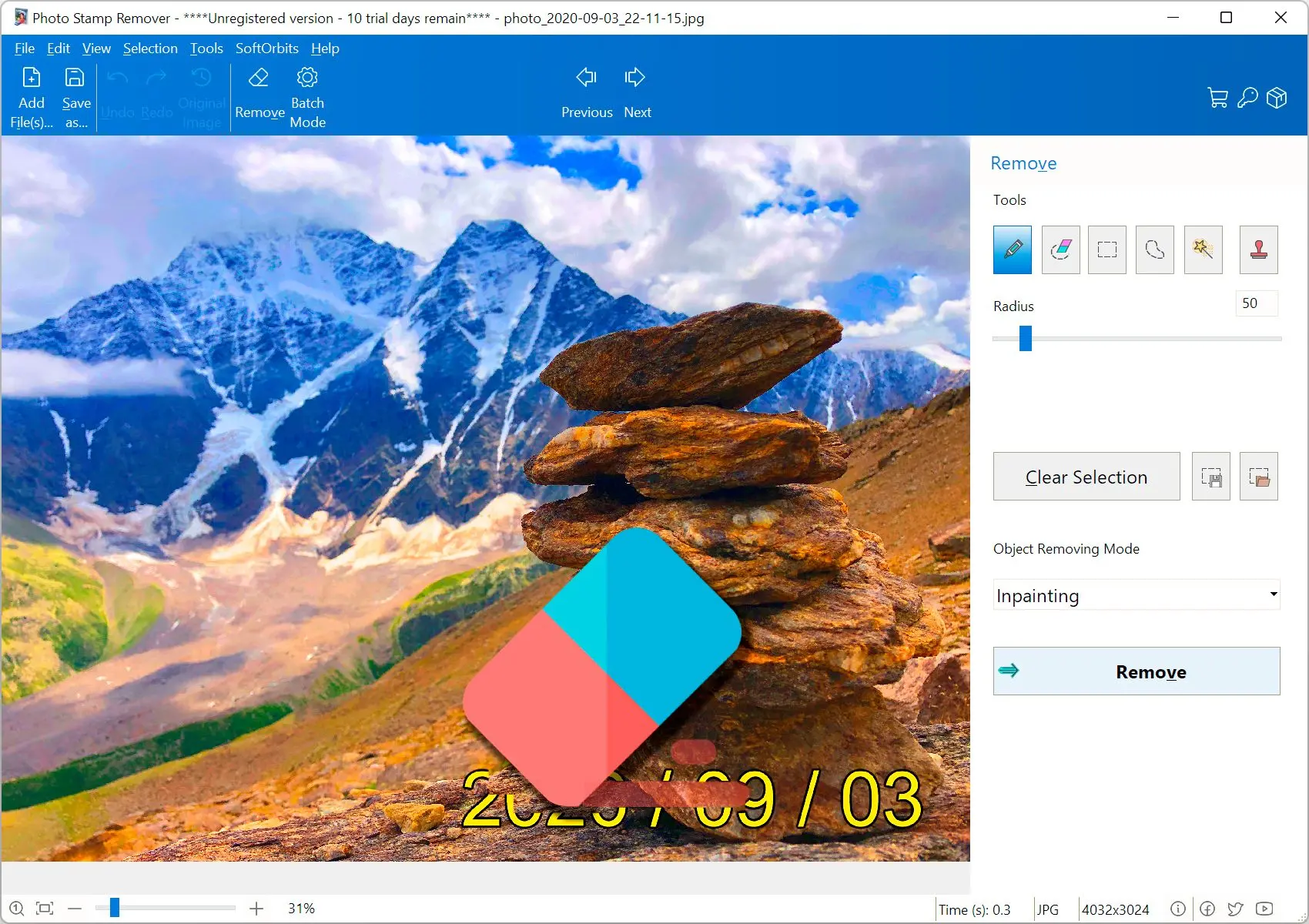
Photo Stamp Remover Screenshot.
️ Eugene - CEO at SoftOrbits, Candidate of Technical Sciences, has more than 16 years of expertise in software development, photo and multimedia applications, enhancing and transforming digital images and videos.
📅 Last updated on:  2026-11-19

Independent reviews say the free HitPaw Watermark Remover tier previews results but exports with a HitPaw logo or asks you to register and pay. Reviewers find it works well on static logos over plain backgrounds, but leaves soft patches on textured photos, faces and moving logos.
We make Photo Stamp Remover, a photo watermark remover for Windows, and rank it first for photo folders. We did not buy a HitPaw license for this review.

Windows 11 / 10Free trial, no sign-up

What you will learn
Apply in 10 min Saves 3 hBeginner

What is the best desktop alternative to HitPaw for photos?

TL;DR

For stamped photo folders on Windows, we recommend Photo Stamp Remover. It detects watermarks, fills the masked areas and cleans an entire folder in one Batch Mode pass. You can preview every result in the trial; saving needs a license.

You get two toolbar modes. Find Watermarks shows the detected mask before anything changes. Remove Watermarks detects and fills in one pass.

Detection uses a model we trained ourselves. The Sensitivity slider runs from 0 to 100, with 70 as the default. Raise it for faint, semi-transparent stamps. Lower it to keep real text, such as shop signs or jersey numbers.
The fill uses inpainting, with an AI option built on MI-GAN. You can fix leftover edges with the brush and clone stamp, or use the concealer tool. The detector also finds date stamps and photographer signatures when you remove copyright from pictures you own.

The desktop program opens JPG, PNG, TIFF, BMP, GIF and PSD, plus camera RAW files such as CR2, NEF, ARW, ORF and DNG. The web version accepts JPEG, PNG, WEBP, GIF and TIFF and takes up to 50 images per batch. Uploads are deleted within 24 hours.

 Photo Stamp Remover on Windows with the detected watermark text highlighted by a red mask over a photo..

Photo Stamp Remover
Photo Stamp RemoverFind and remove watermarks on a whole folder of photos in one Batch Mode run.

HitPaw and its alternatives compared

HitPaw entries use its own pages and independent reviews. "Per review" means the vendor does not state it.
ToolBest forMediaBatchProcessingFree tier
Photo Stamp RemoverFolders of stamped photos on WindowsPhotos, including RAWYes, folder to folderWindows desktop app; web version keeps uploads up to 24 hTrial detects and previews; saving needs a license
HitPaw Watermark RemoverPhotos and video in one appPhotos and videoYes, file count not statedDesktop app for Windows and MacPreview; clean export needs a paid plan
HitPaw OnlineOne short clip in a browserVideo clipsNo, per reviewCloud uploadPreview; free output is watermarked, per review
Adobe PhotoshopManual edits by Photoshop ownersPhotosThrough recorded actionsDesktop appAdobe subscription
IOPaintFree open-source inpaintingPhotosPossible, harder when marks moveRuns on your own hardwareFree

How we reviewed HitPaw and the alternatives

TL;DR

Price led the review. We checked what you can export for free and what you really pay once credits and upgrades are added, then how refunds work.

We ranked by five criteria, in this order:

  • What the free version or trial lets you save
  • Full cost with credits, upgrades and refund terms
  • Quality on textured backgrounds, faces and large marks
  • Batch handling for photo folders
  • Platforms and where files get processed
Photo Stamp Remover facts come from our source code. For HitPaw, we read its product and online pages, four published reviews, and buyer reviews on Trustpilot and Sitejabber. Most HitPaw reviews in search results come from competing watermark-remover vendors; we used their observations only where several sources agreed. Our verdicts come from that reading. We ran no timed tests and give no star ratings.

HitPaw Watermark Remover and 4 alternatives, reviewed

1. Photo Stamp Remover: best for cleaning watermarks off folders of photos on Windows

 Photo Stamp Remover Batch Mode with a strip of dated source photos and a destination folder for the cleaned copies..

Photo Stamp Remover is an AI watermark remover for Windows. It detects stamps and logos, captions too, then fills their areas with plausible background. In Batch Mode, you choose a source folder and a separate destination for cleaned copies. Your originals stay untouched. The desktop version processes files on your PC.

Pros:

Detects watermarks, with a 0-100 slider for adjusting the mask

Cleans every photo in a folder in one Batch Mode run

Opens camera RAW files such as CR2, NEF and DNG

Lets you fix edges with the brush and clone stamp

Cons:

Trial previews results; saving needs a paid license

Large bold marks spanning the frame may need a brush pass

High sensitivity can mask real text, such as signs

Verdict: Choose it for more than a handful of watermarked photos.
We make this program. The slider exists because no single detection threshold fits every photo set.

2. HitPaw Watermark Remover: best for photos and video in one desktop app

 Illustration: HitPaw Watermark Remover desktop window with the removal mode list open..

HitPaw's desktop program doubles as a video watermark removal tool. It removes watermarks and unwanted objects, including date stamps and people, from photos and videos. Its five modes are AI Mode, Gaussian Blur, Matte Filling, Color Filling and Smooth Filling. Buyers posting reviews mostly clean short video clips. One Trustpilot reviewer said the paid service worked well on a five-second video scene. A photography fan quoted on Sitejabber called the removal very powerful.

Pros:

Handles photos and video

Offers five fill modes for different backgrounds

Runs on Windows and Mac

Advertises batch removal for large photo sets

Cons:

Free version previews only; clean export needs a paid plan

Requires registration before export, per an independent review

Leaves soft patches on textures, faces and moving logos, reviewers say

Draws license and refund complaints after version upgrades

Verdict: Pick HitPaw for short videos and photos if you accept paying before your first clean export.

From HitPaw's pages and published reviews, we judge it capable on simple marks but a poor buy for photo folders alone.

3. HitPaw Online Watermark Remover: best for a one-off video clip in the browser

 Illustration: HitPaw Online player with the watermark area highlighted and an export prompt to sign in or upgrade..

According to HitPaw's online tool page, you can use desktop and phone browsers, including Android and iOS, and upload video in MP4 or MOV format, with AVI accepted too. Upload your file and highlight the mark; the fill preview comes before export. Online plans use credits.

Pros:

Works in mobile and desktop browsers

Needs no installation or admin rights

Accepts common video formats, including AVI

Cons:

Uploads every file to the vendor's cloud

Watermarks free output, per independent reviews

Has no browser batch processing, one review notes

Uses credits quickly on longer or repeated jobs

Verdict: Use it for one short clip where you cannot install software.
Read the upload terms before sending client photos.

4. Adobe Photoshop (Content-Aware Fill): best if you already pay for Photoshop

 Illustration: Photoshop Content-Aware Fill workspace with a watermark selected on a textured photo..

Content-Aware Fill rebuilds your selection from surrounding pixels. Use the clone stamp and healing brush to correct errors. In Adobe's community forum, people removing watermarks describe messy, blurred results from Content-Aware Fill alone. A real estate agency owner rebranding old listings asked how to record an action to remove the old watermark in batches.

Pros:

Gives full manual control over every pixel

Corrects edges with clone stamp and healing brush

Repeats an edit across a folder through actions

Cons:

Leaves blurred patches with Content-Aware Fill alone, users report

Requires you to record and test the batch action

Requires an Adobe subscription plan

Verdict: Worth it if you already have Photoshop installed and a few images to fix.
Photoshop gives you the most control of the five and takes longest per image.

5. IOPaint: best free open-source inpainting tool for tinkerers

IOPaint runs AI inpainting models on your hardware. Paint over the mark and the model fills the watermark area. A Microsoft Tech Community reply recommends it for batch watermark removal but warns that batches get harder when the mark changes position between images.

Pros:

Free, with open-source code

Runs inpainting models on your hardware

Gives precise control through a brush mask

Cons:

Struggles with batches when watermarks move between images

Offers community help only, with no paid support line

Requires you to handle setup

Verdict: Choose IOPaint if you enjoy open-source programs and clean images individually.
From the project description and that thread, we judge it suitable for a handful of images, but a poor fit for folders with moving marks.

Is HitPaw free, or only a preview?

TL;DR

You can download HitPaw and preview cleaned results for free. A clean export needs a paid plan.

Several independent reviews describe the browser tier as a preview, with a HitPaw watermark on free output. Software Testing Help also reports that you must register before exporting videos or pictures.

Check the export screen on one test image before spending an hour masking a batch.

HitPaw free tier
  • Preview of the cleaned image or clip
  • Export carries a HitPaw mark or needs an account and plan
VS
Photo Stamp Remover trial
  • Detection, masking and preview on your photos
  • Saving needs a license

What is the HitPaw Watermark Remover price, and what do buyers complain about?

TL;DR

Check HitPaw's pricing page when you buy. Prices in 2025 and 2026 reviews disagree and become outdated quickly.

You can buy the desktop program by subscription or with a longer license. Online credits draw the sharpest complaints. A Trustpilot reviewer in July 2026 described a $26.87 monthly plan where restoring one photo could use 34 points, with extra points costing $14.

Some users report that a major version update treated their lifetime license as expired and demanded an upgrade fee. HitPaw has not publicly confirmed this. Read the license page and check which version your purchase covers.
Reports say HitPaw's 30-day refund policy mainly covers technical bugs support cannot fix; poor results on your photo may not qualify. Several 1-star Trustpilot reviews from December 2025 and January 2026 describe repeated subscription charges. HitPaw replied with offers to fix the billing.

Test your hardest file in the free preview and buy the shortest plan that covers the job. Pricing for Photo Stamp Remover is on its product page.

How well does HitPaw remove watermarks, and where does it blur?

TL;DR

HitPaw cleans static marks over sky, walls or plain fabric well. Reviewers report soft patches on texture, faces and moving footage.

5
AI-powered removal modes on HitPaw's product page, one of them Gaussian Blur
Source

HitPaw's page promises removal with no blur or traces. Four published reviews agree that simple static marks on even backgrounds come out well, but moving or semi-transparent logos often leave faint traces or smears. Textures and faces fare no better. HitPaw describes Gaussian Blur as brushing or blurring the area: it hides the mark without rebuilding the background.

Larger masks require more invented background, increasing the chance of a visible patch. The WatermarkRemover-AI project notes in a ScriptByAI write-up that complex textures and large masks are more likely to show artifacts.
Mask tightly, leaving a pixel or two of margin. Test a representative image before processing the set. Compare it with the original at 100% zoom for repeated texture, blur and broken text.

HitPaw online vs desktop: which version should you use?

TL;DR

Use desktop for photos and batches. Choose online for one video clip on a device where you cannot install software.

The online version works in a browser on any system. The desktop program includes every removal mode and avoids per-credit charges for jobs beyond a clip or two.
Reviews also test HitPaw on TikTok and Sora clips. Their moving marks over changing footage are the hardest case for any remover. Use clips you made. You can compare video-specific programs in our best watermark remover for videos guide.

Can HitPaw remove watermarks from many photos at once?

TL;DR

HitPaw advertises desktop batch removal for photos, but its bulk page gives no file limit. Batch processing works best when marks stay in the same position.

HitPaw's bulk page promises to remove watermarks from hundreds of images in seconds. No independent test we read confirms the file count or time.
In a Windows community thread, a user with a large image collection wants to avoid slow, individual removal while keeping original quality. Replies point out that one mask stops working when watermarks change corners between images.

Sort photos by watermark position and process each group separately, or use detection on every image. Photo Stamp Remover does this in Batch Mode, so stamps can move between corners. Repeating patterns across the frame are harder, as our guide to remove an Adobe Stock watermark explains.

Is HitPaw safe to install, and where do your files go?

TL;DR

FileHorse reports a clean scan for the HitPaw Watermark Remover download, its listed desktop installer. The online version uploads files to HitPaw's servers. Remove marks from your own images; doing so on someone else's carries risks.

Is HitPaw Watermark Remover safe?

51
antivirus engines scanned the HitPaw installer listed on FileHorse, which reports the file as safe
Source

A clean scan covers that file on that day. Get the HitPaw Watermark Remover download from HitPaw's site or its Microsoft Store listing and skip "cracked" builds.

What happens to files you upload to HitPaw Watermark Remover online?

HitPaw's online page mentions encrypted connections. We found no verifiable retention period on its pages, so assume uploads remain on its servers for an unknown time. Keep client work and personal photos in the desktop program.

Is removing a watermark legal?

Remove watermarks only from images you own or have a license to edit. Removing a stock watermark from an unpaid preview gives you no license.

The Progressive Robot checklist puts confirming your rights first, which we agree with. Legitimate cases include your photos with an old logo, product shots you paid for and scans of family prints with date stamps. Before you remove a Getty Images watermark, read that guide's licensing section.

How do you use HitPaw to remove a watermark or object?

TL;DR

Both versions take five steps. How tightly you mask the mark determines the result.

  1. Open HitPaw Online in a browser or install the Windows or Mac app from HitPaw.
  2. Upload your image or clip and check that the full frame loaded.
  3. Select the watermark or object tightly; on desktop, choose a mode for the background.
  4. Process a representative image or short section and inspect the preview.
  5. Export and compare with the original at full size for blur or repeats.

Should you buy HitPaw, try an alternative, or skip it?

TL;DR

Buy HitPaw if your work includes video. Try a photo program first for photos, and skip paid software for one sticker on one picture.

If you subscribe, set a renewal reminder because of the billing complaints above.

Pick another tool if you fit one of these cases:

  • A photographer with a stamped shoot and no clean originals, or a shop rebranding product shots: Photo Stamp Remover detects each mark and cleans the whole shoot as one batch.
  • A Photoshop owner with a dozen images: Content-Aware Fill and the clone stamp cost nothing extra.
  • Someone who enjoys open-source programs and has time: IOPaint, one image at a time.
  • Anyone still comparing: our best watermark remover software list includes more Windows options.

For one emoji or sticker on one image, use a free editor. For someone else's photo with a stock or agency mark, license the image instead.

Also considered: watermark removers that did not make the list

  • WatermarkRemover-AI is an open-source code project pairing Florence-2 detection with LaMA fill, rather than a packaged Windows program for everyday users.
  • Inpaint: HitPaw names it as a competitor on its bulk-removal page, but we found too little recent independent review evidence to rank it.
  • Apowersoft Watermark Remover appears in related searches; we found no verifiable current test results.
  • Media.io Watermark Remover is online-only. The review we found came from the vendor.
  • Wink, UniFab, Vmake and GStory each publish a HitPaw review ending with a pitch for their own program. We used them as leads and left them unranked.

Sources

Photo Stamp Remover Photo Stamp Remover
HitPaw Watermark Remover review: what the free version exports, pricing complaints, blur on textured photos, and desktop alternatives for batches of photos.

Remove unwanted watermarks, text, and logos from all types of images.

Photo Stamp Remover Screenshot.


🙋Frequently Asked Questions

Installation and previews are free. Reviewers report watermarked free output; clean exports need a paid plan.

We did not test ChatGPT. Image generators redraw pictures with changed details. A dedicated remover edits the masked area and leaves the rest unchanged.

The online HitPaw video watermark remover lists Android support. Its separate online photo remover lets you upload a photo and highlight the mark, then preview the result before export. Use it only for images you are comfortable sending to HitPaw's servers.

Mostly on plain backgrounds. Reviewers see soft patches on textures like grass or brick, and on hair and faces. Gaussian Blur blurs by design. Keep your mask tight and inspect the preview at full zoom.

Reports say refunds mainly cover technical bugs support cannot fix. Poor results on a difficult photo may not qualify. Test your toughest file before buying.

An independent review says registration is required before exporting videos or pictures, including trial exports.

Yes. Choose source and destination folders in Batch Mode. Detection runs separately on each photo, and saving batch output needs a license.

Open photos, run detection, adjust the Sensitivity slider and preview the fill. Saving needs a license; check the product page for pricing.

You can remove marks from images you own or are licensed to edit. A stock or agency mark identifies an unpaid preview; license the image before editing.

You can use dedicated removers such as HitPaw or Photo Stamp Remover, general editors such as Photoshop with Content-Aware Fill, or open-source inpainting such as IOPaint.