1. 1️⃣ See where FotoSketcher's effects work and where they fall short.
  2. 2️⃣ Check the free license and Windows 11 support.
  3. 3️⃣ Compare it with Sketch Drawer, XnSketch and Krita.
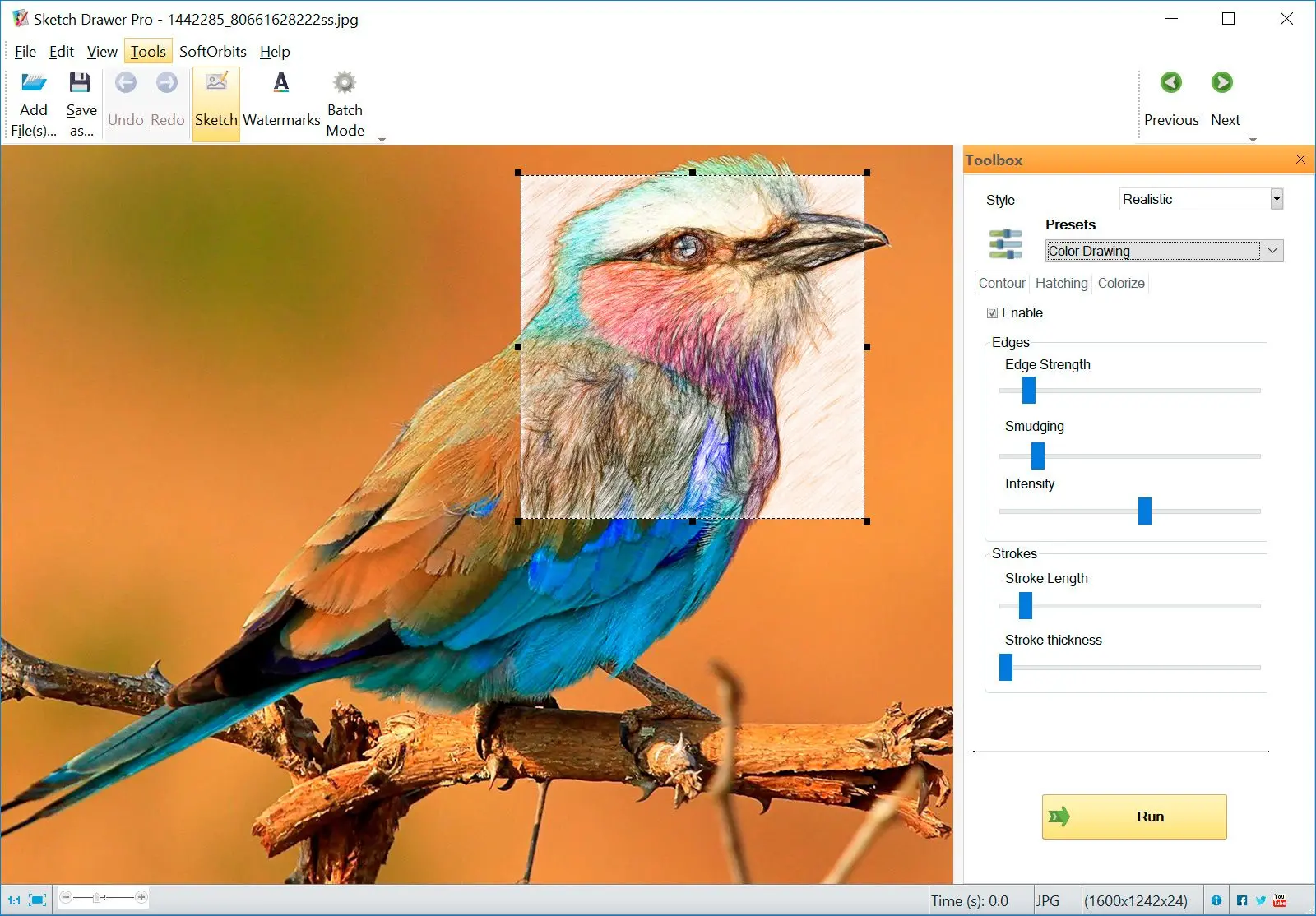
Sketch Drawer Screenshot.
️ Eugene - CEO at SoftOrbits, Candidate of Technical Sciences, has more than 16 years of expertise in software development, photo and multimedia applications, enhancing and transforming digital images and videos.
📅 Last updated on:  2026-11-18

FotoSketcher holds up for a single birthday card. A batch of 300 product photos calls for a closer comparison.
We make Sketch Drawer, a Windows sketch app, and list it first below. Keep that in mind when reading our assessment.

Windows 11 / 10Free trial, no sign-up

What you will learn
Apply in 15 min Saves 2 hBeginner

Is there a photo to drawing app that draws cleaner outlines?

TL;DR

Sketch Drawer is a Windows app with four drawing styles. The default, Line Drawing, uses trained models and has 12 presets. The other three styles use a hatching engine. Batch mode and the command line handle whole folders; the trial previews every style before you buy.

Filter-based converters, FotoSketcher included, draw lines wherever they detect contrast. A patterned shirt or a rug behind a dog can become scribbles around every fold. Line Drawing uses three trained models from the open informative-drawings project. Different simplification and clean-up settings give you 12 presets, from loose contours to dense detail. Click through them and choose from the preview. There are no sliders.

Batch mode applies one style to a folder. The command line accepts an input file, an output file and a preset number (-in, -out, -preset), so you can run it from a .bat file after a photo shoot. You can add your own watermark, including to commissioned pet portrait previews. This photo to sketch software runs offline on Windows.

Outline from an edge filter
  • Lines follow every contrast edge the filter finds
  • Busy backgrounds pick up stray strokes
  • You tune sliders photo by photo
VS
Line Drawing in Sketch Drawer
  • A trained model picks the contours to keep
  • 12 presets from loose to detailed
  • One preset runs across a whole folder

 Sketch Drawer on Windows with a desk still-life photo turned into a clean line drawing using a Line Drawing preset..

Sketch Drawer
Sketch DrawerTurn photos into clean line drawings or pencil sketches on Windows, one file or a whole folder at a time.

Basic information on the FotoSketcher app and three alternatives

ToolBest forPriceStylesPlatformsRuns offline
Sketch DrawerClean line art and pencil sketches in batchesPaid license; trial previews without saving4 styles; Line Drawing has 12 presetsWindows (64-bit)Yes
FotoSketcherFree sketches, watercolours and paintingsFree, commercial use included (vendor)Over 20 effects (vendor)Windows (64-bit), macOSYes
XnSketchQuick sketch filters in a single stepFree22 effects (DownloadCrew)Windows, macOS, Linux, iOS, AndroidYes
KritaPainting over a photo by handFree, open sourceBrushes and filters, no automatic converterWindows, macOS, Linux, AndroidYes
Effect counts and prices come from the vendors and cited reviews, checked on November 17, 2026.

How we reviewed the four apps

TL;DR

Price came first: what you get free or during a trial. We then looked at which effects produce results worth keeping.

We used five criteria, in this order:

  • Cost and free tier limits, including watermarks
  • Quality by style, from user threads and published samples
  • Speed, batch work and scripting
  • Save formats and supported systems
  • How quickly a beginner gets a usable picture
Our Sketch Drawer facts come from the program we build. For FotoSketcher, XnSketch and Krita, we read vendor pages, TechRadar and DownloadCrew reviews, download listings and forum threads with settings and finished images. We did not time conversions or assign star ratings. We identify older versions where sources describe them. Our assessments come from that reading.

The four sketch apps reviewed

1. Sketch Drawer: best for clean line drawings and batch jobs on Windows

Sketch Drawer suits portraits, pets and product shots where you want a clean outline more than a painted texture.

Pros:

Draws outlines with trained models through 12 Line Drawing presets

Processes whole folders in batch mode

Runs from the command line for scripted jobs

Adds your own watermark to finished images

Cons:

Costs money; the trial previews results, saving needs a license

Runs on 64-bit Windows only

Offers four styles, fewer than FotoSketcher's 20-plus effects

Has few recent independent user reviews

We chose presets deliberately. For most people, choosing from 12 finished looks is quicker than adjusting five sliders by eye.

2. FotoSketcher: best free option for sketches, watercolours and paintings

 Illustration: FotoSketcher window with the original photo on the left and a pencil sketch preview on the right..

Hobby artists and card makers use the FotoSketcher app to turn individual digital photos into pencil sketches, ink drawings or paintings. TechRadar's review describes a split screen with the original beside the preview, a manual brush for applying effects to part of a photo, batch processing and scripting. It covers version 3.3; newer builds may look different.

Pros:

Costs nothing, even for images you sell, per the vendor

Offers over 20 effects, from pencil to oil painting

Shows the original and preview side by side

Applies one effect to a set of photos

Runs on Windows and macOS

Cons:

Draws edge lines that look mechanical to some users

Saves to JPEG, PNG or BMP only, per older reviews

Takes time to render, especially on slower hardware

Needs 64-bit Windows for current builds

Start with watercolour before judging the program by its pencil effects.

3. XnSketch: best for fast, simple sketch filters

 Illustration: XnSketch showing a photo with a row of sketch effect thumbnails to pick from..

XnSketch applies a ready-made effect in one click. DownloadCrew's review counts 22 effects and lists JPG and PNG as save formats. The reviewer found Oil Painting disappointing and wanted a bigger brush, an adjustment the program lacks.

Pros:

Applies an effect in one click with almost no setup

Offers 22 effects, per DownloadCrew

Saves results as JPG or PNG

Cons:

Oil Painting disappointed DownloadCrew's reviewer

Gives no control over brush size

Has few user reviews of recent builds

For a plain pencil birthday card, XnSketch is enough. Choose FotoSketcher for a painted look.

4. Krita: best for painting over a photo by hand

On AlternativeTo, Krita has more likes than any other FotoSketcher alternative. You trace and paint over your photo yourself, stroke by stroke.

Pros:

Costs nothing and the code is open

Runs on all three desktop systems and on Android

Gives full control over every stroke

Cons:

Has no automatic photo to sketch converter

Takes practice and time per picture

Feels excessive for one card

We would open Krita for a portrait that should look hand-made. It is too slow for a quick card.

Is the program really free, and does it add a watermark?

TL;DR

Yes, under the vendor's terms. You need no subscription or account, there is no trial timer, and finished images have no watermark. Commercial use is allowed.

The FotoSketcher site says the program is completely free, including commercial use, with no sign-up. The vendor's FAQ says there is no paid pro edition and you keep your creations at full resolution. Donations fund development. The vendor dates the project to 2007 and reports over 15 million downloads.

Free and open are separate questions here. FossHub's listing classifies FotoSketcher as freeware with closed source code. It also says you can sell images made with it without buying a license or asking the author.

How good is the watercolor effect, and how do the other sketch and painting styles compare?

TL;DR

Good enough for most cards and home prints, though results vary. The watercolor effect gets the most praise. Some pencil and ink effects draw hard lines along every detected edge.

20+
effects in FotoSketcher, from pencil sketch and pen and ink to watercolour and oil painting, according to the vendor
Source

An older Wonder of Tech walkthrough divides the effects into five groups, from pencil sketch to stylized and miscellaneous. The vendor says they use classical image-processing algorithms. Each effect has sliders and a preview.
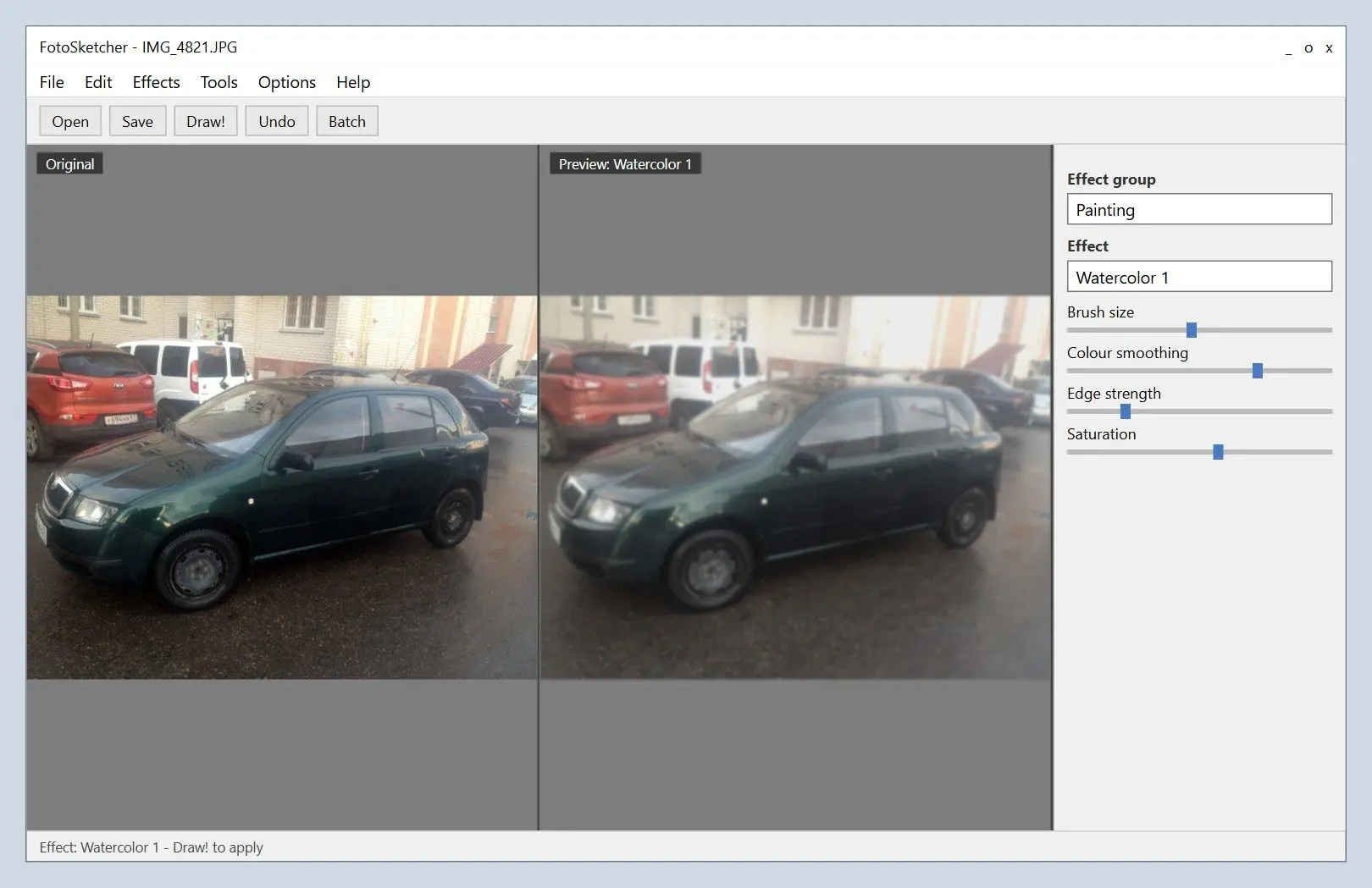
 Illustration: a street photo turned into a soft watercolour painting in FotoSketcher..

On a SketchUp community forum, one member rated FotoSketcher's watercolour well above any other filter software they had used. Another disliked the unnatural lines that filter tools draw along detected edges. A reader under the Wonder of Tech walkthrough said a few effects look great and others look plain ugly. In practice, you will keep three or four.
In the same community, artists process 3D renders in FotoSketcher, then recompose the output in Photoshop. They use the effect as a starting layer, rarely a finished image. Forum users also share exact watercolour settings. Defaults rarely produce those results.

Choose a photo with a clear subject and plain background. A brick wall behind a person becomes stray strokes. Use the manual brush to apply the effect to the subject and leave the cluttered wall alone.

Which output formats does the program save, and how fast are conversions?

TL;DR

Reviews list only three formats, without TIFF. Effects take time, especially with big photos on older hardware.

3
save formats in FotoSketcher reviews: JPEG, PNG and BMP, with no TIFF option
Source

TechRadar called the format list fairly limited. Both reviews behind this count cover older versions, so a current build may offer more. Choose PNG for large prints or a lossless archive. If your print shop needs TIFF, convert the result afterwards.

The older walkthrough warns that effects take time, with longer waits on slow computers. Apply one effect to a group with batch processing and leave it running. TechRadar also mentions scripting for repeat jobs.
Before applying an effect, you can crop and rotate your photo, adjust contrast or run auto levels. Use another program for face retouching or background removal. Our guide to convert a picture into a drawing covers this preparation and ways to get a drawn look on Windows.

Does FotoSketcher work on Windows 11?

TL;DR

Yes. Current builds support 64-bit Windows 7, 8, 10 and 11, and a macOS version is available. On 32-bit Windows, you need an old legacy release.

PortableApps lists support for Windows 7, 8, 10 and 11, 64-bit only, and retains legacy version 3.80 for 32-bit systems. Its portable build is packaged with the publisher's permission. Other download listings also list Windows 11. If FotoSketcher will not start on an older laptop, check whether you have 32-bit Windows first.

Where should you get the latest FotoSketcher version and updates?

We compared four download sites and found four different version numbers, with mismatched file sizes. Check the vendor's site for the latest release.

Download FotoSketcher from the vendor's site or a listing that links to it. Mirrors list different version numbers and installer sizes, making an outdated copy easy to download by mistake.

Does the program use AI, and can AI turn a photo into a pencil drawing?

TL;DR

FotoSketcher uses classical image-processing algorithms, according to the vendor, rather than AI. AI can draw outlines from photos; Sketch Drawer's Line Drawing style uses that approach.

Classic filters turn contrast into strokes. A model trained on line drawings learns which lines an artist would keep. It can discard fabric texture while retaining the contour of a face, cup or car. You see the difference most clearly in busy photos.

In Sketch Drawer, only Line Drawing uses neural models: three from the MIT-licensed informative-drawings project, about 17 MB each, installed with the program. Realistic, Detailed Sketch and Classic use a hatching engine and behave more like traditional filters. Our realistic drawing converter page covers tone and shading in Realistic.
Generative services redraw photos from text prompts. They may change a face or add details.

Which photo to sketch app should you pick?

TL;DR

For one free card, start with FotoSketcher. For a folder of portraits needing clean outlines, try Sketch Drawer.

  • One free sketch or watercolour on Windows or a Mac: choose FotoSketcher and try watercolour first.
  • Selling or printing line art from many photos, such as pet portraits or a product catalogue: try Sketch Drawer and test batch mode during the trial.
  • For outlines to cut or trace, such as to make a stencil from a picture, compare Sketch Drawer's cleanest Line Drawing preset with FotoSketcher's pen and ink effect.
  • For a pencil look in one click with no settings, choose XnSketch.
  • If drawing is your hobby, use the photo as a reference and paint over it in Krita.
  • For 32-bit Windows, FotoSketcher's legacy 3.80 release is the free option.

For worksheet pictures, a teacher may be happy with free effects. A card seller needs consistent outlines across 50 listings; a developer generating sketches in a script needs the command line.
Forum users looking for an easy free program call FotoSketcher well designed and simple.

Also considered: photo to sketch tools that didn't make the list

  • Paint.NET is a free Windows photo editor with a Pencil Sketch effect, fine for a quick test but with far fewer drawing styles than FotoSketcher
  • GIMP with G'MIC-Qt is free and deep, though GIMP forum members direct beginners who find it difficult toward FotoSketcher
  • AKVIS Sketch is a paid sketch converter; we found no independent user reviews to check its results against
  • Browser-based line drawing converters suit single images; size limits and output quality vary by site

Sources

Sketch Drawer Sketch Drawer
FotoSketcher reviewed for 2026: what the free photo-to-sketch app does well, where effects fall short, export formats, Windows 11 support and alternatives.

Want to see your photos as realistic pencil sketches? We trained an AI to do it.

Sketch Drawer Screenshot.


🙋Frequently Asked Questions

FotoSketcher for most Windows and Mac users: the vendor says it is free for any use, without watermarks, with over 20 effects. XnSketch is simpler and lighter. For clean outlines across many photos, try Sketch Drawer.

Yes. Models trained on line drawings select contours and skip most texture. Sketch Drawer's Line Drawing uses three such models; FotoSketcher uses classical filters.

The vendor says FotoSketcher's painting and watercolour effects are free for commercial work too. Users praise its watercolour. In Krita, you paint by hand for free.

Browser converters handle single images, with free tiers that vary by site. For folders or repeat jobs, FotoSketcher or Sketch Drawer batch mode saves repeated clicks.

FotoSketcher and XnSketch offer drawn effects. Paint.NET handles everyday editing and a few artistic effects. Krita and GIMP cover painting and heavier edits.

Reviewers report longer waits for large photos on slow computers. Resize before applying an effect to shorten the wait, or leave a batch running while you do something else.

The trial opens your photos and previews every style and preset. Saving requires a license key. The current price is on the product page.