How to wipe a drive with a certificate in File Shredder
TL;DR
File Shredder - Disk Wipe Software erases a whole non-system volume, or only its free space, from inside Windows 11 or 10. It offers 16 methods, from a single pass of zeros to the 35-pass Gutmann pattern, shows the drive type before you start, and saves a PDF erasure certificate for an employer or a client.
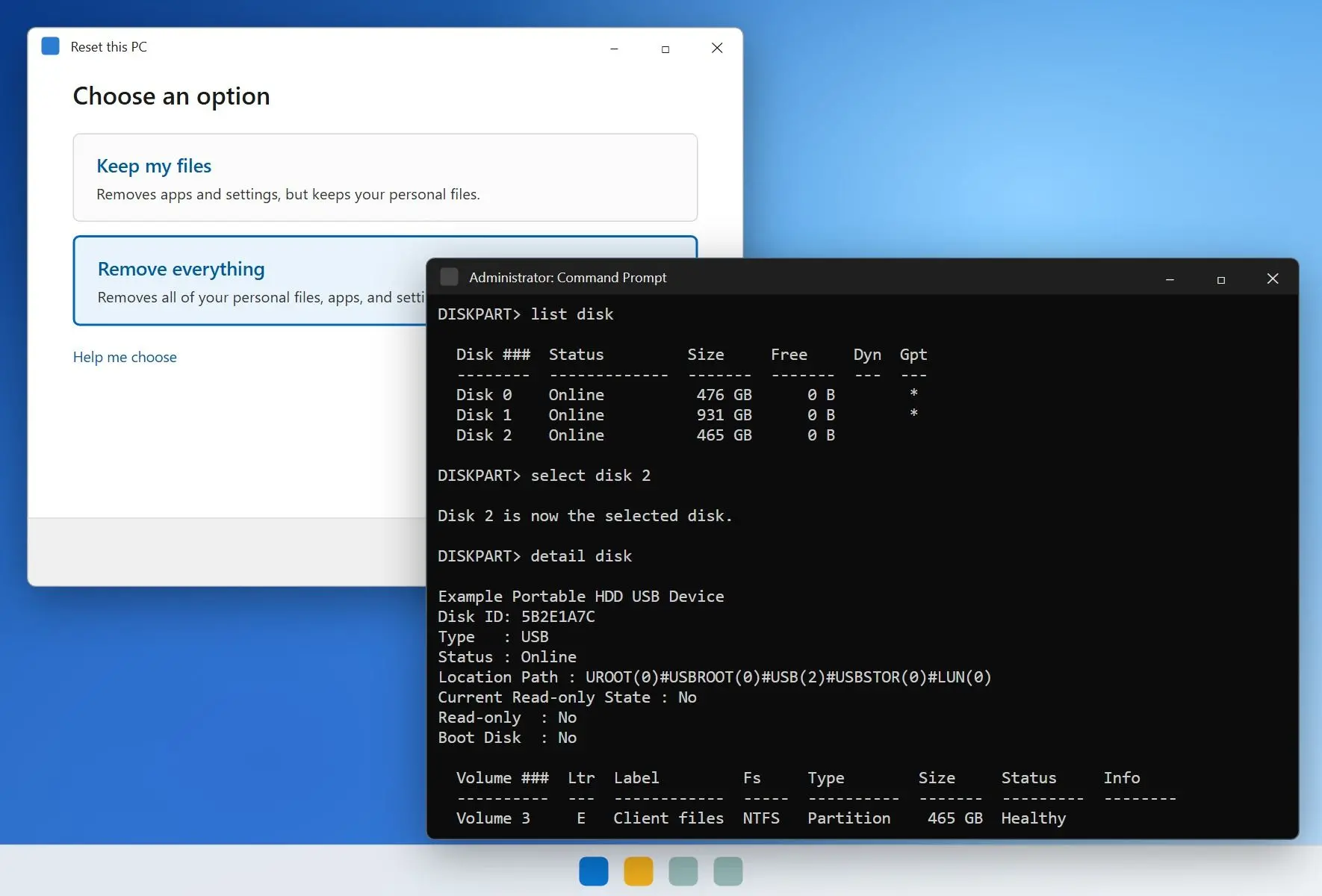
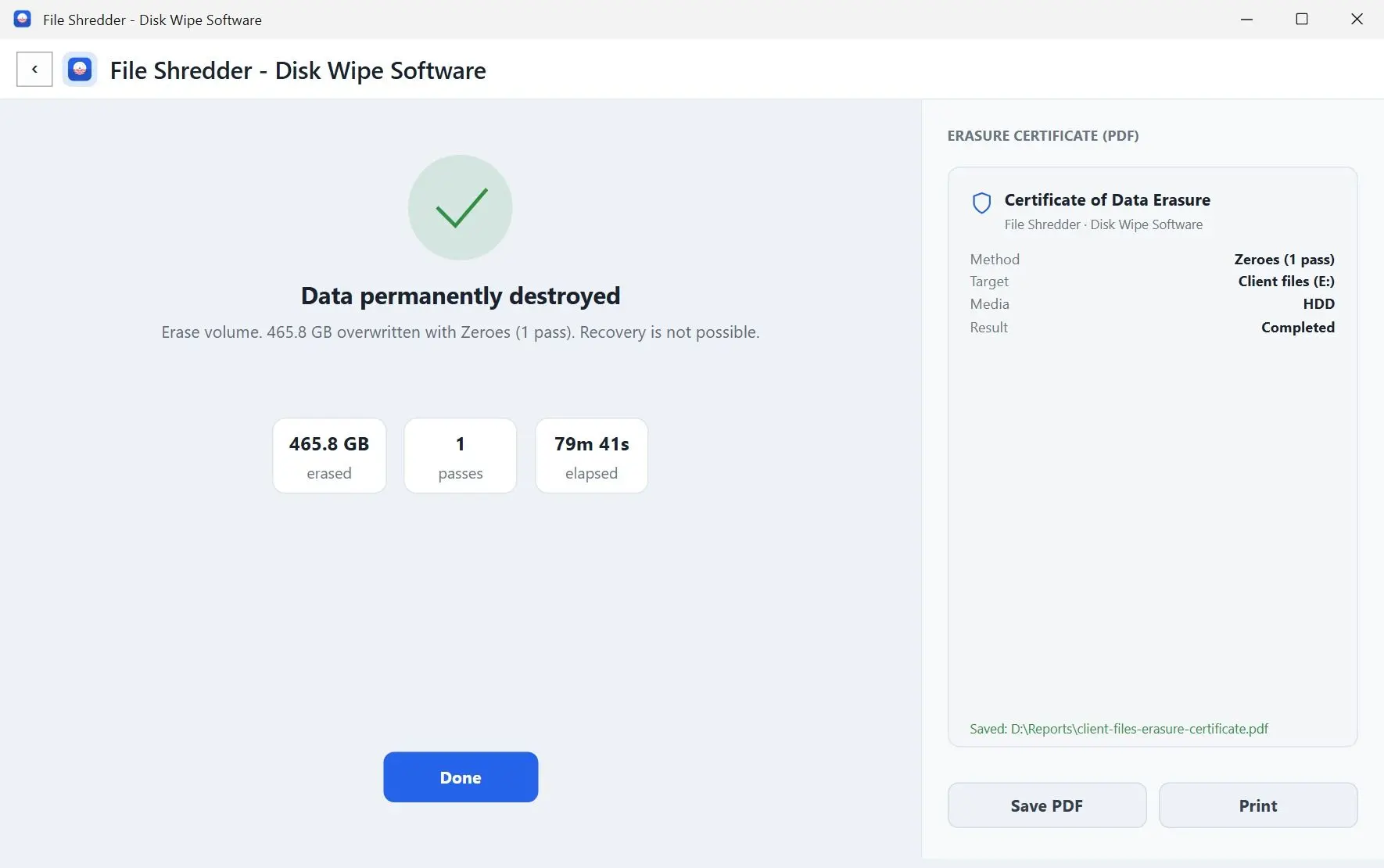
Diskpart leaves no record of the wipe. File Shredder, a Windows program to wipe hard drive volumes, fits cases where somebody asks for proof, such as an office handing back leased laptops or a contractor returning a client's external drive. Volume wipes, free-space wipes and the certificate need a license; the one free run covers shredding files.
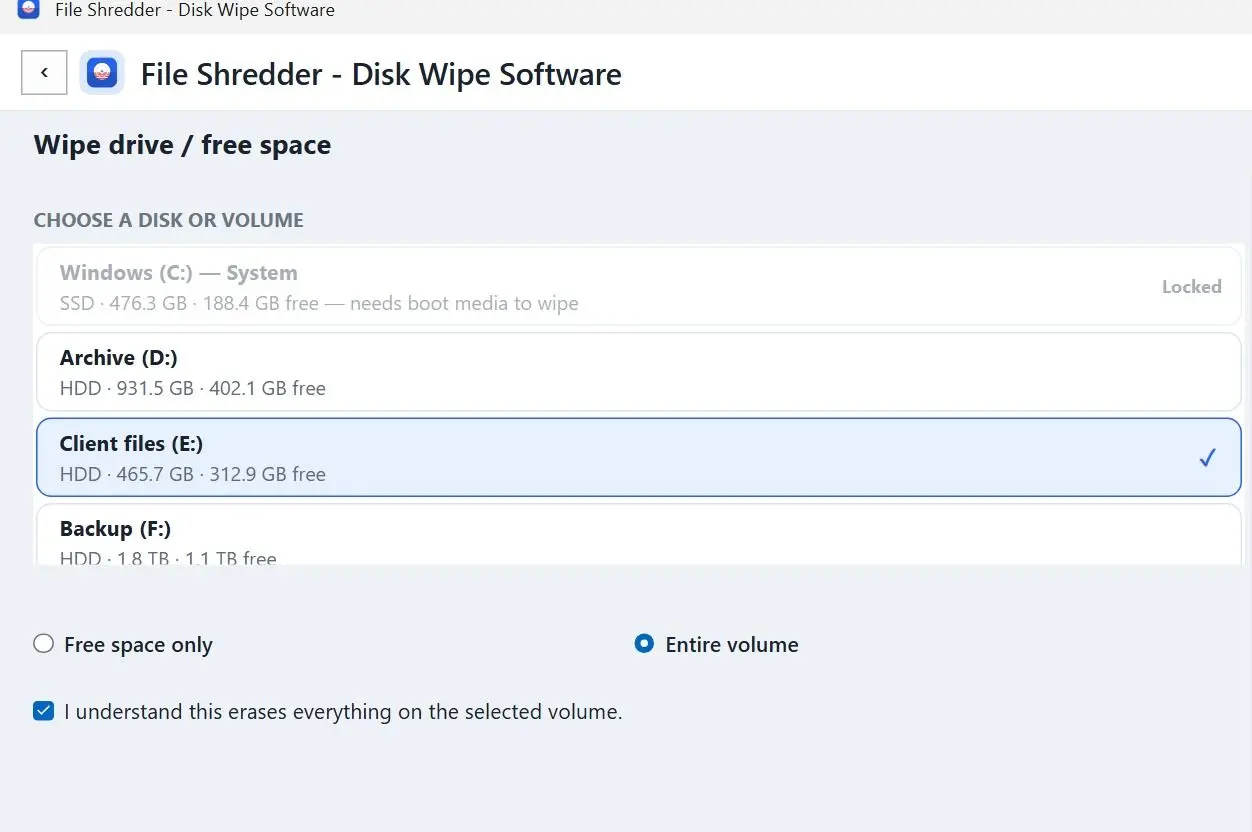
Open the Wipe drive / volume tile. The screen is titled Wipe drive / free space. Pick the disk under CHOOSE A DISK OR VOLUME, then choose Entire volume or Free space only. Pick a method under METHOD, tick I understand this erases everything on the selected volume, and press Erase entire volume. When the prompt shows the volume name, click Yes only if it is the drive you mean.
Each row shows the drive type next to its size. On an SSD or a flash drive, the app warns that an overwrite may leave old data behind and points you to the maker's Secure Erase. During the run the volume is locked and dismounted. The partition stays in place, and its contents are overwritten.
diskpart clean all
Disk picked by number in a text window
One pass of zeros, no other choice
Nothing to file away afterwards
VS
File Shredder
Volumes listed by name, size and drive type
16 methods, from Zeroes to Gutmann
Entire volume or free space only, plus a PDF certificate
16
wipe methods in File Shredder: quick Zeroes and Random passes plus 14 standards, from DoD 5220.22-M with 3 passes to Gutmann with 35
The PDF holds the method and pass count, the device serial and how the run ended. It is a report from our app about its own run, not an independent audit.
Free and full version
Try the basic job once before you buy.
Feature
FreeOne run to try it
Full versionAll methods, unlimited runs
Shred files and folders
✓
✓
Clean traces
✓
✓
Erase runs
1
Unlimited
Zeroes and Random, 1 pass
✓
✓
DoD, Gutmann, NIST and 11 other standards
✗
✓
Wipe free space
✗
✓
Erase entire volume
✗
✓
Remote Wipe via Telegram
✗
✓
PDF erasure certificate
✗
✓
With a license key, new jobs start on DoD 5220.22-M (3 passes). Settings lets you make any other method the default.
How to wipe SSD safely with Secure Erase or Sanitize
TL;DR
Use the drive maker's Secure Erase tool or the Secure Erase or Sanitize option in your BIOS or UEFI. NIST's current media sanitization guide says wear leveling and spare cells make it "infeasible for a user to sanitize all previous data" by overwriting through the normal read and write interface. Multi-pass overwrite tools mostly use up SSD write endurance.
The controller of a solid state drive spreads writes across cells to even out wear and keeps spare cells the operating system never sees. HP's guide to secure erase on SSDs names wear leveling and over-provisioning as reasons an overwrite may miss parts of the drive. The firmware command lets the drive erase its own cells, including spare ones.
Where Windows runs from decides how to wipe an SSD: run the maker's utility on a secondary SSD from Windows. For the boot SSD, look in BIOS or UEFI for Secure Erase or Sanitize; some boards have one. When neither exists, a Parted Magic or Linux live USB can send the ATA Secure Erase or NVMe Sanitize command, which is for confident users only.
Method
Spinning HDD
SSD
Quick format
Data stays recoverable
Not a wipe
Full format or diskpart clean all
Zeros every sector; one pass is enough
Spare and remapped cells may keep old data
Reset this PC with Clean data
Fine for resale
Fine for resale, stronger if encryption was on from day one
DoD 3-pass or Gutmann 35-pass
Works; NIST calls fixed pass counts obsolete
Wears the drive for little gain
Maker Secure Erase or Sanitize
Not needed, an overwrite already works
The recommended route
Turning on BitLocker right before you sell an SSD does not cover what was already there. Wear leveling writes the new encrypted blocks to fresh cells and can leave the unencrypted copies behind. Encrypt when you set the drive up, and use Secure Erase when you retire it.
Does formatting a drive wipe it?
TL;DR
A quick format does not. Dell's erase guide warns it "is not the most secure way to delete your files because the data may still be recoverable with data recovery tools." A full format, with Quick Format unticked, writes zeros across the volume and works as a one-pass wipe on a hard disk.
A quick format builds a fresh, empty file table. The old files stay untouched until something new lands on top of them, which is why people manage to recover a formatted SD card or a USB stick after the wrong click.
The same deep scans that power micro SD card recovery software also read a quick-formatted hard disk. To run a full format, open Disk Management, right-click the volume, choose Format, and untick Perform a quick format. It takes about as long as diskpart clean all. SSDs need the firmware route described earlier.
How many passes do you need to erase a hard drive?
TL;DR
One. NIST SP 800-88 Rev. 2, published in September 2025, says multi-pass overwrite "is not needed" and calls the DoD 5220.22-M language that mandates a set number of passes obsolete. On a spinning disk a single pass of zeros does it.
1 pass
is enough to clear a hard disk by overwriting, per the current NIST media sanitization guide, which dropped the multi-pass rule of DoD 5220.22-MSource
The withdrawn Rev. 1 of the NIST guide said that one overwrite with a fixed pattern such as zeros "typically hinders recovery of data even if state of the art laboratory techniques are applied" on magnetic media.
Forum threads still ask for a DoD 5220.22-M wipe on an SSD, and the usual expert reply is that those schemes were designed for spinning platters.
File Shredder keeps DoD 5220.22-M and Gutmann in its method list because some company checklists still name them. If yours does not, pick Zeroes and save the hours.
How long does it take to clear a hard drive?
TL;DR
Plan for hours, not minutes. Users timing diskpart clean all report roughly an hour per 320 GB, between 3 and more than 10 hours for a 1 TB internal drive, and up to 14 hours for a 1 TB disk over USB. Reset this PC with Clean data can also run for hours.
~1 h per 320 GB
for diskpart clean all on a working internal hard drive, as timed by Windows forum users; USB-connected disks took several times longer
Diskpart shows no progress bar during a clean all drive wipe, so a long silent window is normal. One user saw 14 hours on a USB external and later timed 11 hours on that drive. The USB link and the disk set the pace.
Picture a 2 TB backup disk handed in at 6 p.m. on a Friday. It will not be ready before you leave. That is fine. Start it, keep the PC from sleeping and check in the morning.
How do you wipe the C: drive Windows runs from?
TL;DR
You cannot format or overwrite the drive Windows is running from while it is in use; Tech Advisor's wiping guide makes the same point. Use Reset this PC with Clean data, delete every partition during a clean install, or boot from separate media.
For a PC you keep, boot from a Windows installer USB. At Where do you want to install Windows?, delete every partition on the drive before you continue. That removes the old file system but does not overwrite the data, so it is fine for a fresh start. Before a sale it is not enough.
For a full overwrite of the boot disk, start from something else. On an HDD, DBAN on a USB stick still does the job, though Tech Advisor notes it cannot securely erase SSDs. On an SSD, use the BIOS option or a live USB described earlier. HP's other route is to connect the drive to a second PC as a secondary disk, where diskpart clean all works as described above. Once the wipe tool has loaded from the USB stick, unplug the stick. Some boot tools list every connected disk, including the stick itself.
How do you know the wipe actually worked?
TL;DR
Read the tool's completion message, then check that Disk Management offers to initialize the drive as a blank disk. HP lists both checks, adds the maker's verification utilities for SSDs, and advises saving any report the tool produces. On an SSD, a clean read-back proves the visible blocks changed, not that every flash cell did.
For a hard disk, a blank, unallocated drive after clean all is a good sign, and a read-back pass is better. File Shredder's Verify after erasing option, available when you shred files, reads every byte back and reports how many items it confirmed. Volume and free-space wipes do not include this check. That count goes into the PDF certificate as well.
On SSD and flash media, the app warns that verification confirms only that the logical blocks hold the new pattern. Wear leveling may have moved the old cells out of reach.
How to wipe a hard drive on a PC before selling or recycling it
TL;DR
Back up, sign out of your accounts, then run Reset this PC with Clean data. For an SSD that held work or financial files, add the maker's Secure Erase. Another route is to keep the SSD and let the buyer fit their own.
Sign out of your Microsoft account and any paid apps that count activations or tie a license key to the PC before the reset, to ensure the next owner does not inherit your licenses and you do not lose a seat.
You can remove the SSD and sell the laptop without one or fit a cheap replacement so it still boots. Your data leaves with you. USB sticks that move files between machines leak too. It is easier to password protect a USB drive when it is new than to clean it later. For a stick that carries client files, USB drive encryption keeps a lost one from becoming a leak.
Which wipe method should you pick?
TL;DR
How to completely wipe a hard drive depends on where the disk sits and what type it is, so pick the simplest tool that covers it. Only one of the six cases below needs paid third party software.
Selling or donating the whole PC? Reset this PC with Clean data.
A second internal or USB hard drive, and nobody needs proof? Diskpart clean all.
Someone wants a record of the wipe? Use disk wipe software that saves a certificate.
An SSD that held sensitive files? The maker's Secure Erase or Sanitize in BIOS.
An old HDD in a PC that will not boot Windows? DBAN from a USB stick.
Only the leftovers of deleted files? cipher /w on that drive letter.
File Shredder - Disk Wipe Software
Wipe hard drive data before you sell or recycle a PC. Reset this PC with Clean data, diskpart clean all, SSD Secure Erase and how long each one takes.
Yes. A full wipe overwrites every sector, so your files and partitions go along with the old Windows install. One pass of zeros does it on a spinning HDD; on an SSD, run Secure Erase so the spare cells are cleared as well.
Only a full format, and only on a hard disk. A quick format rebuilds the file table and leaves the data readable to recovery tools, which Dell flags as not a secure way to delete files.
With Clean data on, it overwrites the drive well enough for resale; Microsoft says it makes recovery harder. Without that option, Reset deletes files the quick way, and recovery software may bring many of them back.
Yes, with the drive's own Secure Erase or Sanitize command from the maker's utility or the BIOS. An overwrite from Windows reaches only the blocks the drive exposes, so copies in spare cells can survive.
It keeps your data safe, since the files leave with you. The buyer then needs a new drive and a fresh Windows install, which is why some sellers fit a cheap replacement SSD.
Not a household one. Erasing magnetic platters takes an industrial degausser, which also leaves the drive unusable. The flash memory in an SSD does not store data magnetically at all, so a magnet does nothing to it.
No. Wear leveling writes the new encrypted blocks to other cells and can leave the old unencrypted copies in place. Encrypt before data lands on the drive, and use Secure Erase when you retire it.
Pick the external disk on the Wipe drive screen. File Shredder takes any non-system volume that Windows has mounted, such as a second internal HDD, a USB external disk or a memory card. The drive Windows runs from is marked System; for that one, use Reset this PC with Clean data or boot media.


 File Shredder - Disk Wipe Software