Here is how to password protect a folder on each Windows edition and on a Mac:

  1. 1️⃣ Any Windows edition, free: right-click the folder > 7-Zip > Add to archive, pick AES-256, type a password.
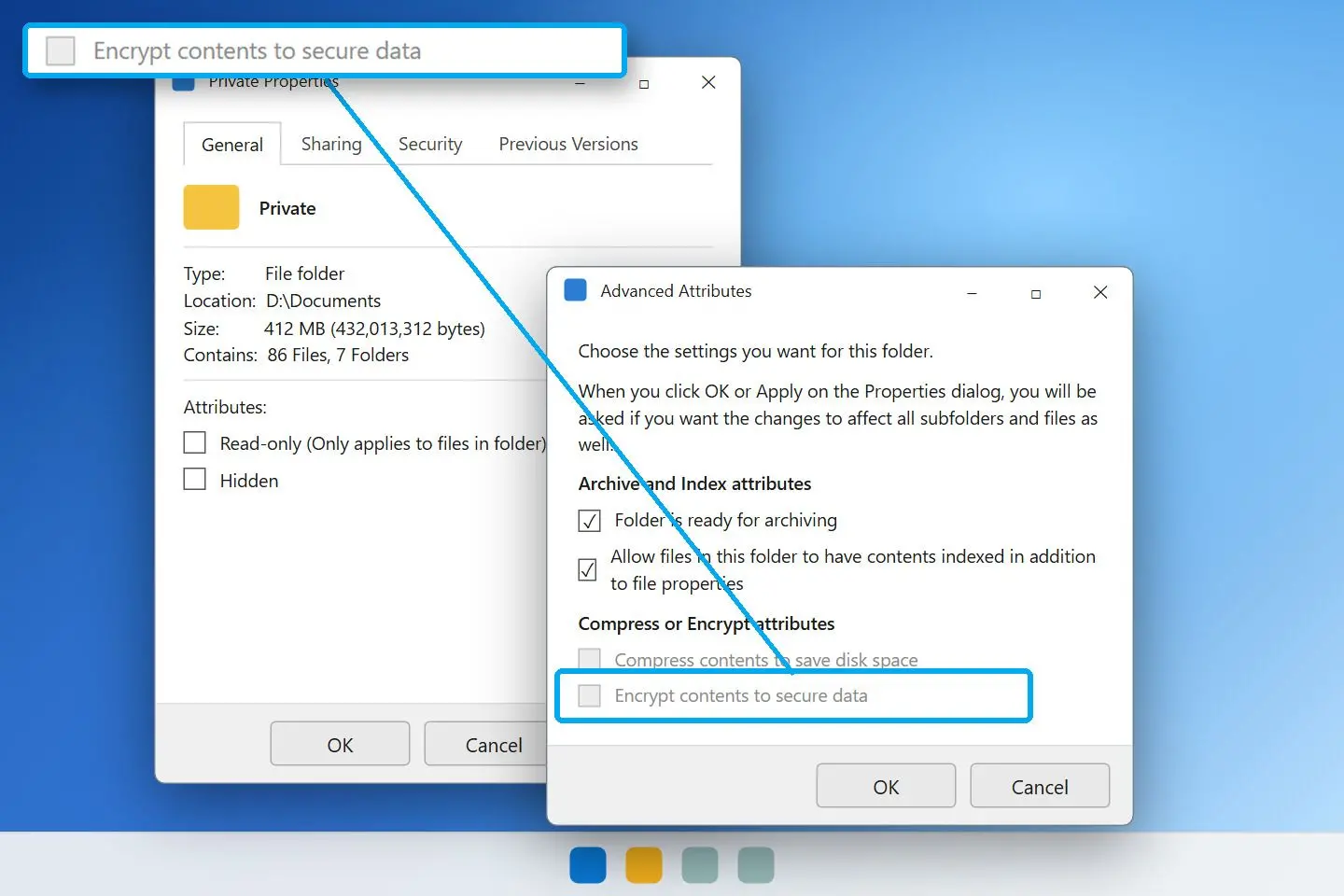
  2. 2️⃣ Windows 10 or 11 Pro: Properties > Advanced > Encrypt contents to secure data (EFS, tied to your account).
  3. 3️⃣ Windows Home, password on the folder itself without zipping: Folder Password Protector locks or encrypts it in place.
  4. 4️⃣ Mac: Disk Utility > File > New Image > Image from Folder, 256-bit AES.
Folder Password Protector Screenshot.
️ Eugene - CEO at SoftOrbits, Candidate of Technical Sciences, has more than 16 years of expertise in software development, photo and multimedia applications, enhancing and transforming digital images and videos.
📅 Last updated on:  2026-11-04

Check your Windows edition: press Win+R, type winver and press Enter. On Home, skip EFS; its checkbox stays grey. Pro, Enterprise and Education include it.

What you will learn
Apply in 10 min Saves 1 hBeginner

What you'll need
  • A Windows 10 or 11 PC or a Mac
  • 7-Zip, free, for the archive method
  • Folder Password Protector for a password on the original folder
  • A USB stick or a password manager to keep the key or recovery code

How to lock a folder with a password using 7-Zip and AES-256

Install 7-Zip and right-click the folder

Download 7-Zip from the official site and run the installer. In File Explorer, right-click the folder; on Windows 11 click Show more options if the 7-Zip menu is missing.

Choose Add to archive in the 7-Zip menu

Point to 7-Zip and click Add to archive.... Leave Archive format on 7z to hide file names too.

 7-Zip Add to Archive dialog with 7z format, AES-256 and Encrypt file names checked..

Set the password and encryption options

Type the password twice under Encryption, keep AES-256 as the method and tick Encrypt file names. Click OK.

Open the new archive once with the password

Double-click the .7z file and open one document. Check that 7-Zip asks for the password and the file opens.

Delete the unprotected original folder

Delete the source folder and empty the Recycle Bin.

Folder Password Protector Folder Password Protector

Password Protect Folder on Windows 10, 11, hide it from File Explorer when you want, and encrypts what is inside with AES-256.

What does a password-protected archive actually protect?

TL;DR

The archive holds a copy encrypted with your chosen cipher. The original folder stays readable until you delete it. To edit an archived file, extract it, make your changes and pack it again.

HelpDeskGeek's Windows guide explains that 7-Zip encrypts an archive containing your folder; it cannot lock the original.

ZipCrypto or AES-256:

For .zip instead of .7z, 7-Zip offers two methods. Every unzip program can read the older ZipCrypto. AES-256 is stronger, but some older built-in unzippers refuse it.

AES-256
is the setting to pick in 7-Zip; the Midwestern State University IT guide calls it much more secure than ZipCrypto
Source

Why file names still show:

Without Encrypt file names, anyone can read the archive's file list, sizes and folder structure. Only the contents are locked. Even the name "passport-scan.jpg" reveals something. That checkbox is available only for 7z.

Sending the archive to someone:

The same university guide advises sending the password by phone call or text, never in the email carrying the archive.

How to encrypt a folder in Windows 11 with EFS

TL;DR

EFS (Encrypting File System) is built into Windows 10 and 11 Pro, Enterprise and Education. Your Windows account opens the folder without a separate password. Other accounts and anyone who pulls the drive cannot read it.

EFS suits a shared family PC with separate logins. Someone who knows your Windows password and uses your signed-in session can still read your files. On an NTFS drive, setup takes about two minutes:

1. Right-click the folder and choose Properties.
2. On the General tab, click Advanced....
3. Tick Encrypt contents to secure data, then click OK and Apply.
4. Choose Apply changes to this folder, subfolders and files.
5. When Windows offers to back up your file encryption key, click Back up now and export the certificate to a flash drive.

 Advanced Attributes dialog in Windows 11 with Encrypt contents to secure data ticked..

Microsoft's file encryption reference describes EFS as a public-key system tied to your Windows account. Keep the certificate holding that key.

Back up the EFS key before relying on it. A Microsoft answer warns that without the key you permanently lose access to the folder, and Microsoft keeps no backup. Reinstalling Windows or deleting your account without that backup loses the files for good.

Why is "Encrypt contents to secure data" greyed out?

TL;DR

Windows 10 and 11 Home do not include EFS, so the checkbox stays grey. On Pro, it turns grey if the folder is on FAT32 or exFAT, the EFS service is stopped, or a policy disables encryption.

The greyed-out checkbox is the most common problem in the Microsoft forums: a Home user finds it, cannot tick it and keeps changing the "disable encryption" registry setting without success. No registry edit adds EFS to Home. Use 7-Zip or a program that locks folders in place. Home's device encryption covers the whole drive.

On Pro, check these in order. Right-click the drive in This PC, choose Properties and read File system. EFS needs NTFS; most USB sticks ship as FAT32 or exFAT. Open services.msc and check that Encrypting File System (EFS) is not disabled. On a work PC, company policy may disable encryption; only IT can change that.

How to password protect a folder without encryption or zipping it

TL;DR

A folder lock program lets you require a password to open a folder under its existing name and location. Folder Password Protector works on Windows 10 and 11, including Home. Lock denies access instantly; Encrypt scrambles every file with AES-256-GCM.

We built Folder Password Protector for Home users stuck at the greyed-out checkbox. It is free for one folder of up to 30 files; a license covers more folders.

Password-protected archive
  • The copy is protected; delete the original
  • To edit, extract the file, change it and repack
  • To hide file names, choose 7z and tick the box
VS
Folder locked in place
  • The folder keeps its location and name
  • Open with the password, work as usual, lock again
  • Lock is instant; Encrypt adds AES-256-GCM per file

Lock or encrypt the folder in place:

1. Add the folder to the program, or drag it into the window.
2. Pick Lock for instant protection on an internal NTFS drive, or Encrypt to keep files unreadable if the disk moves to another PC.
3. Set a password of at least 8 characters.
4. Save or print the recovery key. It works after a new motherboard or a reinstall because it is not tied to your email or hardware.
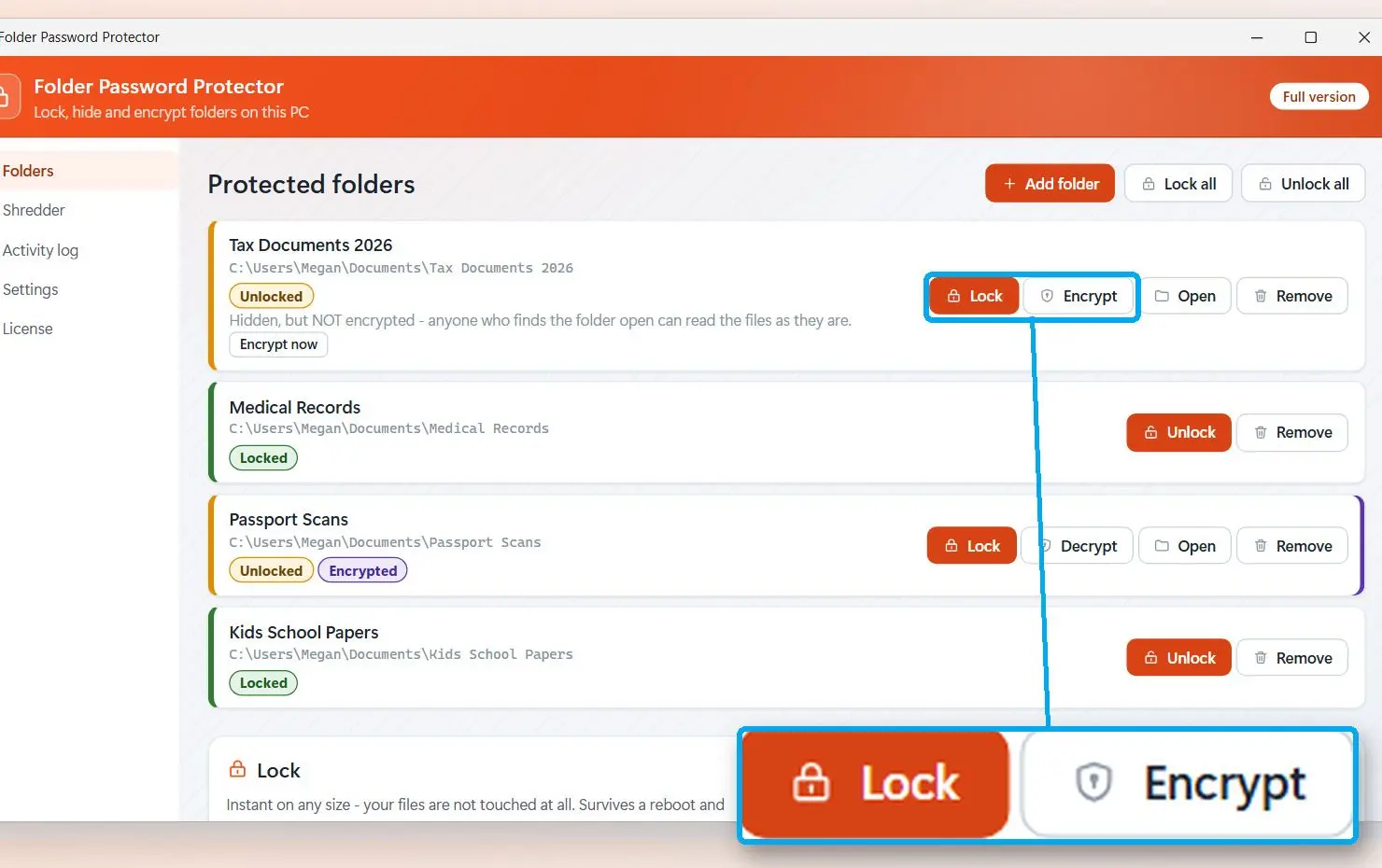
 Folder Password Protector with a folder added and the Lock and Encrypt modes shown..

To password protect a folder without encryption, pick Lock: it sets a deny rule in the folder's permissions and can hide it without renaming or moving it. In our internal test, Lock applied to 50 folders in 319 ms. To password protect a folder on a flash drive formatted as FAT32 or exFAT, use Encrypt, which works on any file system. Argon2id key derivation makes offline password guessing slow.

What we measured:

We tested Encrypt on our own build on 25 August 2026. Each file grew by exactly 64 bytes for its header. After decryption, every file's SHA-256 hash matched the original.

+64 bytes
per file after Folder Password Protector encrypts it with AES-256-GCM; SHA-256 of every decrypted file matched the original in our 25 August 2026 test

Your folders still open if you stop using the program. The 77-second demo shows the whole process on Windows 10.

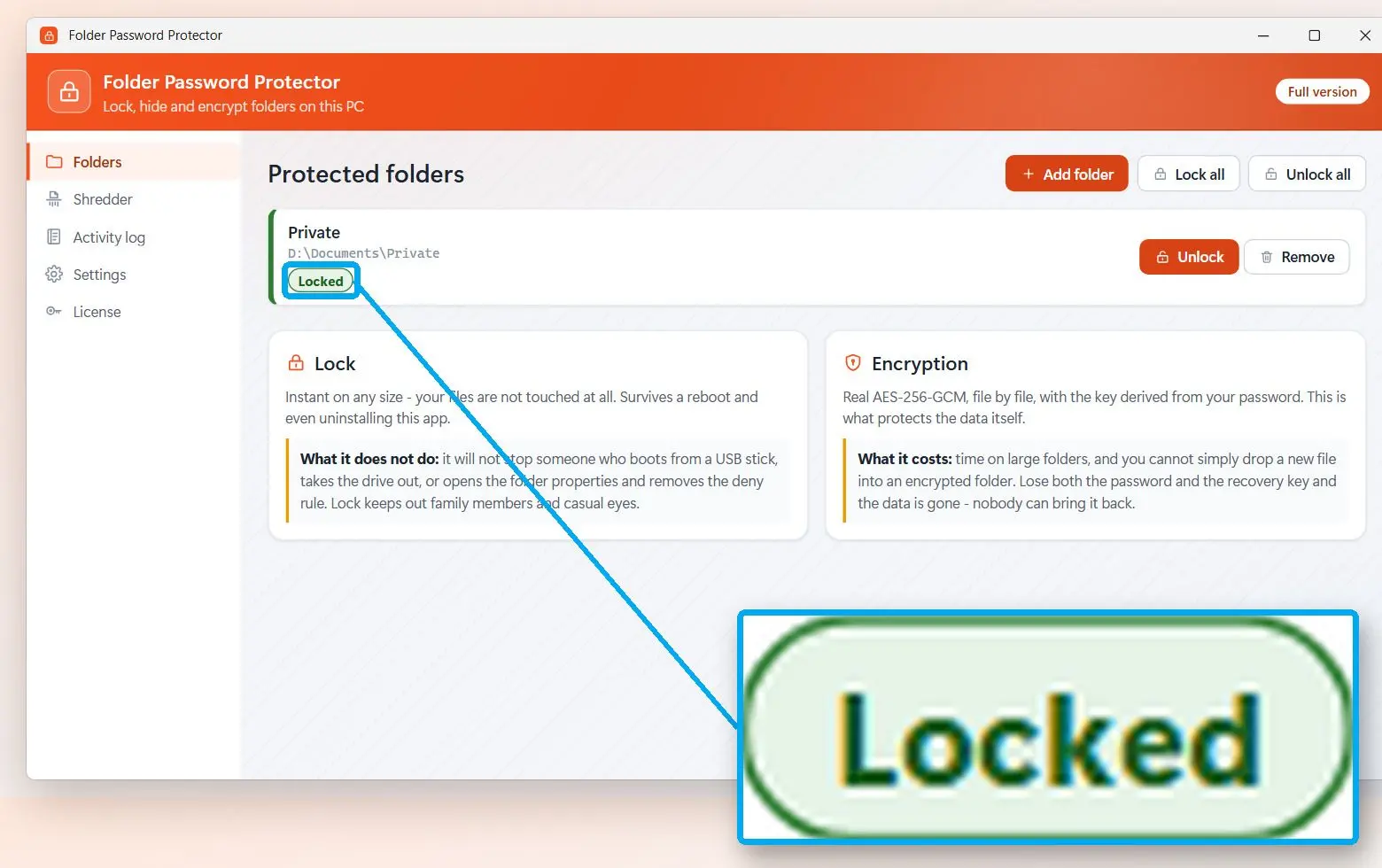
 Folder Password Protector list showing a protected folder with status Locked..

Folder Password Protector
Folder Password ProtectorWindows Home and no EFS? Lock or encrypt the folder in place on your PC, with a recovery key.

Can BitLocker protect a single folder?

TL;DR

BitLocker encrypts whole drives or partitions, protecting your folder along with everything else on the drive. It helps against laptop theft. To protect one folder on a shared PC, use a folder-level method.

Microsoft's BitLocker overview describes it as volume encryption. It ships in Pro, Enterprise and Education. Home offers a lighter version, device encryption, on supported hardware. Both open the drive when you sign in, so anyone using your account sees everything.

You can keep sensitive folders on a separate USB drive and password protect a USB drive with USB drive encryption software. Some people use a VeraCrypt volume as a container instead.

Is hiding a folder or a batch "locker" script real protection?

TL;DR

A hidden folder reappears when someone turns on "Show hidden files" in File Explorer. Popular batch "locker" scripts rename and hide folders, leaving the password in plain text inside the script.

These scripts still circulate in forum answers. They rename the folder to a system class ID so it looks like a Control Panel item, then mark it hidden and system. Anyone can read the password by opening the .bat file in Notepad. One Tom's Guide user reported that the correct password produced a command error instead of opening the folder.

Never keep your only copy in a script-locked folder. If the script breaks, you have no recovery key or support. Your files remain behind a renamed system folder that may be hard to open.

Are free folder-lock programs safe to install?

TL;DR

A reply in Microsoft's Tech Community warns that some free folder lockers carry malware or use weak encryption. Check how a program handles your files before locking anything you cannot replace.

What to check before you install one:

  • The vendor names the cipher (AES-256 or similar) and explains how it derives the key from your password.
  • The lock does more than rename the folder; a program that only renames folders leaves them under the wrong name if you uninstall it.
  • You keep the recovery key yourself; it is not tied to your email account or PC hardware.
  • You can open and decrypt folders without paying, even after the free tier ends.
  • Encryption writes to a temporary file first, preventing half-written files after a crash or power cut.

Microsoft Store programs are signed and sandboxed, but the Store badge tells you nothing about their encryption.

What happens if you forget the password or lose the EFS key?

TL;DR

A forgotten 7-Zip password means losing the files; there is no reset. Losing your EFS certificate is just as final. A recovery key, such as the one Folder Password Protector provides, gives you another way in.

  • Archive: store the password in a password manager. If you used WinRAR, RAR password recovery can only try guesses and works on short passwords.
  • EFS: keep the exported .pfx certificate on a flash drive in a drawer, away from the PC.
  • Folder lock: print the recovery key or save it outside the protected folder.

Spend a minute opening the protected folder with your password before deleting anything or closing the program.

How to lock a folder on a Mac

TL;DR

Use Disk Utility to make an encrypted disk image on a Mac. It puts the folder's contents in a .dmg file protected by AES encryption and a password. Enter the password to open the image like a drive.

Apple's guide to creating a disk image explains the options.

1. Open Disk Utility from Applications > Utilities.
2. Choose File > New Image > Image from Folder and select the folder.
3. Set Encryption to 256-bit AES and enter the password twice.
4. To add files later, pick an editable Image Format (Apple's guide points to RAW image), then click Save.
The original folder stays in place. Check that the image opens before deleting the original and emptying the Trash.

How to password protect a folder in Windows 11: which way fits your setup?

TL;DR

Use 7-Zip to send or archive files, EFS on Pro with separate accounts, or a folder lock on Home to keep the folder in place. Hidden folders and batch scripts belong under Avoid below.

MethodWindows editionReal password?Original folderIf you forget
7-Zip archive, AES-256AnyYesStays until you delete itFiles lost
EFSPro, Enterprise, EducationNo, tied to your Windows accountEncrypted in placeLost without the certificate backup
BitLocker or device encryptionPro; Home on supported hardwareDrive-level onlyWhole drive protectedRecovery key needed
Folder Password ProtectorWindows 10 and 11, Home includedYesLocked or encrypted in placeRecovery key
Hide or batch scriptAnyNoVisible with hidden files shownScript may break

✔️ Use.

7-Zip with AES-256 for uploads and backups as well as sending files. EFS for a Pro PC shared between several accounts, with the certificate exported.

✔️ Consider.

A folder lock on Home, or if you open files daily and repacking becomes tedious. Add BitLocker or device encryption to your folder protection on any laptop that leaves the house.

✔️ Avoid.

Hidden folders, batch scripts with passwords inside, and unknown free lockers that do not name their cipher.

Can you password protect a folder on Android, iPhone or in the cloud?

TL;DR

Phones and cloud drives offer locked areas. On iPhone, lock the Hidden album with Face ID. Many Android phones include a secure folder. OneDrive's Personal Vault asks for a second check before opening.

Protect Windows files on your PC before syncing them to the cloud. An encrypted 7z archive stays encrypted in OneDrive or Google Drive.

Sources

Folder Password Protector Folder Password Protector
How to password protect a folder on Windows 11, 10 or Mac: 7-Zip with AES-256, EFS on Pro, an in-place lock for Home users, and how not to lose access.
Folder Password Protector Screenshot.


🙋Frequently Asked Questions

Yes. Windows has no single "set password" button for folders; choose one of the methods above.

For a separate password, use 7-Zip with AES-256 or a folder lock program. On Pro, Enterprise or Education, EFS above encrypts the folder under your Windows account instead.

Windows cannot do this on its own. Put the file in a 7-Zip archive with AES-256, or use the password option in the program that made it, such as Word or a PDF editor.

On Windows Pro, use EFS from Properties > Advanced. Home has no built-in folder password; a free archiver such as 7-Zip is the lightest option.

For a separate password on any Windows 10 edition, use 7-Zip or a folder lock program. EFS on Pro uses your account.

Put an encrypted 7z archive into OneDrive and it stays encrypted there, or use Personal Vault, which asks for a second check before opening. Send the archive password through another channel.

Look in Settings under security or privacy for a secure or private folder protected by your PIN or fingerprint. Its name and location vary by phone maker.

Folder Password Protector opens and decrypts folders without a license, past the free limit and after a reinstall. You need a license only to protect new folders beyond one folder of 30 files.