How to find missing rows and changed values with XLOOKUP
TL;DR
Match by ID, not position. On the new sheet, look up each ID in the old sheet, then do the same in reverse on the old sheet because that second pass shows deleted rows. "Missing" marks a new row, and a different value marks a change. Excel 2016 and 2019 do not have XLOOKUP, so use COUNTIF or VLOOKUP there.
A key-column lookup answers which names are missing from list 2 and which numbers in column B changed for the same person. The poster in an r/excel question had been checking both by hand. Assume column A holds the ID and column C holds the price on both sheets. In D2 on the New sheet: =XLOOKUP(A2,Old!A:A,Old!C:C,"Missing")
The first formula fetches the old price, and the fourth argument of XLOOKUP replaces #N/A with your own text. The second formula, in E2, turns the result into a label you can filter on. To find deleted rows, put the same pair of formulas on the Old sheet and look up into New. Anything marked "New row" from that side was removed.
2016 / 2019
Excel versions that do not include XLOOKUP, according to Microsoft. Use COUNTIF or VLOOKUP with FALSE as the last argument in those versions.Source
In Excel 2016 or 2019, these two do the same job:
=IF(COUNTIF(Old!A:A,A2)=0,"Missing","Found") =IFERROR(VLOOKUP(A2,Old!A:C,3,FALSE),"Missing") One reply in the same thread as the 200-300 account names suggested an XMATCH against the main column, which also works in Microsoft 365. Keep the match type exact.
Find rows that appear in both sheets:
The COUNTIF formula above also finds duplicates. Filter on "Found" to see every ID present in both lists. Filter on "Missing" for the ones only in the new sheet.
When the lookup gives a wrong answer:
Lookups return the first match. If an ID appears twice in Old, the second row is never checked, and a changed value can go unnoticed next to an unchanged duplicate. Run the COUNTIF duplicate check from the cleanup section first. To hand the "Changed" rows to someone else, filter the view and share it as a sheet or a PDF export from Excel.
How to list unmatched rows with a Power Query anti join
TL;DR
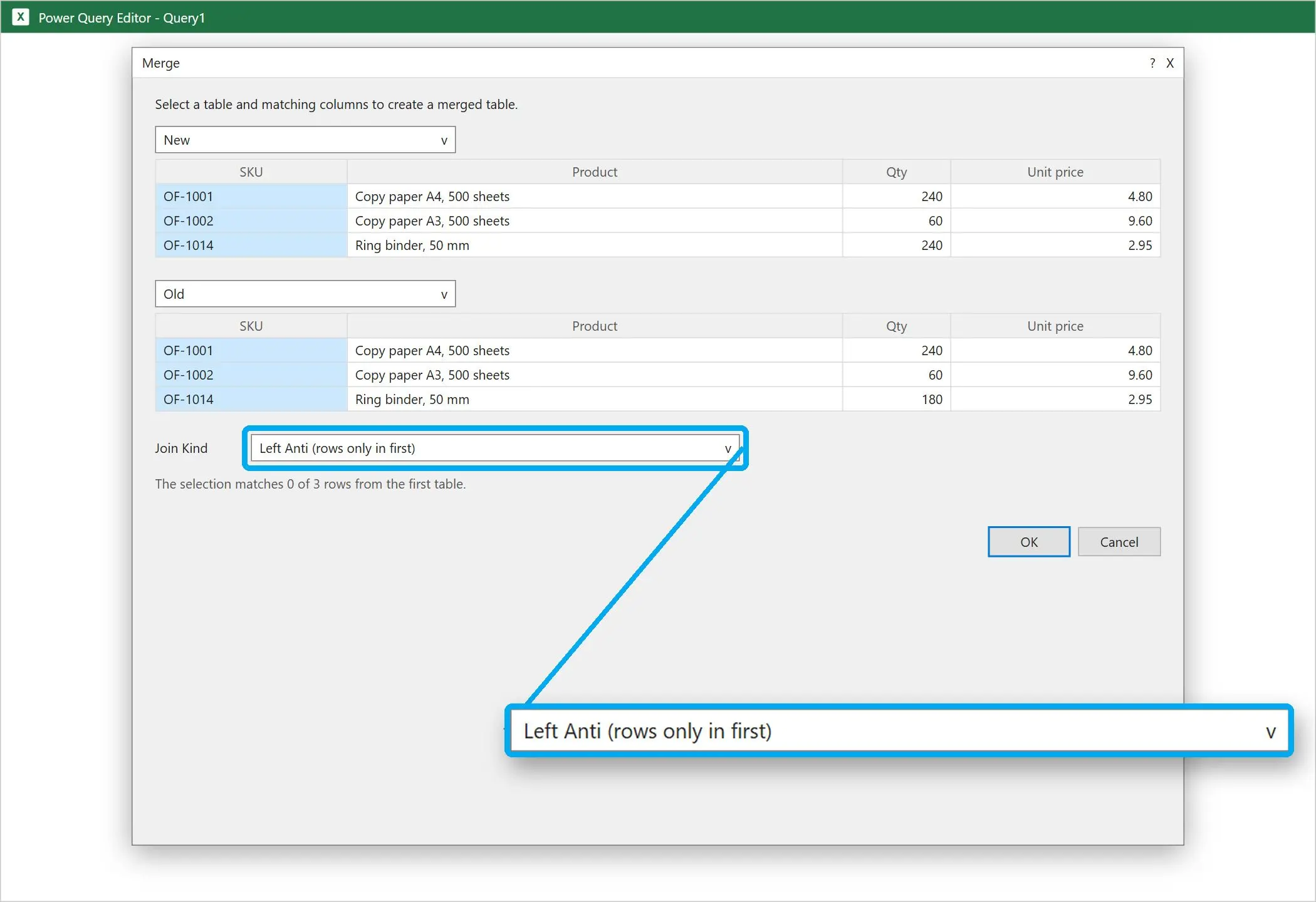
Load both sheets into Power Query, merge them on the key column and choose Left anti. The result holds only rows from the first table with no match in the second. Swap the tables to see the other direction. The output refreshes when the source sheets change, so you can rerun the check next month.
7
join kinds in Power Query's Merge Queries dialog, from Inner and Full outer to the Left anti and Right anti joins used for finding missing rowsSource
Microsoft's Merge queries page says a Left anti join "brings in only rows from the primary table that don't have any matching rows from the related table." That answers what is missing.
Click inside the new table and select Data > From Table/Range, then Close & Load To > Only Create Connection
Repeat for the old table
Select Data > Get Data > Combine Queries > Merge
Put New on top and Old below, then click the key column in each
Set Join Kind to Left anti, confirm, then choose Close & Load
For changed values, pick Full outer instead, expand the price column from the second table and add a custom column that compares the two prices. A reply on the two-lists Reddit thread suggested this route too: a Left outer or Full outer merge, then filters and conditional formatting on the result. Microsoft lists the Merge feature for Excel for Microsoft 365, Excel 2024, Excel 2021 and Excel for Microsoft 365 for Mac. Excel for the web is not on that list.
How to compare two Excel files with Spreadsheet Compare
Turn on the Inquire add-in
Go to File > Options > Add-ins, set Manage to COM Add-ins, click Go, tick Inquire and click OK.
Open Compare Files on the Inquire tab
Open a workbook, then select Inquire > Compare Files. Two files may share a name as long as they sit in different folders.
Choose the older file and the newer file
Pick the original in the first box and the edited copy in the second, then press OK. Remove passwords first, or the tool stops with "Unable to open workbook".
Read the side-by-side results
Both workbooks appear next to each other. Hidden sheets are included, and VBA code is compared as well.
Export or copy what you found
Click Export Results to save the comparison as an Excel file, or Copy Results to Clipboard to paste it into an email. Show Workbook Colors keeps the original cell colors visible.
Spreadsheet Compare & Merge Tool for Excel - Combine Excel Files into One
Spreadsheet Compare & Merge Tool for Excel by SoftOrbits is an Excel file combiner and a comparison tool in one window. It folds a folder of workbooks into a single file, then shows what changed between two versions of a table. The files are read by the program itself. Excel does not have to be installed on the machine that does the work.
Locked out of an old version? Microsoft's tool cannot open a protected workbook, so you would need Excel password recovery before the comparison can run.
Why don't I have Spreadsheet Compare in my Excel?
TL;DR
Microsoft ships it only with certain business editions. Its overview page says "Spreadsheet Compare is only available with Microsoft 365 Apps for enterprise." It runs only in Excel for Windows, so Mac and web users never see an Inquire tab. If Inquire is not under COM Add-ins, your version lacks it or an administrator turned it off.
The Spreadsheet Compare overview gives the enterprise requirement. The Inquire add-in page has the Windows-only detail for the add-in that hosts the Compare Files button. The related how-to page lists Spreadsheet Compare 2013, 2016, 2019 and 2021 under Applies To. Consumer plans are not named on those pages.
Microsoft's pages stop at the enterprise plan "and equivalent editions". Community answers add Office Professional Plus: the top reply in a Microsoft Q&A thread points to Office Professional Plus and Office 365 ProPlus, and a reply asking about the Home and Family plan got no answer. In a Reddit thread on the Inquire add-in, one person said they had assumed they lacked the licence. Check COM Add-ins before you trust either source.
People often open Compare and Merge Workbooks instead. It does a different job. Ablebits explains that it merges only copies of the same shared workbook, so it stays greyed out for two unrelated files. The command is hidden by default, and in a Microsoft Tech Community thread one user who added it back reported: "When I click on it nothing happens." Without Inquire, the lookup and Power Query methods cover the same ground. Only the VBA comparison is lost.
Why does every row show as different after one inserted row?
TL;DR
Formulas and conditional formatting compare row 5 with row 5. Insert one row in one sheet, and each later row is checked against its neighbor, so everything below turns red. Match rows by a key column with XLOOKUP or Power Query, or use a tool that aligns inserted and deleted rows.
The Ablebits guide to comparing Excel files says: "As soon as you add or delete a row / column in one sheet, all subsequent rows / columns will be marked as differences." Here is the result when one washer was added to a parts list:
Row
Old sheet
New sheet
Cell-by-cell formula says
2
A-100 Bolt
A-100 Bolt
Same
3
A-101 Nut
A-099 Washer (inserted)
Changed
4
A-102 Pin
A-101 Nut
Changed
5
(empty)
A-102 Pin
Changed
One real change produces three flags. Sorting both sheets by key column helps only when they contain the same set of rows. Added or removed rows still leave a gap that shifts everything after it. An inserted column causes the same cascade sideways. Professor Excel admits that "no method is perfect" and lists this shifting as the weak spot of the cell-by-cell method. Use cell-by-cell methods for fixed templates such as budgets, and key-based methods for lists.
How do you compare large sheets or rows in a different order?
TL;DR
For tens of thousands of rows, skip cell-by-cell coloring of the whole sheet. Match on a key with XLOOKUP over exact ranges, or load both tables into Power Query and merge them. Spreadsheet Compare can struggle with very large workbooks, so test it on a copy before a deadline.
A Microsoft Q&A question describes the hard case. Each sheet had about 500,000 rows in a different order, and the poster wanted to flag column B with 0 for equal and 1 for different wherever column A matches. The answer offered a plain VLOOKUP. It pairs the rows, but a missing ID comes back as #N/A instead of its "Not Found" label.
At that size:
Point lookups at the used range (A2:A500001) rather than whole columns
Calculate once, then paste the results as values before filtering
Prefer Power Query loaded as a connection, so the merged table is built in one pass
Split the check by year or region if the workbook still stalls
On the Inquire thread mentioned earlier, one commenter reported that files above 100 MB made Excel work for many minutes and then stop with an error. Treat it as one person's experience, but plan for slow runs when add-in has to load both workbooks fully.
Sometimes one version exists only as a PDF export from an accounting or ERP system. Turn it back into rows with a PDF to CSV converter first, then compare the CSV with the workbook using any method above.
Can you check two Excel files for differences without installing anything?
TL;DR
Yes. Every method in the sections above is built into desktop Excel. Browser-based compare sites also need no install, but you upload the workbook to use them. Keep payroll and customer data on your own PC.
Web tools suit a one-off check of a harmless file. Many accept CSV and older formats too. You upload the file, and the Ablebits guide questions how safe online comparison services are.
Before you upload two Excel files to any web service, check your company's data policy. A price list, a payroll export or a customer list with emails should stay on your machine. Use the built-in Excel methods or a local desktop tool for those.
If a web tool is fine for your file, strip extra sheets and hidden columns first, so you upload only what the comparison needs.
When is a dedicated compare tool worth it?
TL;DR
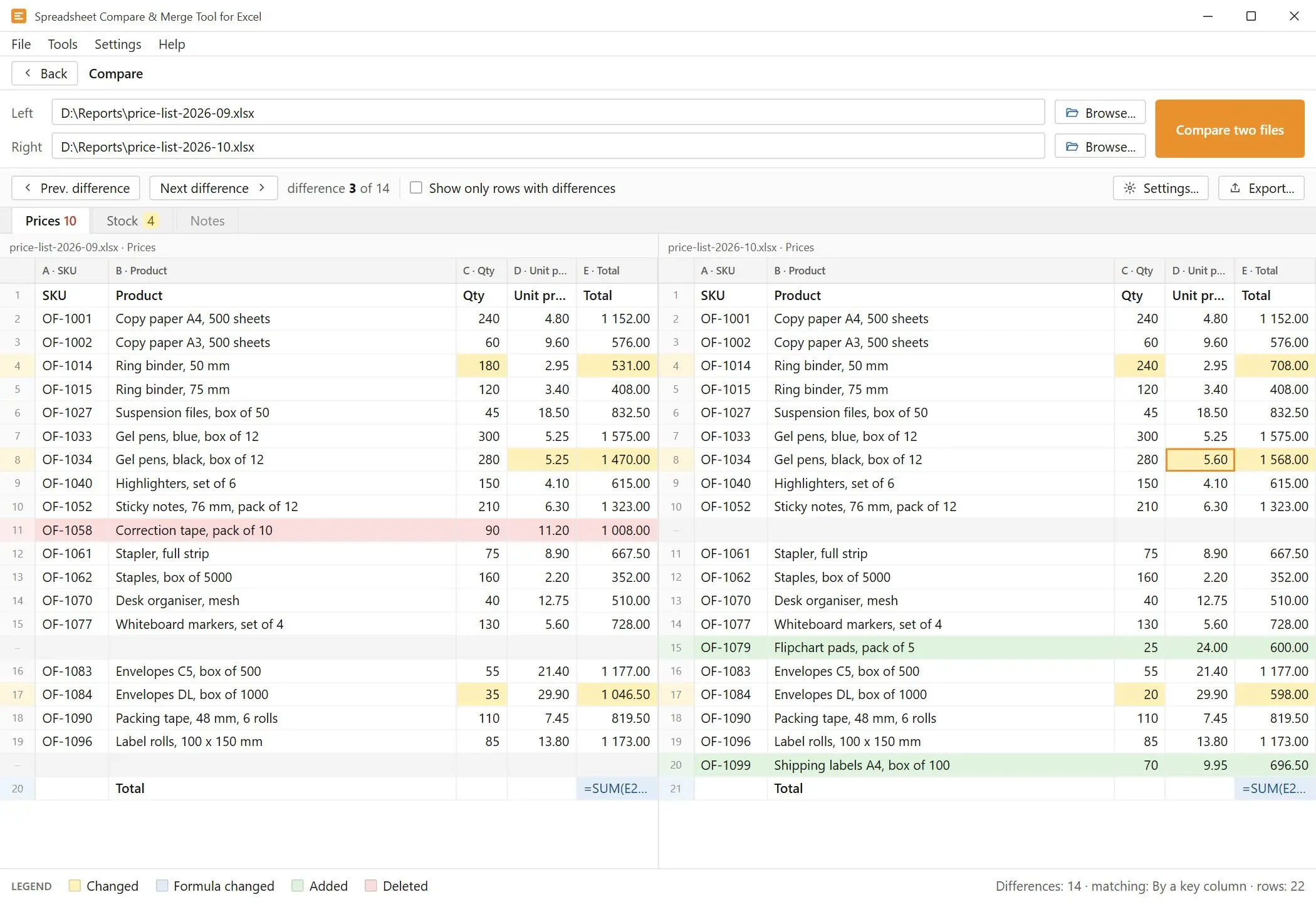
It pays off when the built-in options run out. Typical triggers are a missing Spreadsheet Compare, rows that were inserted or reordered, very large files, or a manager who wants a report. Our Spreadsheet Compare & Merge Tool for Excel compares two .xlsx, .xlsm, .csv or .tsv files on Windows, without Excel installed.
We built it for these cases. Rows can be matched by a key column or strictly row by row. A third, automatic mode aligns the two sheets so inserted and deleted rows do not shift everything after them. Columns are paired by header text, so a moved column is flagged as moved instead of deleted and re-added. Sheets pair up by name or by position.
The result shows both files in two grids that scroll together. Nine kinds of difference get their own colors, from a changed value or formula to an added or removed sheet, with a legend next to the grid. Next and Previous jump between differences, and a filter hides rows with no changes. Options cover ignoring case, ignoring spaces at the edges of a cell, skipping formatting and setting a numeric tolerance. The number 42 and the text "42" count as equal, which lets a CSV export be compared with the original workbook.
6.56 s
to open and compare two sheets of 100,000 rows and 10 columns each with Spreadsheet Compare & Merge Tool for Excel, in our own tests as published on the product page. Your timing will depend on the files and the PC.
Formulas and conditional formatting
One inserted row marks every later row as changed
You build helper columns and rules by hand
Values only, unless you write more rules
VS
Spreadsheet Compare & Merge Tool for Excel
Rows matched by a key column or aligned automatically
Each kind of change gets its own color
The result exports as a colored workbook or a report
The XLSX export colors both sides and adds the legend as a separate sheet. The CSV export has one line per difference with the old and new value, which suits a script or an audit trail. HTML and PDF reports are available for reading. To check whether it handles your files, compare two Excel workbooks in the free trial first.
Pros:
Works without Excel and keeps the files on your PC
Handles inserted, deleted and reordered rows
Matches columns by header and marks moved columns
Cons:
Reads .xlsx, .xlsm, .csv and .tsv only, so resave .xls, .xlsb or .ods files as .xlsx first
Compares two files at a time, never three
The trial lists only the first 25 differences, although the total count is complete
Windows only, and a paid license after the trial
Spreadsheet Compare & Merge Tool for Excel - Combine Excel Files into One
Compare two Excel sheets side by side, with formulas, XLOOKUP, Power Query or Spreadsheet Compare, and find missing rows even when the row order changed.
Add a helper column on one sheet with =COUNTIF(Other!A:A,A2)>0, where column A holds the key. TRUE means the row appears in both sheets. Filter on TRUE to list the shared rows, or on FALSE to list the rows unique to that sheet. Trim spaces in the key first, or near-identical entries will be missed.
Reference the second tab inside the formula, as in =VLOOKUP(A2,Sheet2!A:C,3,FALSE). Excel searches column A of Sheet2 for the value in A2 and returns the third column. Keep FALSE as the last argument for an exact match, and wrap it in IFERROR to show "Missing" instead of #N/
Select View > New Window, then View > View Side by Side, and click a different sheet tab in each window. Turn on Synchronous Scrolling so both move together. It works in desktop Excel on Windows and in recent Microsoft 365 builds on a Mac. Excel for the web cannot do it.
For files with an unchanged structure, use =A1<>Old!A1 in a conditional formatting rule to color changed cells. For lists where rows moved, look up each ID with XLOOKUP or merge both tables in Power Query. Spreadsheet Compare produces a full report, but only in enterprise editions of Excel for Windows.
Merge the two tables in Power Query on the key column and choose the Left anti join kind. You get only the rows from the first table that have no match in the second. Swap the tables to find what is missing from the other side. COUNTIF equal to zero does the same job in a formula.
Pick a column both files share, such as an order ID, and look it up with XLOOKUP or VLOOKUP with an exact match. Open both workbooks while you build the formula, or copy one sheet into the other workbook so the links do not break when a file moves.
Yes. =IFERROR(VLOOKUP(A2,$C$2:$C$500,1,FALSE),"Missing") returns the value when it exists in the other column and "Missing" when it does not. VLOOKUP returns only the first match, so check the lookup column for duplicates before you trust the result.
Use =XLOOKUP(A2,List2!A:A,List2!A:A,"Not in list 2") next to the first list. The fourth argument replaces #N/A with your own text, so missing items are easy to filter. Return a second column instead to compare values, such as prices, for the same key.
Type =A1=B1 to get TRUE when the cells match and FALSE when they do not. This test ignores letter case. Use =EXACT(A1,B1) when "Smith" and "SMITH" should count as different. Wrap either one in IF to show your own labels.
Microsoft documents Spreadsheet Compare only for Microsoft 365 Apps for enterprise and equivalent editions on Windows, and its pages do not name consumer plans. Check File > Options > Add-ins > COM Add-ins for Inquire. If it is not listed, use the formula or Power Query methods, or a separate compare tool.
Sources
Overview of Spreadsheet Compare (https://support.microsoft.com/en-us/office/overview-of-spreadsheet-compare-13fafa61-62aa-451b-8674-242ce5f2c986) Edition requirement for Spreadsheet Compare
Compare two or more worksheets at the same time (https://support.microsoft.com/office/1deed3da-a297-4260-98aa-a7b2d90c81ab) View Side by Side and Synchronous Scrolling steps
Merge queries (Power Query) (https://support.microsoft.com/en-us/office/merge-queries-power-query-fd157620-5470-4c0f-b132-7ca2616d17f9) Join kinds, including Left anti, and supported Excel versions
XLOOKUP function reference (https://support.microsoft.com/en-us/office/xlookup-function-b7fd680e-6d10-43e6-84f9-88eae8bf5929) Syntax, if_not_found and version availability
Microsoft 365 Roadmap 367423 (Message Center mirror) (https://mc.merill.net/message/RM367423) View Side by Side arriving in Excel for Mac
Ablebits guide to comparing Excel files and sheets (https://www.ablebits.com/office-addins-blog/2016/02/25/compare-two-excel-files-sheets/) Why inserted rows break formula comparisons, Compare and Merge limits, online-service security
Professor Excel: Compare sheets (https://professor-excel.com/compare-sheets-how-to-see-differences-of-two-excel-sheets/) Trade-offs between comparison methods
Microsoft Tech Community: Spreadsheet Compare (https://techcommunity.microsoft.com/discussions/excelgeneral/spreadsheet-compare/2733061) Users who cannot find the tool, Compare and Merge not responding
Spreadsheet Compare & Merge Tool for Excel - Combine Excel Files into OneTwo versions with inserted rows or no Spreadsheet Compare? Compare them locally on Windows, no Excel needed.


 Spreadsheet Compare & Merge Tool for Excel - Combine Excel Files into One