Quick answer:

  1. 1️⃣ You shoot RAW and judge exposure and focus by eye: FastRawViewer is worth buying after the 30-day trial, on Windows and Mac.
  2. 2️⃣ Thousands of frames per job, most of them blurry or repeated: AI Photo Culling flags the rejects before you pick.
  3. 3️⃣ Captions on deadline or a free quick pass: Photo Mechanic, or FastStone Image Viewer on Windows.
AI Photo Culling Screenshot.
️ Eugene - CEO at SoftOrbits, Candidate of Technical Sciences, has more than 16 years of expertise in software development, photo and multimedia applications, enhancing and transforming digital images and videos.
📅 Last updated on:  2026-11-20

FastRawViewer (FRV) lets you page quickly through a shoot and see how your RAW converter will read each file. The RAW histogram helps you judge exposure. Focus peaking shows where focus landed. You decide which frames to keep when you cull RAW photos.
We make AI Photo Culling, one of the five tools below and the only one here that flags rejects for you. We've drawn on the vendor's site, its support forum and photographers' threads for the FastRawViewer review.

Windows 11 / 10Free trial, no sign-up

What you will learn
Apply in 15 min Saves 3 hEasy

FastRawViewer alternatives at a glance

TL;DR

The rows start with the program that does the most of a large cull for you. We checked vendor prices on November 20, 2026. The Photo Mechanic price comes from a third-party comparison published in August 2026.

ToolBest forHow you cullPricePlatforms
AI Photo CullingClearing blurry frames and near-duplicates from large shootsReview the AI's Keep/Maybe/Reject flagsFree analysis, 15 frames exported per session. License on the product pageWindows 10 and 11, 64-bit
FastRawViewerChecking exposure and focus on RAW dataRead the RAW histogram and inspect focus peaking$23.99 one-time, 30-day full trialWindows 7-11 64-bit, macOS 10.13+
Photo MechanicFast ingest and captioning on deadlineInspect the embedded JPEG previewAbout $149 a year (Narrative, Aug 2026)Windows, macOS
Lightroom ClassicCulling in your editing catalogSet flags and stars in the Library moduleAdobe subscription planWindows, macOS
FastStone Image ViewerA free first look at a card on WindowsTag frames and compare them side by sideFree for personal useWindows

How we judged these culling tools

TL;DR

We gave the most weight to how much of a large shoot each program sorts for you and how easily your picks reach Lightroom or Capture One. Price and platform mattered less.

  • How much you judge by eye and which flags the program sets for you
  • Where your ratings and rejects go, into XMP sidecars or a program-specific catalog
  • What you see when you inspect a frame, RAW data or the embedded JPEG
  • What a one-time license, free tier or subscription costs over several years
  • Which systems you can use

For AI Photo Culling we describe our own build and its limits. For the other four, we consulted vendor documentation, pricing pages, the FastRawViewer support forum and photographers' discussions. Our speed comparisons come from user reports. We ran no timed benchmarks. The "Our take" comments give our judgment without star scores. Our seven-program comparison includes subscription AI cullers: best photo culling software.

The five tools, reviewed one by one

1. AI Photo Culling - best for clearing blurry, closed-eye and repeat frames before you pick

 AI Photo Culling grid in Series mode with stacked similar frames and blurred frames marked Reject..

AI Photo Culling reads your folder and marks each frame Keep, Maybe or Reject. It checks subject sharpness, motion blur, closed eyes and exposure, and groups near-duplicates and HDR brackets into stacks. Review the Maybe pile in Grid (G) or Loupe (E). The shortcuts match Lightroom's: P picks a frame, X rejects it and U clears the flag. Use 1-5 for stars.

In Survey, select five frames of the same first kiss and compare them side by side with synchronized zoom. When you're done, the program copies keepers to _Selected and moves rejects to _Rejected. If you choose to delete the rejects, they go to the Windows Recycle Bin.
You can open 25 RAW extensions, including .CR3, .NEF and .DNG, as well as JPEG, HEIC, PNG and WebP.

15
frames per session you can export from the free version of AI Photo Culling after it analyzes the whole folder

Pros:

Check sharpness, eyes and exposure across the folder in one pass

Compare similar shots and HDR brackets in stacks

Carry XMP sidecar ratings into Lightroom, Capture One or Bridge

Review rejects in their own folder before deleting anything

Cons:

Exporting a full job requires a license

Runs on Windows 10 and 11 PCs (64-bit). On Mac, consider FRV

You still choose the best frame in each series

Our take: Choose AI Photo Culling Software for a shoot with a few thousand frames when you can dismiss most rejects as soon as you see them flagged.

2. FastRawViewer review - best for checking exposure and focus on the real RAW data

 FastRawViewer window with a RAW photo, the Raw Histogram and Exposure Stats panels and a filmstrip of thumbnails..

FastRawViewer comes from LibRaw LLC, the team behind the open-source LibRaw decoding library. Most viewers show the JPEG stored inside the RAW file. FRV renders the sensor data and uses it for the histogram, so you can see which channel clipped. Alongside the RAW histogram and RAW statistics, you get Highlight Inspection and Shadow Boost (Shift-S). Focus Peaking and the per-channel view are each a keystroke away.

Exposure and white balance adjustments go into XMP, along with ratings and labels. The original RAW stays untouched. When you reject a RAW+JPEG pair, FRV moves both files.
Some photographers remap FRV's shortcuts to Lightroom's P, X and star keys for the whole cull. Others use Photo Mechanic or Lightroom for the main pass and open FRV with a hotkey when the JPEG leaves a frame in doubt.
Reports in the vendor's support forum include a 20-second wait between frames on Windows 11 and a hang just after launch on Windows 10.

Pros:

Inspect a clipped channel in the RAW histogram

Spot soft or overexposed frames with focus peaking and highlight inspection

Pay once for a license

Save ratings and labels alongside your original files

Cons:

You judge each frame by eye. The vendor lists no automatic blur or eye detection

RAW previews can look softer than Lightroom's default render

Users report slowdowns, heavy RAM use and freezes on some Windows systems

Version 2.0.11 shows a JPEG preview for Sony A7 V Compressed RAW

Our take: FastRawViewer is our first choice for inspecting exposure and focus. A 3,000-frame wedding still takes 3,000 decisions by hand, which helps explain why photographers pair it with another program.

3. Photo Mechanic - best for fast ingest and captioning on deadline

 Photo Mechanic contact sheet with yellow and green color class labels under bird photo thumbnails..

Photo Mechanic from Camera Bits has long been popular with news and event photographers. Paging feels instant because you see the JPEG embedded in each RAW file. You score the frames yourself.

Narrative's August 2026 comparison puts the subscription at $149 a year or $14.99 a month. In early 2026, one photographer wrote that the switch to subscription pricing prompted them to cull in FRV and import the keepers into Capture One.

Pros:

Browse embedded previews without waiting for a RAW render

Ingest, caption and keyword images on deadline

Transfer ratings and color tags to other editors through XMP

Cons:

The camera JPEG can hide a clipped highlight

The subscription has led some users to seek a one-time license

Without an iPad version, you need to reach a computer to cull

Our take: We'd pass on $149 a year for culling alone. If you have 400 frames to caption before an agency deadline, the metadata features justify the price.

4. Lightroom Classic - best for culling inside the catalog you already edit in

 Illustration: Lightroom-style Library grid with pick flags, rejects and star ratings..

Lightroom Classic decodes the full RAW file to build its previews. A photographer using a Mac with an M1 Max chip and 64 GB of RAM described jumping between RAW files as painfully slow, at about 1.5 seconds per jump. For a quicker first pass, start with the camera JPEG by choosing Embedded & Sidecar previews in the import options.

Use P, X and U for flags, and 0-5 for stars.

Pros:

Cull where you edit, without a separate program or import step

Keep flags, stars and color labels in the catalog with your edits

Start the cull sooner with Embedded & Sidecar previews

Cons:

Jumping around a large folder is slow with full RAW previews

You need an Adobe subscription plan

Every frame enters the catalog, including the ones you'll reject

Our take: Importing everything makes sense for 200 frames. At 2,000, the threads we read recommend culling first and importing only the keepers.

5. FastStone Image Viewer - best free viewer for a quick pass on Windows

FastStone Image Viewer opens common RAW formats. Photographers use its full-screen view and slideshows to tag frames during a cull. For exposure checks, you have the preview image to go by.

Pros:

Free for home and educational use

Open RAW, JPEG and most other image formats in one window

Inspect up to four frames side by side in Compare view

Cons:

Windows only

Commercial use requires a paid license

The interface looks dated beside newer culling programs

Our take: For a family trip, one full-screen pass and a few tags may be all you need. For a paid wedding, we'd want FRV's histogram or our own automatic flags.

Does FRV show the real RAW data or the embedded JPEG?

TL;DR

For most cameras you see the RAW data, the strongest reason to buy FRV. In release 2.0.11, you see the embedded JPEG if you shoot Compressed RAW on a Sony A7 V.

Most RAW files include the full-size JPEG you see on the camera screen, as described in the overview of RAW image formats. Photo Mechanic and other quick viewers show that JPEG. Its histogram can reach the right edge while the RAW file still holds detail in the sky. Clipping at either edge costs you tones, as Cambridge in Colour's histogram tutorial explains.

The vendor's homepage claims only FRV shows RAW "as RAW converters will see it". According to the release notes on the FastRawViewer blog, release 2.0.11 displays the embedded or external JPEG for Sony A7 V Compressed and Compressed HQ files. Only lossless compressed files get a full RAW render on that camera. The 2.0.12 beta adds preliminary support for those formats on the A7 V and A7R VI.
AI Photo Culling Software checks the stored preview and decodes the RAW file itself if the preview is too small. The preview is enough to spot missed focus or closed eyes. Use FRV's RAW histogram for a pixel-level highlight check on your keepers.

Lightroom applies baseline sharpening to every RAW file. One photographer stopped using FRV because shots looked "unacceptably soft" there and fine in Lightroom. They had to retrieve frames they'd rejected for apparent softness. If you edit in Lightroom, use focus peaking at 100% zoom to judge sharpness in FRV and assess the overall look after import.

Is FastRawViewer worth buying in 2026?

TL;DR

If you cull for exposure and focus, the low price covers two machines and you can try every feature for 30 days. For a high-volume shoot, try an AI first pass before buying.

$23.99
one-time price for a FastRawViewer V2 license covering up to two computers, checked on the vendor's purchase page on November 20, 2026
Source

The license follows you across operating systems. You can use one purchase on a Windows desktop and a MacBook and move the license between them. If you bought a 1.x license after January 20, 2021, your upgrade to version 2 is free. Earlier buyers get 40% off. For culling, the base program is enough. Bundles include RawDigger and Monochrome2DNG.
Download sites and reviews from 2014 quote $19.99 and list version 2.0.10 or older. The vendor's blog lists 2.0.11 as current and 2.0.12 in beta. Use the trial on a couple of your own shoots to see whether the RAW view changes your picks.

Why is FRV slow or using so much RAM?

TL;DR

FRV deliberately uses RAM to prefetch and cache upcoming files. The vendor forum reports tie long waits and freezes to particular setups.

A Windows 11 user with 16 GB of RAM reported waiting about 20 seconds per frame while culling 26-megapixel Fuji files on an external SSD. FRV used 6 GB of memory. The vendor replied that FRV uses that RAM to prefetch files.
A Windows 10 user running version 2.0.7 saw Not Responding just after launch. Another user reported lock-ups at 13-65% CPU with fewer than 50 RAW files in the folder. A disk check, reinstall and cache reset all failed to help. On 2.0.5, one user reported frequent crashes in two-window mode with Olympus .ORF files.

The threads suggest trying the following, though none is a guaranteed fix.

  • Copy the card to an internal SSD and cull there
  • Update to 2.0.11, since several reports concern older 2.0.x builds
  • Close other programs that use a lot of memory to leave room for prefetching
  • Use single-window mode if your files cause crashes in two-window mode
  • Post your camera model and FRV version in the vendor forum, where LibRaw staff reply

FRV vs Lightroom: which is faster for culling?

TL;DR

Users of both programs say FRV is quicker on the first pass because Lightroom builds its own RAW previews. Import the keepers into Lightroom when you're ready to edit.

One photographer in the Adobe community estimated that a cull in FRV took less than half the time it took in Lightroom. That personal estimate fits the pattern in culling threads.

In one published FRV workflow, you remove obvious rejects on the first pass and refine your selection on the second and third passes. Put the keepers in a folder and import just that folder into Lightroom.

Import first, cull in Lightroom
  • Every frame gets a catalog entry and a preview
  • Rejects stay in the catalog until you remove them
  • Jumping between full RAW previews means waiting for a render
VS
Cull first, import the keepers
  • Cull in FRV or review the AI Photo Culling flags before import
  • Only picks enter the catalog, with ratings in XMP
  • Lightroom builds previews for the frames you'll edit

FRV vs Photo Mechanic: which one should you cull in?

TL;DR

Photo Mechanic pages through frames faster using the camera JPEG. FRV gives you a better exposure and focus check. Some photographers use both.

In one setup photographers describe in forum threads, you cull in Photo Mechanic and open FRV with a hotkey for the "difficult" frames. Others make their first pass in FRV and import the picks into Capture One or Lightroom.
Over three years, Photo Mechanic's subscription costs considerably more than FRV's one-time license. For agency and sports work, fast ingest, captions and keywords can justify the difference. With either program, you flag each frame yourself.

What is the best free alternative to FRV?

TL;DR

Use FastStone Image Viewer or XnView MP to browse and tag, or Windows Photos to open RAW files. The free version of AI Photo Culling can analyze your whole shoot.

For a handful of RAW files, Windows Photos works once you install Microsoft's free Raw Image Extension. You'll need another program to rate the frames.
FastStone Image Viewer and XnView MP are common recommendations for browsing a card. Both are free for home use and let you tag or move files as you browse. XnView MP also runs on macOS and Linux. Before rating a whole wedding for Lightroom or Capture One, check that your stars are saved in standard XMP metadata.

With the free version of AI Photo Culling, you can check the flags against your own choices across an entire folder. The cap applies at export. Get the download from the AI Photo Culling product page.

Which culling tool fits your shoot?

TL;DR

If the number of frames slows you down, start with an AI pass. If you're unsure about exposure, use FastRawViewer.

Stop at the first yes.
1. More than 1,000 frames per job, mostly rejects from blur, closed eyes or repeats? Start with AI Photo Culling and check exposure on the Maybe pile.
2. Would one clipped highlight or missed focus point ruin the frame, as in landscape or product work? Use FastRawViewer with the RAW histogram open.
3. Do you have an hour to file captioned images to an agency? Use Photo Mechanic.
4. A few hundred frames to edit in Lightroom? Cull in Lightroom Classic with Embedded & Sidecar previews.
5. A holiday folder and no budget? Use FastStone Image Viewer.

For a 3,000-frame wedding due in two days, use AI flags first and open FRV for doubtful exposures. With 80 bracketed frames from one sunrise, FRV is worth buying to check every RAW histogram. For a family trip on a single card, FastStone and Windows Photos may cover the whole job.

Tools we also considered and left out

  • XnView MP overlaps FastStone if you cull on Windows. Its cross-platform support makes it a free option for private use on other systems.
  • Adobe Bridge is a good browser and free with an Adobe account. People who have Bridge usually have Lightroom for culling.
  • Aftershoot and Narrative Select sell subscriptions for wedding and event photographers who want AI help with culling and editing. Read our Aftershoot review.
  • RawDigger, LibRaw's RAW analyzer, gives you more detail than FRV for camera and exposure tests. FRV is better suited to paging through a shoot.

Sources

AI Photo Culling AI Photo Culling
FastRawViewer review for 2026: what the RAW histogram and $23.99 license get you, where users hit slowdowns, and 4 culling alternatives compared.
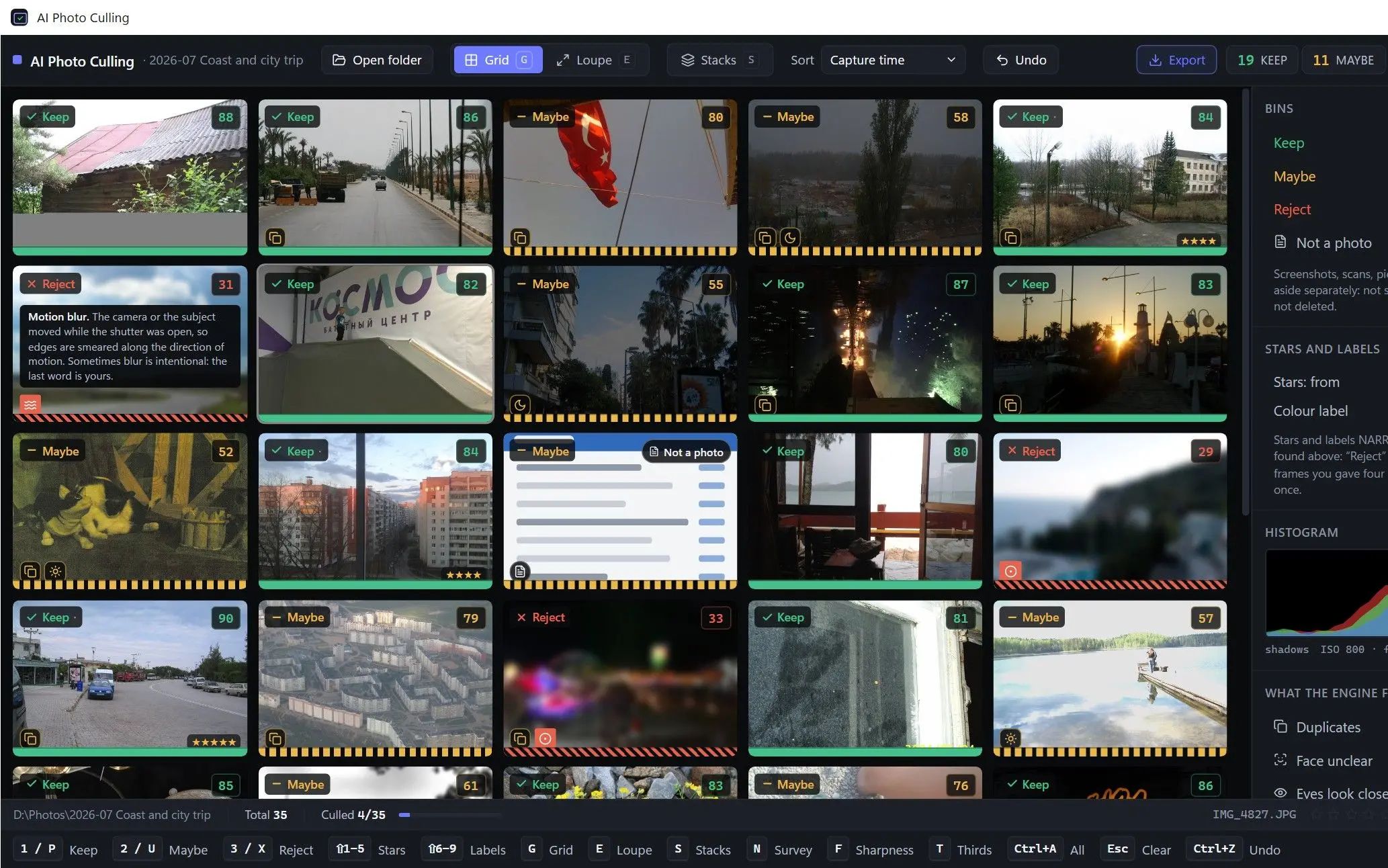
AI Photo Culling Screenshot.


🙋Frequently Asked Questions

FastRawViewer gives you a histogram from the RAW data. For browsing, embedded JPEG previews feel quicker. Windows Photos opens most RAW files with Microsoft's Raw Image Extension installed.

FastStone Image Viewer and XnView MP both open RAW files on Windows and are free for personal use. For culling, the free version of AI Photo Culling sorts the whole folder and exports 15 frames per session.

Photo Mechanic and FastStone feel instant because they show the JPEG already in the file. FRV prefetches files into RAM for RAW rendering. We haven't timed these viewers in milliseconds.

You get 30 days with all features enabled. Afterward, $23.99 covers up to two Windows or macOS computers.

Yes. The FastRawViewer Mac version runs on macOS 10.13 or later, and you can move your license between it and 64-bit Windows 7 to 11. Some users miss having an iPad version for culling on the road.

Photographers who cull entirely in FRV often remap its shortcuts to Lightroom's P, X and star keys. Others keep Photo Mechanic open and use a hotkey to inspect doubtful focus or exposure in FRV.

The vendor lists no automatic detection for either. You judge frames with focus peaking and highlight tools. AI Photo Culling flags soft focus, closed eyes and exposure problems, groups similar frames and leaves each reject decision to you.