Sketch Drawer
Make a picture stencil free: use the in-browser stencil maker, or download Sketch Drawer software for Windows - presets, batch, and Cricut/SVG-ready output.
Which format should you export - SVG, PNG, or PDF?
Export SVG for cutting machines like Cricut and Silhouette, because they need vector paths, not pixels. Use PNG when you want to print the stencil and cut it by hand, and PDF for tiled large-format printing. Sending a raster PNG into Cricut Design Space is the usual reason a photo traces into hundreds of unweedable fragments.
The format you choose depends on how you will cut. Cutting machines read vector files, so SVG is the right export for Cricut and Silhouette workflows. Cricut's own help lists unsupported items in uploaded files, and pushing a complex photo through its built-in trace often spits out tiny fragments, so prepare a clean vector first.
If you are printing and cutting by hand, PNG or PDF is simpler. PNG keeps a crisp black-and-white image for a single sheet; PDF tiles a large stencil across several pages for a wall or a banner.
| Format | Best for | Note |
|---|---|---|
| SVG | Cricut, Silhouette, laser/CNC | Vector paths; cleanest cut |
| PNG | Print and hand-cut | Raster; one sheet |
| Large-format tiled printing | Multi-page for walls |
What can you cut a stencil from - Mylar, cardstock, vinyl?
Match the material to the job. Mylar is reusable and washable for repeat work like airbrushing and signage; cardstock is cheap for one-time paper stencils; adhesive vinyl sticks flat for crisp edges on mugs, shirts, and walls. Thicker material needs bolder bridges to stay rigid.
The design is only half the result; the material decides how long the stencil lasts and how clean the edges stay. Mylar film is the workhorse for reusable stencils because it wipes clean and holds its shape after many passes. Cardstock and freezer paper are fine for a single project on a budget. Adhesive vinyl, the common choice for Cricut users, sticks to the surface so paint cannot bleed under the edges.
Whatever you pick, remember that thicker and stiffer material wants wider bridges. A delicate paper stencil tolerates thin tabs; a rigid mylar sheet for spray paint needs sturdier connections so the islands do not flex out of place.
Who uses a stencil maker, and for what?
Crafters and small sellers reach for a stencil maker software, and so do hobbyists and classroom teachers. Common jobs run from t-shirts and tote bags to mugs and tumblers, plus wall art and airbrush templates, with pumpkin carving spiking every fall. The same photo-to-stencil flow serves all of them; only the material and cut method change.
A picture stencil maker is not one audience. Sign painters and woodworkers turn logos into spray templates or a clean outline for routing, often prepping the artwork first with an image outline maker. Cricut and Silhouette crafters cut vinyl for shirts, tumblers, and decals. Airbrush artists need reusable mylar templates with fine, connected detail. Teachers and parents make quick holiday shapes, and pumpkin carvers convert a face photo into a high-contrast carving guide.
The workflow is the same across all of these. You convert a photo to a bold black-and-white design, add bridges, then cut it in your chosen material. What changes is scale and finish, which is exactly where desktop stencil software does more than a one-off online pass.
Why Sketch Drawer fits photo-to-stencil work on Windows
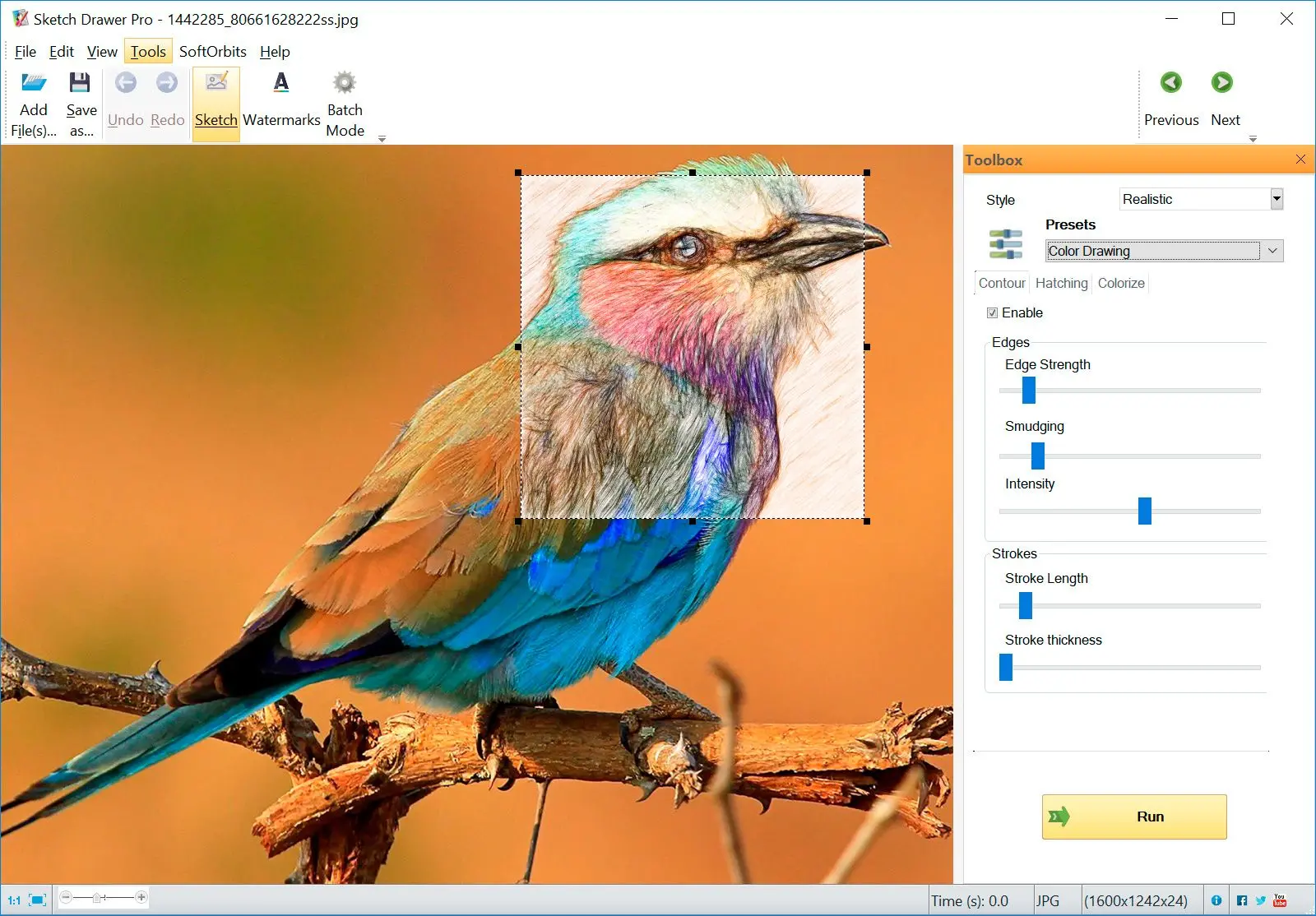
Sketch Drawer is a Windows program - a desktop photo to sketch converter - that converts photos into sketch and stencil-style art with presets and a live preview. It fits people who want batch processing and finer control than a quick browser tool. The payoff shows up when you make stencils often, not once.
For occasional single images, the online tool above is enough. When you make 10 or 20 stencils in a sitting, a stencil creator desktop program saves real time. Sketch Drawer is the free picture stencil maker download for Windows that opens a photo, applies one of 30+ presets, and lets you tune the look, then exports a high-contrast result you can cut or print. It imports JPEG and PNG, plus TIFF and RAW camera files, so you can work straight from the original shot. The same engine also handles photo to sketch conversions when you want shading instead of a flat stencil.
Batch mode applies the same settings to a whole folder of photos at once
Presets (Classic, Detailed Sketch, Realistic) plus stroke and edge controls
Runs locally on Windows with an optional watermark on the saved file
Windows only, not a web app or mobile tool
It is a sketch and stencil engine, not a full vector editor for manual node work
Pitfalls when making a stencil from a photo
Most ruined stencils trace back to the same few mistakes. The usual culprits are too much retained detail and missing bridges. A cluttered background or the wrong export format will break the cut too. The result looks the same every time, a design that falls apart when you cut it.
Letters and portraits are full of islands, and without bridges the centers drop out. Add the tabs before you cut, not after, and keep them wide enough to survive the blade.
People reach for a built-in editor and find it cannot push a photo to clean black and white. One Windows Paint help thread shows a user stuck because the app has no brightness or contrast panel at all. Pick a tool with a real threshold control before you trace.
A grayscale image still has gray tones, and a cutter needs pure two-tone. A scroll-saw maker in a Windows imaging question hit exactly this gap. Push the threshold to solid black and white, not a gray wash.
Drop a cluttered PNG into Cricut Design Space and the auto-trace produces hundreds of tiny fragments that take forever to weed. Clean the image and export a proper vector instead.
The black-and-white option many people relied on in MS Paint was removed in a Windows update, so use a dedicated stencil maker app for high-contrast output.
Sketch Drawer
Sources