Quick answer:

  1. 1️⃣ Any photo, no install: the free SoftOrbits online face blur tool finds faces and plates.
  2. 2️⃣ Video: Auto Video Redaction blurs faces on Windows.
  3. 3️⃣ Manual control on a PC: select the face in Photoshop or GIMP and apply Gaussian Blur.
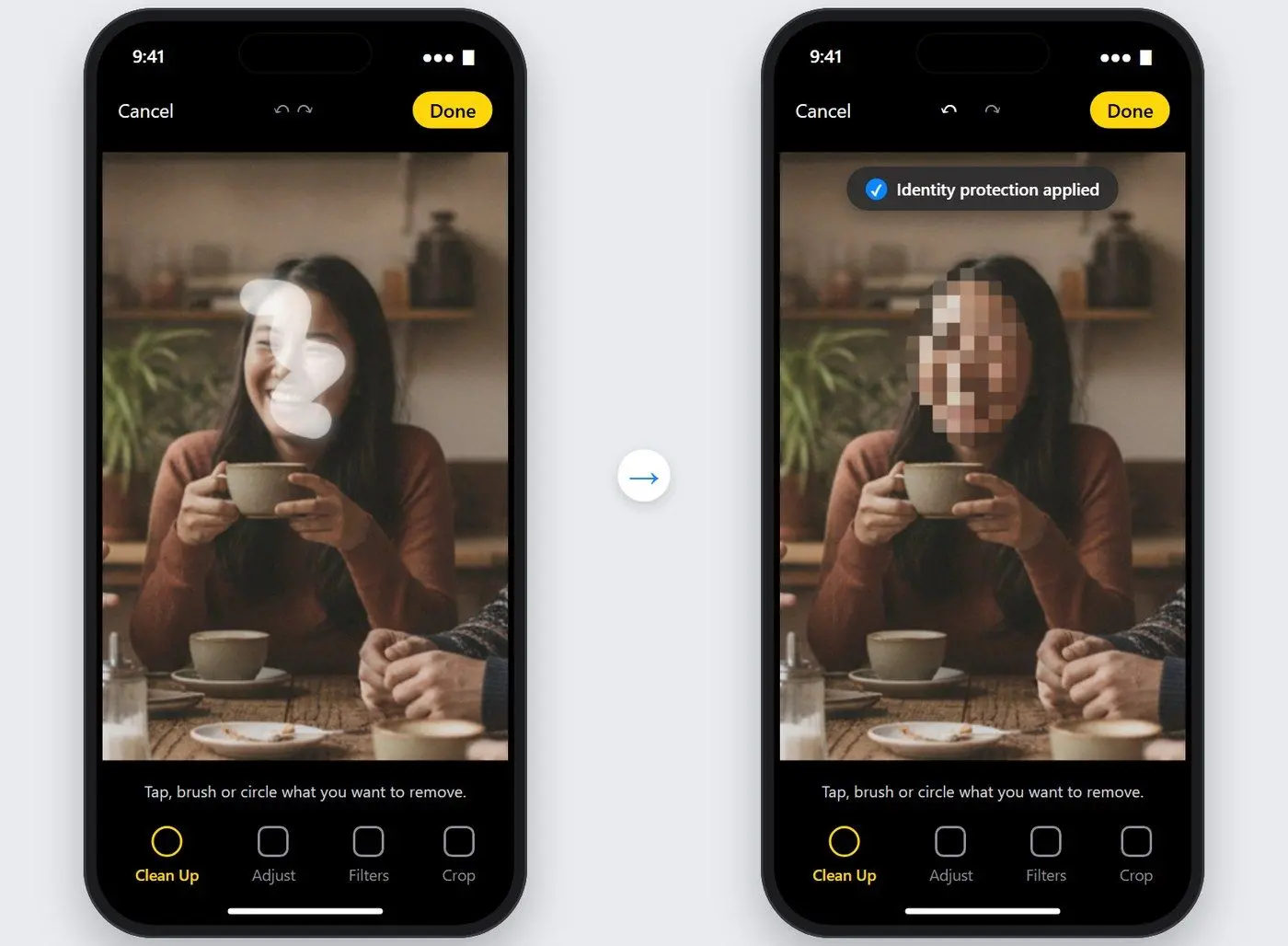
  4. 4️⃣ On iPhone, brush over the face with Clean Up in the Photos editor.
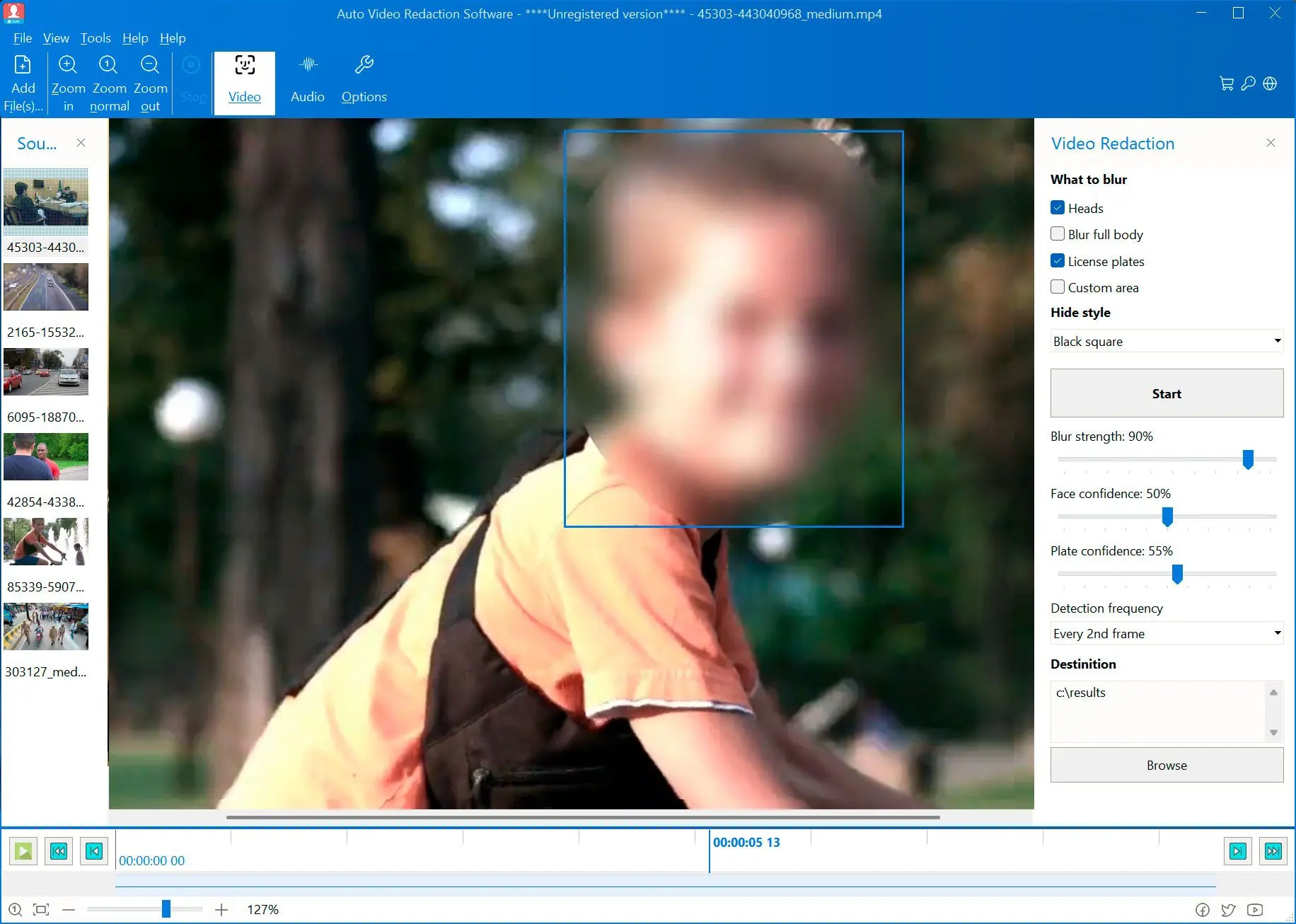
Auto Video Redaction Software Screenshot.
️ Eugene - CEO at SoftOrbits, Candidate of Technical Sciences, has more than 16 years of expertise in software development, photo and multimedia applications, enhancing and transforming digital images and videos.
📅 Last updated on:  2026-11-05

Most guides on how to blur a face in a photo stop once the face looks soft. Here is how to blur a photo safely without missing a stranger in the background, a blur that friends still recognize or a GPS tag left in the file.

What you will learn
Apply in 10 min Saves 1 hBeginner

What you'll need
  • The free SoftOrbits online face blur tool, which also opens iPhone HEIC photos
  • Auto Video Redaction Software, only for faces in a video
  • Photoshop or the free GIMP, to select each face by hand
  • About 10 minutes for a first batch

How to blur faces in a picture with the free online tool

Open the online tool and add your photos

Go to blur faces online in any browser and drop in one photo or up to 20 at once. JPG, PNG and iPhone HEIC files load directly.

 Free online face blur tool with several photos added in a strip above the editing canvas..

Let detection frame the faces and plates

The tool frames every face and license plate it recognizes.

 Detection frames around faces and a license plate in a street photo, ready to be checked..

Check every face and fix the frames

Check the background and anyone turned sideways. Frame missed faces and delete frames over people you want visible.

Pick pixelation, blur or a solid fill

Raise the blur effect strength until only a shape remains.

 Effect choice between pixelation, blur and solid fill with a strong effect applied to the faces..

Download the blurred copy

You get a new file; the original stays untouched. Several photos download as one ZIP.

Auto Video Redaction Software Auto Video Redaction Software

Video Redaction Software - faces, heads, and license plates in body cam, dashcam, and CCTV video. 100% offline, built for FOIA and DSAR compliance workflows.

Online blur services advertise that they catch every face, yet a redaction vendor's own guide admits that even manual checks miss faces in backgrounds and window reflections. Check the frames yourself.

How do you blur faces in 100+ photos at once?

TL;DR

Use the free online tool in batches of up to 20 photos; each run returns one ZIP. For 100 event photos, you need five runs.

up to 20
photos per run in the free SoftOrbits online face blur tool, saved together as one ZIP

On photo forums, a Photoshop user with 100+ photos found no command to select only faces. Others suggested scripting, but learning it looked slower than blurring the face in each photo by hand.

By hand in a photo editor
  • Select each face with an oval or a brush
  • Paint over a face several times for a strong blur
  • Repeat in every file
VS
In the free online tool
  • Faces and plates get framed automatically
  • Up to 20 photos per run, one ZIP back
  • Fix incorrect frames

Check the first run closely. A face missed on a backlit stage will be missed in similar shots too.

How do you blur faces in a video instead of a photo?

TL;DR

A photo tool covers one frame; video needs a tracker to follow each face. Auto Video Redaction Software finds heads on a Windows PC, hides them throughout the video and processes the file offline.

Open a video such as MP4, MOV or MKV. Pick smooth blur, pixelation or a solid circle and check the live preview with blue detection frames. On the People tab, choose who stays unblurred, such as an interviewee, and confirm uncertain parts of the clip.

In our body cam and street clip tests, dense crowds and night footage left some faces unblurred; glare sometimes got blurred by mistake. Review the export before sharing.
Follow the steps to blur face in video or, for car footage, blur license plates in video.
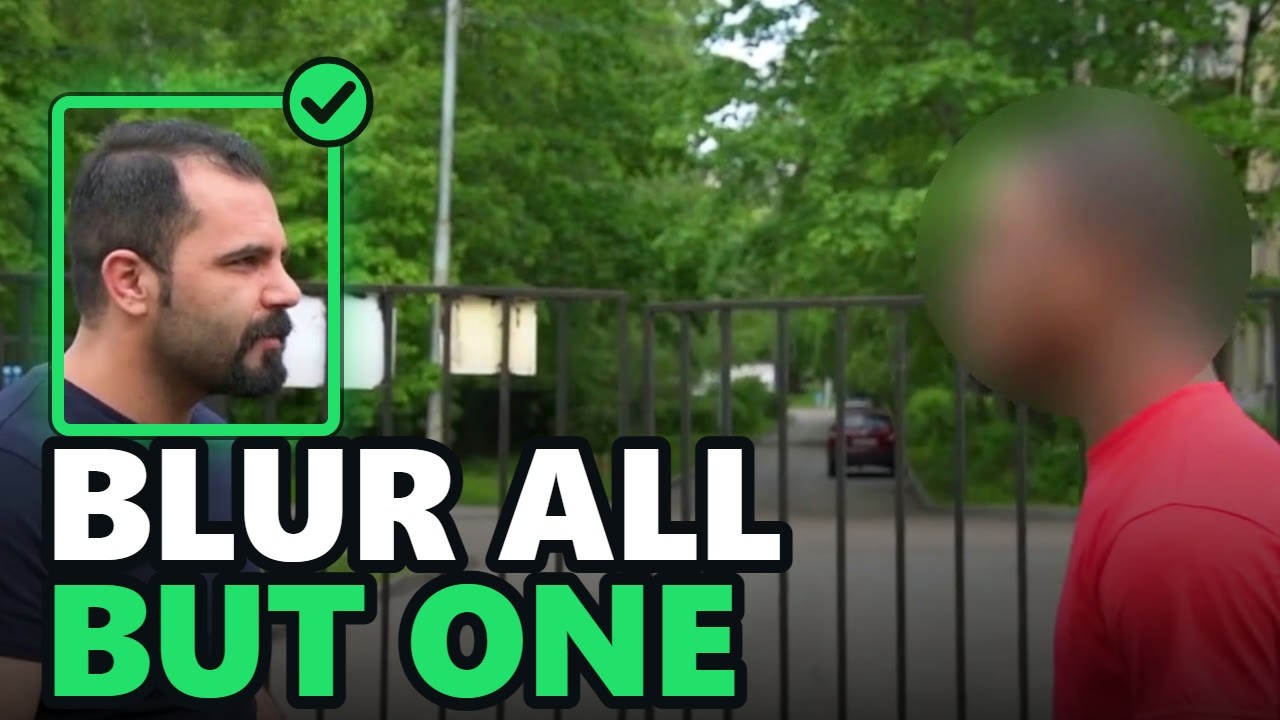
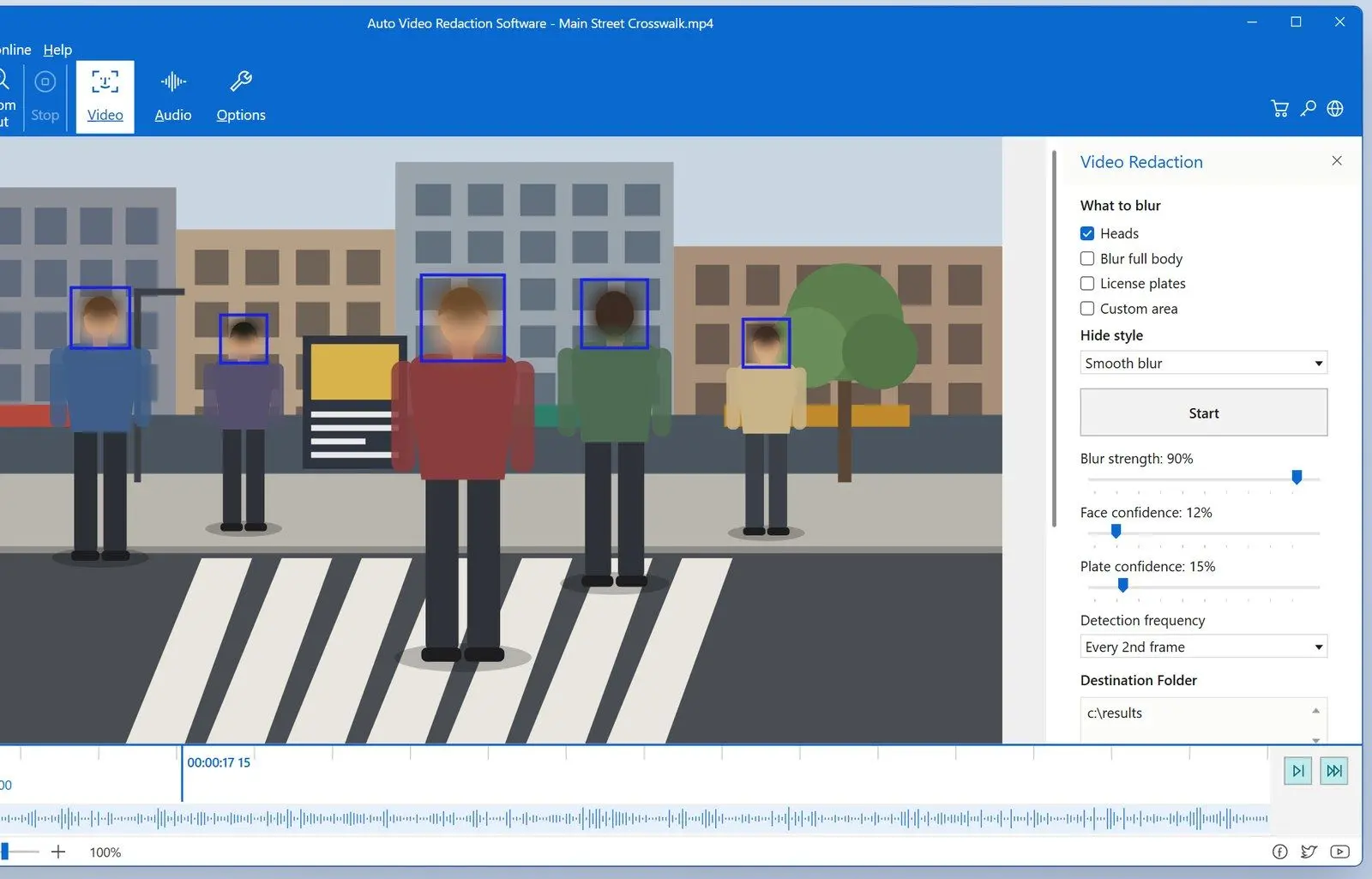
 Auto Video Redaction window with heads blurred in a street video and blue detection frames in the preview..

Auto Video Redaction Software
Auto Video Redaction SoftwareBlur faces and license plates in body cam, dashcam and phone videos on Windows.

Blur, pixelate or a solid box: which hides a face better?

TL;DR

Solid fill hides a face completely. Strong blur and coarse pixelation work for everyday sharing if they cover the whole head. Light blur leaves the outline and hairstyle, often enough for friends to recognize someone.

  • Use for anything sensitive: solid fill for protest photos, children and witnesses. Nothing remains to reconstruct.
  • Fine for social media posts: heavy blur or large pixel blocks covering hair and ears too.
  • Avoid: weak blur, small mosaic cells or a bar over the eyes. The face shape still shows.

Some face blur vendors call pixelation irreversible anonymization, which overstates it.

Can AI unblur a pixelated face?

Security firm Bishop Fox released Unredacter, which makes pixelated text readable again. Its authors say black bars are the only safe way to redact text. The research concerns text; we found no public demo that rebuilds a face from heavy pixelation.

Is your photo private after a face blur?

TL;DR

Not always. A copy uploaded to someone else's server and metadata inside the file can still expose you. Phone photo metadata usually includes GPS coordinates and the time of the shot.

Where the file goes:

Several online face blur services in search results upload your photo to their servers. The free SoftOrbits tool processes it in your browser. Google's help page for its own face blur notes that blurring leaves the original image on your device unchanged. Keep the original private or delete it once the blurred copy is safe.

GPS and EXIF data:

3 meters
typical accuracy of the GPS coordinates a modern phone writes into a photo
Source

The same guide notes that email attachments, Discord and forums pass this data along untouched. The free online tool strips the EXIF block from saved copies. For files from another editor, right-click in Windows, open Properties > Details and click Remove Properties and Personal Information.
How to blur a face by hand in Photoshop or GIMP

TL;DR

Select the face with an oval, apply Gaussian Blur or a pixelate filter and raise the strength until the eyes and mouth disappear. This works for one or two faces but is slow for a stack of photos.

MethodWho finds the facesFiles per runWhere it runs
Free online toolDetection frames faces and plates, you check themUp to 20 photosAny browser
Photoshop or GIMPYou select each faceOne photoWindows or Mac
iPhone Clean UpYou brush over each faceOne photoiPhone Photos
Auto Video RedactionDetection finds heads in every frameVideo files, not photosWindows PC

In Photoshop:

  • Pick the Elliptical Marquee Tool and drag an oval over the face, holding Shift to add more faces
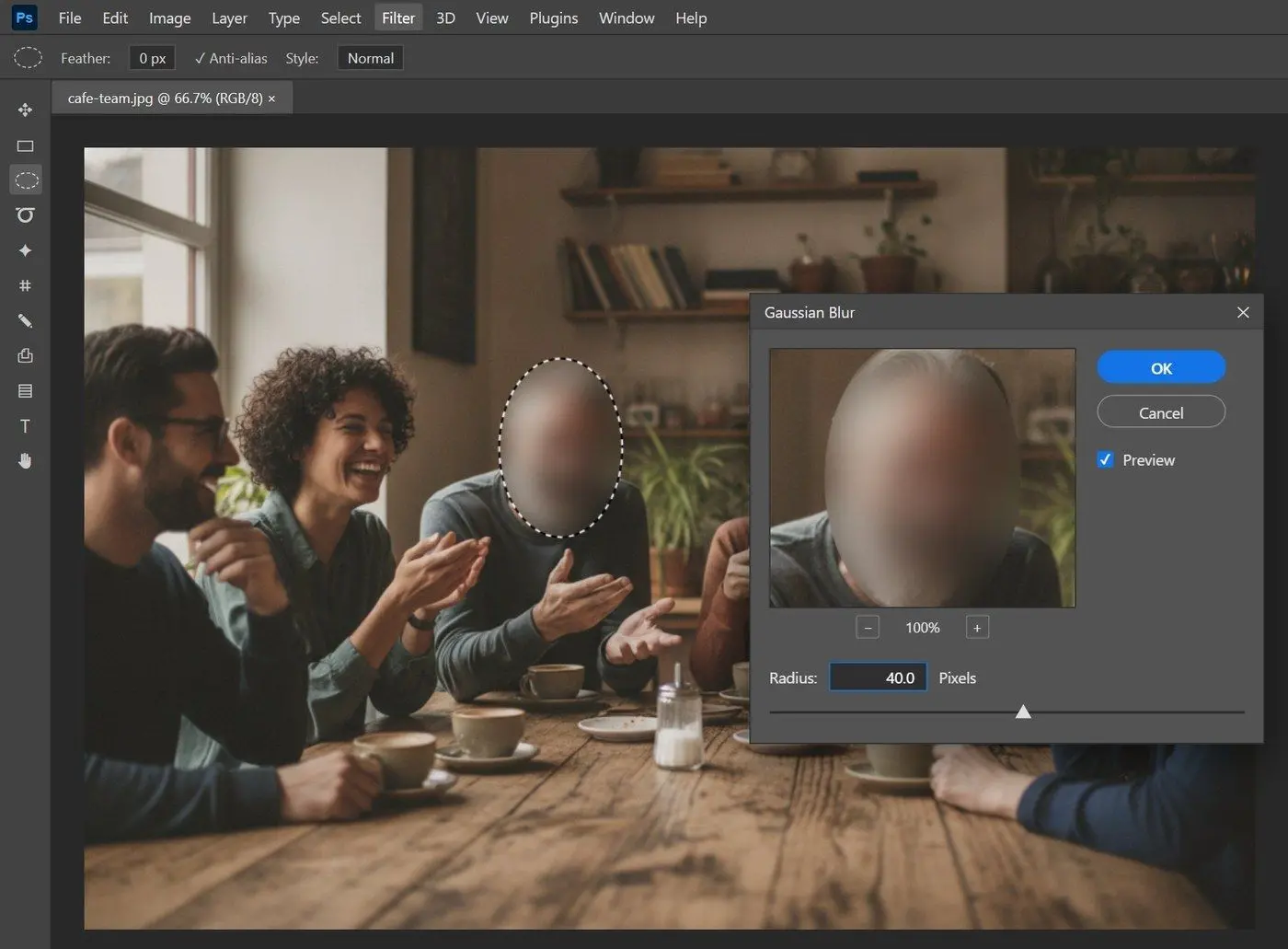
  • Open Filter > Blur > Gaussian Blur and raise Radius until the features disappear
  • For a mosaic, use Filter > Pixelate > Mosaic with a large cell size
  • Save with File > Save As under a new name
 Photoshop Gaussian Blur dialog with a high Radius applied to an oval selection over a face..

The Blur brush needs several passes per face, making group shots slow.

In GIMP (free):

GIMP is free and runs on Windows and Mac. Draw an Ellipse Select over the face and apply Filters > Blur > Gaussian Blur, or Filters > Blur > Pixelize for blocks. Use File > Export As to preserve the original.

How to blur a face on iPhone or Android

TL;DR

On iPhone, open the photo in Photos, go to Edit > Clean Up and brush over the face. iOS pixelates it and shows "Identity protection applied". Android gallery editors differ by brand; use the free online tool in a browser for a predictable route.

Tom's Guide explains the iPhone steps and how to undo them. Clean Up removes objects but blurs recognized faces; iPhone owners on Apple's forum complain there is no setting to choose. Zoom in. If you can still recognize the face, use the online tool's solid fill.

 iPhone Photos Clean Up tool brushing over a face, with the pixelated result and the identity protection message..

On a Mac, Photos cannot pixelate a face or blur a selected area; the usual workaround is a filled black rectangle in Markup. On Android, open the online tool in Chrome and pick a picture from your gallery.

Sources

Auto Video Redaction Software Auto Video Redaction Software
How to blur a face in a photo: auto-detect faces free online, blur 100+ photos in batches, pick blur or a solid box, and strip GPS data before you share.
Auto Video Redaction Software Screenshot.


🙋Frequently Asked Questions

Use the free SoftOrbits online face blur tool, GIMP or iPhone Clean Up. With GIMP and Clean Up, you mark each face yourself.

Delete detection frames over people you want visible: the tool blurs faces in a photo only inside the remaining frames. In Photoshop or GIMP, select only the faces you want hidden before applying the filter.

Yes, the SoftOrbits online tool. Animated GIF and WebP files are processed as their first frame only.

To censor a photo, cover identifying details, including house numbers. Use solid fill for sensitive content and strip GPS data before sending.

Photos has no pixelate tool; use Clean Up on iPhone or Markup on a Mac as described above.

Auto Video Redaction tracks heads throughout the clip and lets you choose who stays visible.

Tiny faces, shadows, profiles and reflections in glass cause misses. Frame each missed face by hand before downloading.