old photo before restoration 1 old photo after restoration 1
old photo before restoration 2 old photo after restoration 2
old photo before restoration 3 old photo after restoration 3
old photo before restoration 4 old photo after restoration 4
old photo before restoration 5 old photo after restoration 5
Photo Retoucher Photo Retoucher

AI Old Photo Restoration Software (2026) That Targets Scratches, Noise, and Faded Color

Easily restore your old and damaged photos to their former glory with our intuitive software.

Compute automation Automation image/svg+xml Amido Limited Richard Slater

Easy to Install

Installing SoftOrbits Photo Retoucher is as simple as downloading and running the installer. There are no additional packages to download and no wait after installing: use the tool right away!

file_type_cuda

Universally Compatible

The old photo restoration software supports most current video cards from AMD, NVIDIA, and Intel, including discrete and integrated graphics. We validated the stack across board generations before release.

ultra-hd-4k

Supports 25+ Megapixels

Thanks to smart tiling technology, high resolutions are supported without excessive memory requirements. We tested SoftOrbits Photo Retoucher with images of up to 25 megapixels, and it won't break or cause out-of-memory errors.

AI Photo Restoration Software Made Simple

In the era of artificial intelligence, models refresh almost overnight, yet none is flawless on its own. SoftOrbits Photo Retoucher bundles the repair stack, presets, and guardrails so you are not babysitting every slider. Installation stays painless, requirements stay modest, and most current AMD, NVIDIA, and Intel GPUs - including integrated graphics - are supported (expect slower renders on chip graphics). Finally, we tested the photo restoration app flow on 12 MP photos without crashes.

Over time, old photos can fade, accumulate scratches, and suffer all kinds of damage. SoftOrbits photo restoration program employs innovative artificial intelligence to restore your old photos, utilizing a neural network technology to automatically remove imperfections, clear noise and blurriness, and even add color to black-and-white photos.
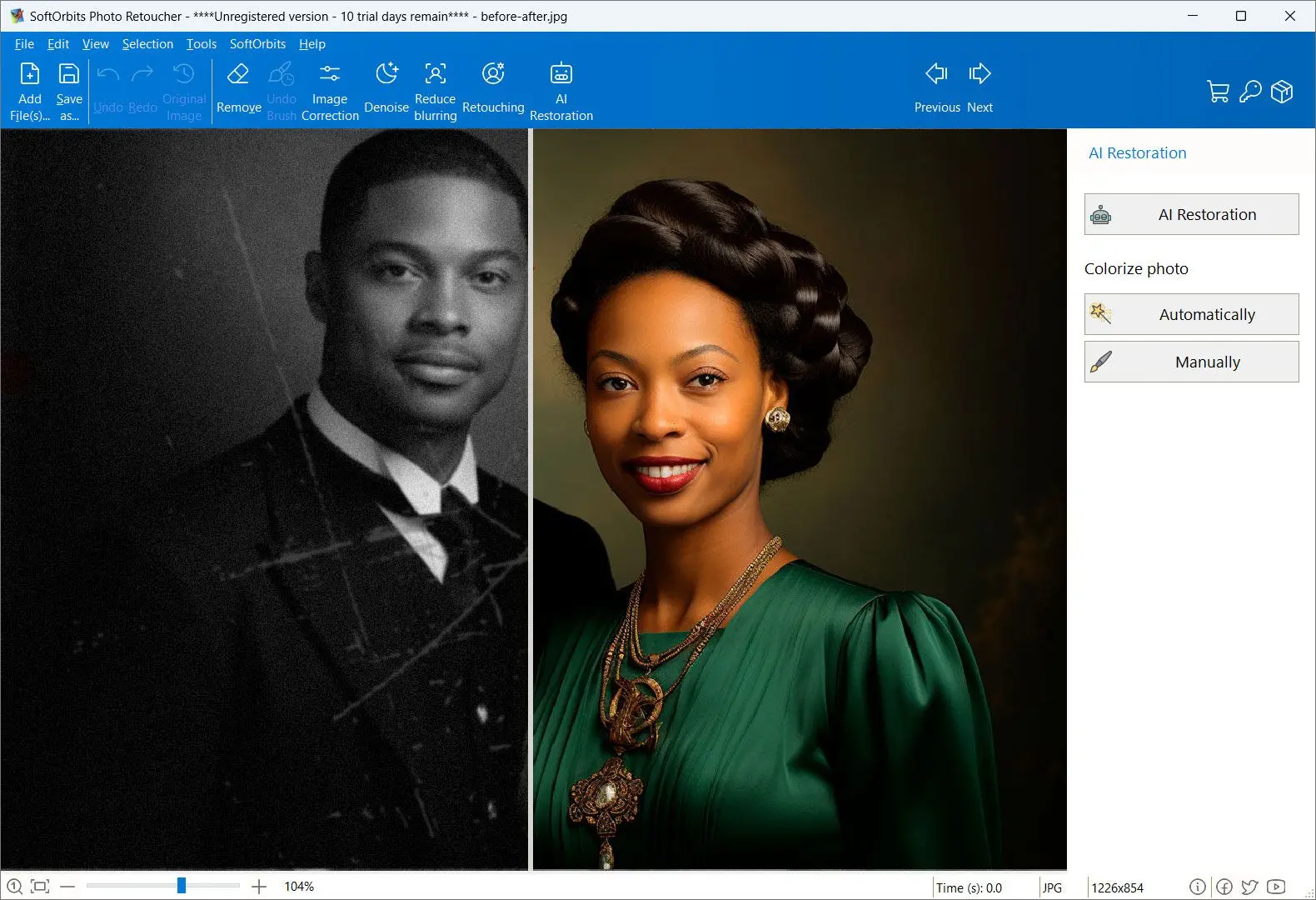
Photo Retoucher: Screenshot.

Photo Retoucher ships as Windows desktop software, but some days you only need one wedding frame back from the brink without touching installers. For that cadence we built an online photo restoration service that mirrors the same AI fixes inside the browser.

Quick Steps Inside Your Photo Restoration Program

With SoftOrbits Photo Retoucher, restoring your old photographs is seamless.

Upload Your Photo.

1. Upload Your Photo

1. Upload Your Photo

Simply drop your scanned photo onto the main window. If you have more than one, drop all of them - or the whole folder.

 Download
Hit the Right Button.

2. Hit the Right Button

2. Hit the Right Button

After each upload you choose what happens first. Use AI to hunt scratches, calm blur, denoise fabric, upscale detail up to 8x, or colorize monochrome frames, all inside the same photo restoration software workspace.

 Download
Add Manual Enhancements.

3. Add Manual Enhancements

3. Add Manual Enhancements

Beyond automated AI repairs, dedicated brushes and cleanup layers let you finesse skin tone, remove stray objects, or paint corrections only where you need them.

 Download
Save and Share.

4. Save and Share

4. Save and Share

Once you finish, export the file or share it instantly with friends and family.

 Download

Desktop Installers and Online Photo Restoration

Photo Retoucher ships as Windows desktop software, but some days you only need one wedding frame back from the brink without touching installers. For that cadence we built an online photo restoration service that mirrors the same AI fixes inside the browser.

If you searched for a photo restoration software free download for PC, start with the online upload: approve the look, then install the desktop suite when you want batch control and local privacy.

Drop an image
Supported formats: Png, Jpeg, Jpg, Webp, Heic

Features and Benefits

AI Powered Scratch and Blemish Removal.

AI Powered Scratch and Blemish Removal

The engine finds scratches, dust, and print damage while preserving film-based grain so portraits never take on an artificial plastic sheen.

   
 Download for Free

AI Powered Face Restoration

We trained an advanced AI model to automatically restore faces on blurry, scratched, or low-resolution photos.

   
 Download for Free

AI Powered Face Restoration.
AI Powered Noise and Blur Reduction.

AI Powered Noise and Blur Reduction

Effectively reduces film grain and digital noise while correcting blurriness. The specially trained AI model produces perfectly natural looks.

   
 Download for Free

AI Powered Black-and-White Colorization

Colorizes old monochrome images with a specially trained AI model.

   
 Download for Free

AI Powered Black-and-White Colorization.
AI Photo Upscale.

AI Photo Upscale

Upscale your photos up to 800% without losing quality thanks to AI-driven technology.

   
 Download for Free

AI Object Removal

Remove unwanted objects from your photos using advanced tools. The background will be restored with generative AI.

   
 Download for Free

PROD_NRET_B_H6: Before.
AI Object Removal: After.
Manual Retouching Tools.

Manual Retouching Tools

The photo restoration software offers manual tools for retouching and enhancing your images.

   
 Download for Free

Photo Retoucher

Photo Retoucher

Languages
File Size

66.8 Mb

Version

13.0

Last updated on

23/05/26

$ 19.99

🖥️ System Requirements

  • Windows 11/10/8.1/8/7 (32/64 bit)
  • Intel i3, AMD Ryzen 5 or above
  • 4 GB of RAM or above
  • NVIDIA® GeForce® series 8 and 8M, Intel® HD Graphics 2000, Quadro FX 4800, Quadro FX 5600, AMD Radeon™ R600, Mobility Radeon™ HD 4330, Mobility FirePro™ series, Radeon™ R5 M230 or higher graphics card with up-to-date drivers
  • 1280 × 768 screen resolution, 32-bit color
  • 1 GB of free hard disk space or above

🙋 Frequently Asked Questions

SoftOrbits Photo Retoucher is a Windows Software, however you may use our free online old photo restoration tool.

SoftOrbits Photo Retoucher repairs most types of damage - scratches, tears, dust, water stains and fading. Very severe damage or missing areas may still need a few manual touch-ups, which the built-in brush tools let you do by hand.

While SoftOrbits Photo Retoucher doesn't directly control your scanner, you can easily scan them and then use SoftOrbits Photo Retoucher.

You can try Photo Retoucher free before you buy, and our online tool can fix a photo or two at no cost. Free web services usually cap the number of images, add watermarks or lower the quality, while the desktop app restores whole albums with a one-time purchase and no subscription.

Yes. Photo Retoucher runs the restoration on your own computer, so it works with no internet connection and your photos are processed locally - nothing is uploaded to a server.

For personal archives, yes. Free online tools upload your images to their servers, while Photo Retoucher keeps every photo on your own machine, so sensitive family pictures never leave your computer.

Yes. Photo Retoucher includes automatic colorization that adds realistic, natural tones to a grayscale image, with manual controls to fine-tune specific areas when you need more precision.

Yes. Batch processing lets you apply the same restoration to a whole scanned album in one run instead of editing each photo individually - a key advantage of the desktop app over one-at-a-time online tools.

For one-click repair on Windows, a dedicated tool beats a general editor like Photoshop. Photo Retoucher is built specifically for old photos - it removes scratches, noise and fading, restores faces, colorizes black-and-white shots and upscales, all on Windows with a one-time purchase and no cloud upload.

Yes, most can - the result depends on the source photo. A sharp, high-resolution scan gives the software the most detail to rebuild, so faded colors, scratches and noise clean up well. Photos with large torn or missing areas are the hardest and may need some manual retouching.

Scan or photograph the print, open it in Photo Retoucher, and let the automatic scratch and dust removal clean the surface - it fills damaged spots using the surrounding pixels. For stubborn marks the manual healing brush lets you paint them out, and batch mode applies the same fix to a whole album at once.

Rate Photo Retoucher

  • Windows 7
  • Windows 8
  • Windows 10
  • Windows 11
Author: SoftOrbits (English)
Avg. rating: 4.5 from 1130 votes

Risk-free download

14-day money-back guarantee
Full refund, no questions asked
progressive-webapps/apis/offline-first Created with Sketch.
100% offline
Your files never leave your PC
Safe & secure download
Directly from the official website
No sign-up required
No account or email to get started
Trusted since 2006
Desktop software for Windows