Photo Retoucher Photo Retoucher

Restore and enhance old photos with SoftOrbits Photo Retoucher, AI-based photo restoration software. Remove scratches, reduce noise, and colorize black-and-white images automatically with AI.

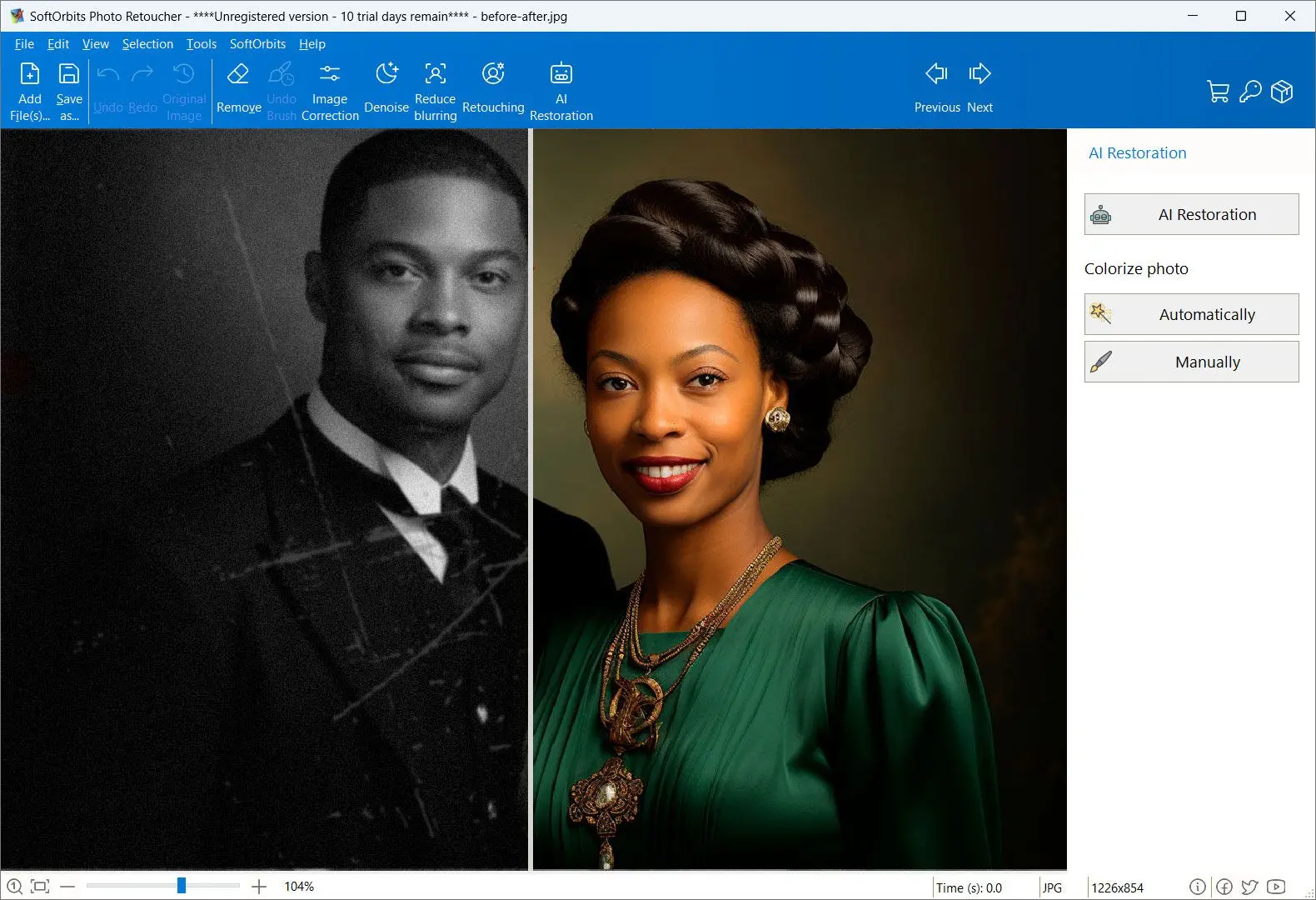
Photo Retoucher Screenshot.

In this review, you will:

  1. 1️⃣ Learn whether your problem is a broken file or a worn-out photo, because Repairit only solves one of them well.
  2. 2️⃣ See the 2026 prices, the AI-credit cap, and the 2025 cloud-storage breach that no page-one review mentions.
  3. 3️⃣ Compare Repairit with SoftOrbits Photo Retoucher and three other tools before you pay for anything.
Photo Retoucher Screenshot.
Eugene - CEO at SoftOrbits, Candidate of Technical Sciences, has more than 16 years of expertise in software development, photo and multimedia applications, enhancing and transforming digital images and videos.
📅 Last updated on:  2026-07-11

This Wondershare Repairit review is written for one specific reader. You typed the brand into Google after finding a photo that will not behave. Maybe the file refuses to open. Maybe it opens fine and the picture is simply old and gray and covered in scratches. Those two problems sound alike and need completely different software, and almost nobody says so out loud. We read Wondershare's own product and checkout pages, pulled the independent reviews, went through the complaint threads, and looked up the security disclosure filed against the product in 2025.

Disclosure: SoftOrbits makes Photo Retoucher, which appears below as the alternative for old-photo restoration. We judged Repairit on the same five criteria we would use on any tool. We name the whole category where it beats us outright and we list our own limits before we ask you to download anything.

Our verdict is 3 out of 5. Wondershare Repairit is a capable file-repair suite. If a video or document is corrupted at the byte level and will not open, it is a reasonable place to start, and reviewers who have tested the engine say it works.

Best for: a corrupted MP4 from a failed SD card. Also a Word file that will not open, or a photo that throws an "unsupported or damaged" error.

Skip if: your photo opens fine and only looks old. That is restoration rather than repair, and Repairit treats it as a cloud add-on with a credit meter attached.

What you will learn
Apply in 9 min Saves 4 hEasy

Repair or restore: which problem do you actually have?

TL;DR

File repair and photo restoration are two different jobs. Repair fixes a file that is broken at the byte level and will not open. Restoration fixes a photo that opens perfectly well but looks scratched, faded, or gray. Wondershare Repairit is built for the first job and treats the second as an AI add-on.

Start here, because getting this wrong is the most expensive mistake in the whole category.
A corrupted file is broken data. The camera lost power mid-write. The card failed, or the transfer stopped halfway. Windows shows you a thumbnail and then refuses to open the file, or throws a message about an unsupported or damaged format. Nothing you do in a photo editor helps, because there is nothing to edit. The bytes are wrong. On the Microsoft community forum this exact complaint runs for pages, where people copy photos off a phone and find that the copies will not open at all once the originals are gone. That is a repair job.

An old photo is a different animal. Your grandmother's wedding portrait scanned at 600 dpi opens instantly. The JPEG is perfectly valid. It just carries a crease down the middle, a coffee stain in one corner, sixty years of yellowing and no color whatsoever. Nothing here is corrupted. The image data faithfully records damage that happened to a piece of paper. That is a restoration job, and it wants a different engine altogether, one built around scratch removal and face reconstruction rather than byte-level surgery.

The file will not open

Windows says "unsupported or damaged." No viewer or editor will touch it. The bytes are broken. You need a repair tool, and Repairit is a legitimate choice.

The file opens, but the photo looks bad

Scratches. Creases. Dust and fading and grain. The file itself is perfectly healthy. You need a tool that rebuilds the picture, not the file.

Repairit blurs this line, and it does so deliberately, because the same checkout page sells you both. That is fine as a business model. It is less fine when someone with a shoebox of scanned family photos pays for a repair suite and then discovers that the feature they actually wanted is metered by credits. If your job is the second one, the practical route is a local tool that specializes in it, and you can see how that work goes in our walkthrough of how to colorize a black and white photo.

What is Wondershare Repairit?

TL;DR

Wondershare Repairit is a file-repair suite for Windows and Mac, with a browser version and a separate mobile app. It repairs corrupted video and photos. It also takes on audio files, documents and ZIP archives. On top of that core it layers AI tools, including old-photo restoration and colorizing, upscaling and an object eraser.

Wondershare is a Shenzhen-based software company, best known for Filmora and Recoverit. Repairit is its repair line, and it has grown from a video-only tool into a suite that will take a swing at almost any broken file you own.

The core product is straightforward. You feed it a file that will not open. It analyzes the structure, patches what it can, and shows you a preview of the result. For video there are two modes. Quick Repair works on the file alone. Advanced Repair wants a healthy sample clip shot on the same device so it can borrow the correct header structure. The Photo Repair module covers 20-plus formats, from JPG and TIFF through to camera RAW from Canon and Nikon and Sony.
Then there is the second Repairit, the one that shows up in ads. It sells AI restoration for old prints, plus automatic colorizing and an enhancer. There is a generative fill and an eraser for unwanted objects. These are real features and they are what brings most people to a page like this one. They are also computed on the vendor's servers rather than on your machine, which matters more than it sounds, and we come back to it below.

Main Features of Wondershare Repairit

TL;DR

Repairit ships repair modules for video and photos, and separate ones for audio and documents. Batch processing and a free preview come with them. The AI layer adds old-photo restoration and colorizing, along with face improvement, upscaling and an object eraser. The free tier lets you preview a result but not save it.

Here is what the product actually gives you, taken from Wondershare's own pages rather than from an affiliate summary.

✔️ Video repair

fixes corrupted MP4 and MOV files. Quick Repair works on the file alone. Advanced Repair needs a healthy sample clip from the same camera.

✔️ Photo repair

handles image files that will not render at all. It covers 20-plus formats including camera RAW. This is repair of the file rather than restoration of the picture.

✔️ Audio repair

works on the usual formats from MP3 through to FLAC.

✔️ Document and archive repair

Office files and PDFs. It also takes ZIP archives and Outlook mail files.

✔️ AI Old Photo Restoration

targets the damage a paper print collects over decades. The vendor names scratches and tears and sepia toning alongside what it calls "complex damage."

✔️ AI colorizing

brings color back to a monochrome shot, with several style presets.

✔️ Facial improvement

sharpens eyes and skin texture in old portraits.

✔️ AI upscaling

the desktop app claims a resolution increase of up to 800% "without quality loss."

✔️ Batch processing

repairs many files in one run. You cannot pause or cancel a single file mid-batch.

✔️ Preview before you save

seeing the repaired result costs nothing. Keeping it does.

That upscaling number deserves a footnote, because it gets repeated across the web as if somebody had measured it.

800%
resolution increase claimed by Wondershare for the desktop Photo Repair upscaler. This is the vendor's own figure. We found no independent benchmark for it, and we did not run one, so treat it as marketing until somebody does
Source

The feature list is genuinely broad. What it is not is deep in our corner of it. Reviewers who have tested the repair engine praise it. Nobody on page one of Google has ever published before-and-after results for a scratched paper scan, which is the exact thing the ads promise. That gap is worth noticing.

Pricing and Performance Review

TL;DR

Repairit sells per module. Photo Repair on Windows is $29.99 a month, $39.99 a year, or $59.99 as a perpetual license. The all-in-one toolkit that includes AI restoration was listed at $99.95 on 2026-07-11. Subscriptions renew automatically, and the AI features draw from a credit meter of 1,500 a month.

Pricing is where most of the complaints start, so it is worth being precise. The numbers below were fetched from Wondershare's own checkout pages on 2026-07-11. Prices move, promotions rotate, and the store shows different figures depending on which module page you land on. Check the vendor before you buy.

Plan (Windows)1 month1 yearPerpetualAI credits
Photo Repair$29.99$39.99$59.99not stated
Video Repair$29.99$39.99$59.99not stated
All-in-One Toolkit (includes AI old-photo restoration and colorizing)$99.95, shown on the store as a discount from $139.951,500 per month on a subscription, or 2,250 once on the perpetual license

Two things in that table catch people out.
The first is the credit meter. AI restoration is not unlimited on any plan. You get an allowance, and every enhancement run spends from it. If you have a drawer with 400 scans in it, that allowance stops being an abstraction very quickly, and the same meter governs the AI upscaling too. Doing the same work without a per-image cost is exactly what a desktop tool is for.

1,500
AI credits per month on a Repairit subscription, or 2,250 granted once on the perpetual license. Old-photo restoration and AI upscaling both draw from this meter
Source

The second is auto-renewal. Wondershare's own checkout says "Automatically renew, cancel any time," which is honest enough as a line of text and easy to miss as a buyer. The complaints that follow are consistent. On Trustpilot, where the aggregate score sits in the "excellent" band, the negative reviews cluster around renewals nobody expected and refunds that took several appeals. On r/datarecovery, one user describes a single one-off recovery job that produced three separate charges, because a subscription and an "insurance" add-on were applied on top of the purchase.

If you buy Repairit for a one-time job, check which plan you are actually on at checkout, and cancel the renewal the same day. The auto-renew wording sits on the vendor's own buy page, and almost every refund complaint we read begins with a charge the buyer did not expect.

There is one more catch that has nothing to do with renewals. The free tier lets you preview the repaired file but not save it. That sounds reasonable until you are the person who pays, watches the software mark the file as fixed, and then finds the export still behind another purchase. Wondershare's own file-repair page confirms the pattern. Free users get to look, paying users get to keep, and for documents the free preview shows only the first page.

On performance we will be careful. We did not buy a license and run a timed benchmark, so we are not going to quote a speed number as if we had. What exists is this. NerdTechy, an independent reviewer with hands on the product, calls the repair success rate "pretty darn close" to complete but states plainly that "it can't fix every type of playback issue." SoftwareTestingHelp praises the three-step flow and the batch mode, then lists real cons. There is no weekend customer support, and no way to stop one file inside a running batch. Wondershare itself says most standard images process in "seconds to a minute," which is a vendor claim with no independent test behind it.

Pros:

The core repair engine works, and hands-on reviewers back that up

Very wide format coverage, from MP4 and RAW through to PST and ZIP

Free preview before you commit to a plan

Available on Windows and Mac, plus a browser version and a mobile app

Batch mode for repairing many files in one run

Cons:

Subscription-first pricing, and it auto-renews by default

AI restoration is metered by credits, so heavy jobs cost more

You cannot save a repaired file on the free tier, only look at it

AI features run on Wondershare's servers rather than on your PC

Repeat billing and refund complaints across several review sites

No weekend support, and no per-file control inside a batch

How to Use Wondershare Repairit

Download and install the desktop app

Get the Windows or Mac build from Wondershare's site. The browser version needs no install, but it uploads your files to their servers, so for anything personal the desktop app is the lesser of two evils.

Pick the right module before you do anything else

This is the step people get wrong. If your file will not open, choose Photo Repair or Video Repair or File Repair. If your photo opens fine and simply looks old, choose Old Photo Restoration under the AI tools instead. The two paths use different engines and produce completely different results.

Add your files

Use the Add button or drag files onto the window. The desktop app takes many files at once. The free browser tier caps how many files you can add and how large each one can be.

Turn on the extras you want

For a monochrome source, toggle the AI colorizer if you want a color version. Face improvement and upscaling are separate switches. Each one spends AI credits.

Start the run

Click Repair or Start Enhancing. Wondershare says most standard images take seconds to a minute. The work happens on their AI models in the cloud rather than fully on your machine, so your connection speed is part of the equation.

Preview the result

Compare the output against the original side by side. This part is free and it is the honest way to find out whether the tool did anything useful for your file.

Save, which is where the paywall lands

Exporting the full-resolution result needs an active paid plan. The free tier stops at preview. Budget for this before you start, not after you have seen a good preview.


Photo Retoucher Photo Retoucher

Restore and enhance old photos with SoftOrbits Photo Retoucher, AI-based photo restoration software. Remove scratches, reduce noise, and colorize black-and-white images automatically with AI.

Is Wondershare Repairit safe to use?

TL;DR

Repairit is not malware, and the app itself is a normal signed download from an established vendor. The real safety question is where your files go. In 2025, security researchers found two critical authentication-bypass flaws in the product's cloud storage, scored CVSS 9.1 and 9.4, and reported that user files were sitting in that storage unencrypted.

The security question is the one other reviews skip, so we will keep it factual and let you decide.
In April 2025, researchers working with Trend Micro's Zero Day Initiative reported two vulnerabilities in Wondershare Repairit. They were published that September as CVE-2025-10643 and CVE-2025-10644, carrying CVSS scores of 9.1 and 9.4. Both were authentication bypasses in the tokens guarding the vendor's cloud storage. The Trend Micro write-up describes what was sitting in that storage. User photos and videos. The AI models themselves. Application binaries and source code. According to the disclosure the vendor did not respond during the coordination window, which is why it went public, and TechRepublic covered the same finding.

9.4
CVSS score of CVE-2025-10644, one of two authentication-bypass flaws found in Wondershare Repairit's cloud storage tokens. Its companion CVE-2025-10643 scored 9.1
Source

The uncomfortable part is not the bug count. All software has bugs. The uncomfortable part is the gap between what the privacy policy said and what the audit found. The policy told users their data would not be stored. The researchers found it stored, in the open.

Weigh this against what you are uploading. A corrupted holiday clip is one thing. A scanned photograph of a grandparent who died forty years ago, of which exactly one print survives, is another. If a tool can do that job entirely on your own PC, there is no reason to hand the file to anyone's server, and this is the same trade you accept whenever you restore old photos online through a browser-based service.

To be fair to Wondershare, the flaws were reported and published, and vendors do patch. If you are reading this in late 2026, check the current status before you assume anything. The point is not that Repairit is uniquely careless. The point is that its AI restoration lives in the cloud by design, and that is a structural choice rather than a bug somebody fixes.
Where does Wondershare Repairit fall short?

TL;DR

Four recurring problems. The cost model punishes one-time buyers. The AI credit meter caps the restoration work you came for. The free tier will not let you save what it just fixed. Support is bot-first with no weekend cover. On top of that, nobody on page one of Google has ever independently tested the restoration feature.

Take the billing first, since it produces the loudest complaints. Repairit sells a subscription by default to people who almost always have a one-time problem. Nobody wakes up needing to repair corrupted files every month. They need it once, in a panic, after a card failure or a bad transfer. A monthly plan aimed at a one-off emergency is a mismatch by design, and the fallout shows up as renewals nobody expected and refunds that took several rounds of email. Trustpilot reviewers describe buying a second, pricier bundle despite already owning a Repairit product, with no upgrade path between the two.

Then the paywall. Preview is free, saving is not. In practice this means you learn whether the tool worked and then you find out what it costs to keep the result. Some people will call that a fair trial model. Others will call it pressure applied at the exact moment you are most desperate, and after reading that Reddit thread it is hard not to see their point.
Third, the credit meter, which hurts our reader specifically. Old-photo restoration is inherently a batch job. Families do not have one photo. They have a drawer. Metering AI runs by credit is fine for someone rescuing a single corrupted video and awkward for someone processing 300 scans.

Fourth, support. SoftwareTestingHelp lists "no weekend customer support" as a con in an otherwise positive review, and the account of a bot-only support queue that took days to escalate lines up with that.
There is a fifth thing that is less a flaw than a warning. Searches for a cracked Repairit build are common, and they are a bad idea for the obvious reason. You would be running an unsigned binary from a stranger against files you have already told us are irreplaceable. If the price is the problem, a cheaper legitimate tool is a better answer than a pirated expensive one.

Best alternative for old photos: SoftOrbits Photo Retoucher

TL;DR

If your photo opens fine and just looks old, SoftOrbits Photo Retoucher does that job on your own PC. It removes scratches and noise, reconstructs faces, colorizes monochrome shots and batches whole folders, with a one-time license and no credit meter. It does not repair corrupted files, and it is Windows only.

We built Photo Retoucher for the second job in this article, not the first. That distinction is the entire reason it exists, and it shapes every trade-off inside it.

The processing runs on your machine. It uses your GPU through DirectML or CUDA and falls back to the CPU if there is no GPU worth using. AI models download once from our servers on first launch, and after that no photo ever leaves the PC. For a scanned print of someone who is no longer alive, that is not a feature bullet. It is the whole argument.
The tools match the damage a paper photo actually collects. AI restoration handles scratches and creases and grain in one pass, which is the same work covered step by step in our guide to dust and scratch removal software. Face reconstruction rebuilds features that a soft or damaged scan has lost. AI colorizing turns a monochrome portrait into color, and you can adjust the result afterwards by hand instead of accepting whatever the model decided. An object remover clears date stamps and creases and people you did not want in the frame. The Photo Enlarger upscales up to 8x. Batch mode runs a whole folder with a chosen set of operations, without spending a credit per image, because there are no credits.

 SoftOrbits Photo Retoucher restoring a scratched black-and-white photo locally on Windows..

SoftOrbits Photo Retoucher is a one-time license with a free trial, and you can read the full spec on our old photo restoration software for Windows page.
Now the honest part, because a review that only praises its own product is worth nothing.

Pros:

Runs on your own PC, so family photos are never uploaded anywhere

One-time license, with no subscription and no per-photo credit meter

Built specifically for scratches and fading and monochrome sources

AI face reconstruction and colorizing, with manual adjustment after the AI pass

Batch a whole folder with one set of operations

Cons:

Windows only for the desktop app. There is no Mac build and no mobile app

It does not repair corrupted files. If your JPEG or MP4 will not open, Photo Retoucher cannot help you, and Repairit can

No video and no document support at all, only images

The first launch downloads AI models, so you need an internet connection once

Full-resolution saving requires a license after the trial

Wondershare Repairit vs SoftOrbits Photo Retoucher

These two products get compared constantly and they barely overlap. Here is the side by side on the points that actually decide the purchase. Repairit figures come from Wondershare's own pages, fetched 2026-07-11. Ours come from our product data.

PointWondershare RepairitSoftOrbits Photo Retoucher
Main jobRepairing corrupted files that will not openRestoring old photos that open fine but look damaged
Broken file that will not openYes, this is its coreNo, not at all
Scratches, fading, creases, dustYes, as a cloud AI add-onYes, as the core job
Colorize a monochrome photoYes, spends AI creditsYes, unmetered, with manual touch-up
Where processing happensWondershare's cloudOn your own PC (GPU, CPU fallback)
Payment model$29.99/mo, $39.99/yr or $59.99 perpetual per module; all-in-one $99.95One-time license, free trial
AI usage cap1,500 credits/mo, or 2,250 once on perpetualNone
Batch foldersYes, but AI operations spend creditsYes, unmetered
Video, audio, documents, archivesYesNo, images only
PlatformsWindows, Mac, browser, mobile appWindows only

Verdict: they are neighbours rather than competitors.
If a file is broken, buy Repairit and do not waste your time on anything else. If a photo is old, buy a restorer and skip the credit meter entirely. The only genuine overlap between the two products is the AI restoration layer, and there Repairit is a bolt-on to a repair suite while Photo Retoucher is the whole product.

When is Wondershare Repairit still the better pick?

TL;DR

Repairit wins outright whenever the file itself is broken. A corrupted MP4 from a failed card, a Word document that will not open, an archive that died mid-transfer. Photo Retoucher does none of that. Repairit is also the pick if you are on a Mac, since we are Windows only.

We are not going to pretend our tool replaces theirs, because it does not.
If the file is corrupted, you need a repair engine, and that is a genuinely hard piece of software to build. Repairit has years of work in it, and the people who tested the engine hands-on say it delivers. The scenarios where it is the right answer are specific and common. Video from a camera that lost power mid-recording. Photos copied off a phone that now throw "unsupported or damaged." A spreadsheet that will not open after a bad save. An email archive that will not mount.

Repairit is also the pick on platform. It runs on macOS and in a browser. Our desktop app runs on Windows only, and no amount of wishing changes that for a Mac owner.
One honest caveat applies to any repair tool, this one included. A broken file is broken. Sometimes the data needed to rebuild it is simply gone. The Microsoft forum puts it more bluntly than any vendor ever will, in a thread about JPEGs that no viewer would open. The advice there was to "remember that it is not always possible to repair the corrupted photo." Nobody publishes a real success rate for this category, Repairit included, and you should be suspicious of anybody who does. Use the free preview to find out before you pay.

And if the photo opens but grain is the problem rather than damage, that is not a repair job either. A dedicated noise-reduction tool handles that specific complaint better than any repair engine will.

Other alternatives we also considered

TL;DR

We looked at four other tools people reach for and cut them all, for reasons we will name. AnyRecover and Picwand run the same review-plus-alternative play we do. Tipard FixMP4 and AnyMP4 are video-only. Browser restorers solve the right job but keep the cloud problem.

Repairit is not the only name on this SERP, and it is fair to say what else is out there and why none of it changed our recommendation.

  • AnyRecover runs its own "Repairit review plus best alternative" page and pitches itself for harder corruption cases. It publishes no price on that page and no verifiable success rate, so we have nothing to check. Cut for lack of anything falsifiable.
  • Picwand AI is a browser-based restorer and it competes with Repairit on exactly the AI-restoration axis we care about. It is also browser-based, which means the same upload we spent a whole section arguing against. Cut on the cloud trade-off rather than on quality.
  • Tipard FixMP4 and AnyMP4 Video Repair get positioned by review sites as cheaper video-only specialists. They are, and that is useful if video repair is your job. It is irrelevant if your job is a scanned photograph. Their headline success-rate percentages are vendor-published with no independent test, so we will not repeat them as fact.
  • Free online restorers need no install and cost nothing, which is genuinely attractive. They also want you to upload the one surviving photo of your grandfather to a server you know nothing about. If that trade is acceptable to you, take it with clear eyes.

If you want the wider field rather than a head-to-head, our round-up of the best photo restoration software compares the desktop options on Windows in more detail.

Photo Retoucher Photo Retoucher
Wondershare Repairit review 2026: what it repairs, what it costs, the 2025 cloud breach, and the best Windows alternative for restoring old photos.
Photo Retoucher Screenshot.


🙋Frequently Asked Questions

The app itself is a normal signed download from an established vendor and it is not malware. The question worth asking is about the cloud. In 2025 researchers disclosed two authentication-bypass flaws in the product's cloud storage, scored CVSS 9.1 and 9.4, and reported that user files were held there unencrypted despite a privacy policy that said data would not be stored. Check the current patch status before you upload anything you cannot replace.

On the vendor's Windows checkout pages, fetched 2026-07-11, Photo Repair and Video Repair each cost $29.99 a month or $39.99 a year, or $59.99 for a perpetual license. The all-in-one toolkit that includes AI old-photo restoration was listed at $99.95, shown as a discount from $139.95. Subscriptions renew automatically unless you cancel.

No. There is a free preview, which lets you see the repaired file before you pay, and that part is genuinely useful. Saving the result requires an active plan. For documents the free preview shows only the first page. Several users have described paying, seeing the file marked as fixed, and still needing a purchase to export it.

It is an established company with a long product line and an "excellent" aggregate score on Trustpilot. That said, the negative reviews cluster around billing rather than software quality, and the 2025 security disclosure reported that the vendor did not respond during the coordination window, which is why the flaws were published. Buy it for a job it is good at, read the checkout page carefully, and do not upload files you cannot afford to lose.

Yes. Wondershare Technology is headquartered in Shenzhen and is publicly listed. Whether that matters is your call, but it is relevant context when the product sends your files to the vendor's servers for processing.

There is no reliable free tool that repairs badly corrupted image files, and it is worth being blunt about it. Some editors will re-save a file with minor header damage and that occasionally works. Beyond that, the honest answer is the one the Microsoft forum gives. It is not always possible to repair a corrupted photo at all. Use a paid tool's free preview to find out whether your specific file is recoverable before you spend money.

If the photo opens and simply looks old, SoftOrbits Photo Retoucher is the alternative we would pick, and yes, we make it. It clears scratches and grain, rebuilds faces, colorizes monochrome portraits and runs whole folders in one batch. The license is one-time, there is no credit meter, and the work happens on the machine in front of you. The honest limits are that the desktop app needs Windows, and that it will not repair a file which refuses to open, which is the one job Repairit does better than we do.

Sources

Photo Retoucher Photo Retoucher

Restore and enhance old photos with SoftOrbits Photo Retoucher, AI-based photo restoration software. Remove scratches, reduce noise, and colorize black-and-white images automatically with AI.