Eugene - CEO at SoftOrbits, Candidate of Technical Sciences, has more than 16 years of expertise in software development, photo and multimedia applications, enhancing and transforming digital images and videos.
📅 Last updated on:  2026-06-09

Compare the 9 best Wispr Flow alternatives for Windows in 2026: offline, one-time-purchase dictation tools that beat a Mac-only cloud subscription.

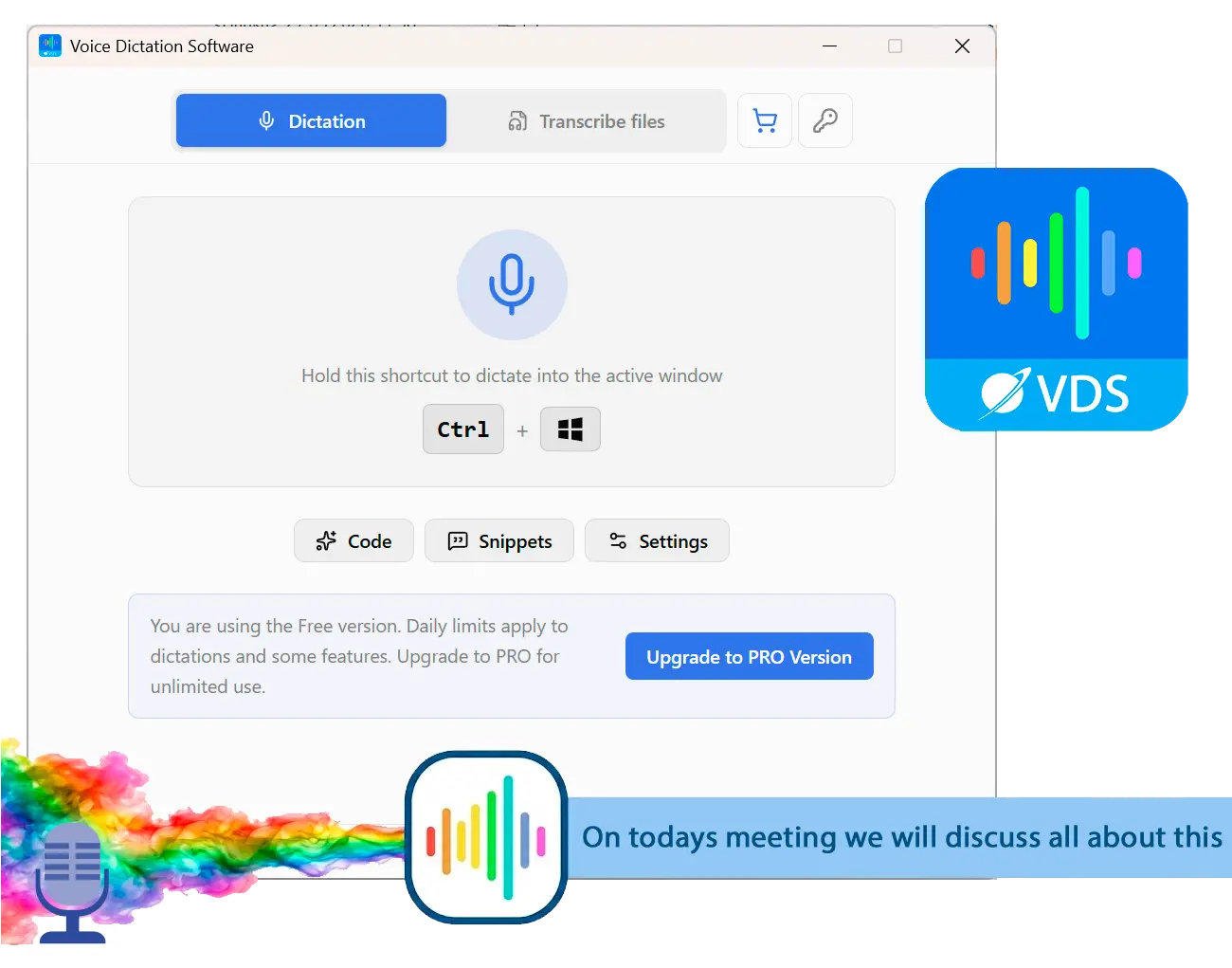
SayOnce - Voice Dictation Software Screenshot.

After reading this guide, you will be able to:

  • See which of these dictation tools actually run well on Windows 10 and 11
  • Pick offline dictation software that keeps your audio on your own PC
  • Find a one-time purchase instead of signing up for another monthly plan
Wispr Flow made voice typing feel modern. But it was built Mac-first, and on Windows it still feels like a port. It runs only in the cloud, it bills monthly, and community benchmarks have clocked it at around 800 MB of RAM while idle. If you are on Windows and want something faster, cheaper over time, or that simply does not phone home with your voice, you have real options. This guide ranks nine Wispr Flow alternatives for Windows, with honest pros and cons for each, so you can compare them before installing anything.

Transparency: we compared these dictation tools on Windows 10 and 11, and we make the number-one pick, SayOnce. We still list the limits of every tool here, including our own, so the ranking is something you can check rather than take on faith.

What you will learn

Why people switch from Wispr Flow

TL;DR

People usually drop Wispr Flow for a mix of reasons. The Windows app is heavy and Mac-first, everything runs through the cloud, and the monthly cost stings. A 2025 privacy scare did not help.

Wispr Flow started on the Mac, and Windows came later as an Electron app. On a PC, that shows. In a widely shared cancellation post, a developer described the app freezing not just itself but whole program he was dictating into, such as VS Code. Plenty of Windows users are simply hunting for something better than built-in tool, as you can see in threads like this Tom's Hardware forum request for a replacement for Windows voice typing.

Privacy is the second reason. Wispr Flow has no offline mode, so your audio always travels to its servers. It also drew criticism in 2025 for capturing screenshots of your active window for context, and the first response was reportedly to ban the user who raised it, according to an independent write-up of the incident. For anyone handling sensitive material in legal or medical work, cloud-only dictation is a hard no.

Then there is the bill. Wispr Flow runs about $15 a month, and reliability complaints after the trial are common enough that the app sits at a 2.7 out of 5 score on Trustpilot. None of this makes the app useless. It makes it a tool a lot of PC users are ready to replace.

Quick comparison

ToolBest forPlatformOffline?Pricing
SayOnce: Voice Dictation SoftwarePrivate, offline Windows dictationWindows 10/11Yes (local STT)One-time
SuperwhisperLocal AI models on Mac and WindowsMac, Windows, iOSYes (local models)Free tier / sub / lifetime
VoiceTyprNo-subscription offline dictationMac, WindowsYes (by default)One-time
Weesper Neon FlowBudget on-device dictationMac, WindowsYes (on-device)Sub / lifetime
BossAIWindows-native with screen contextWindows, Mac, iOSPartial (Boss Mode is cloud)Free tier / sub / lifetime
Willow VoiceStyle-aware, cross-platformMac, Windows, mobileNo on WindowsFree tier / sub
TypelessCross-platform with voice editingMac, Windows, iOS, AndroidNoFree tier / sub
Dragon ProfessionalLegal and medical long-formWindowsYesOne-time (~$699)
Windows Voice AccessFree built-in baselineWindows 11NoFree

How we picked these alternatives

TL;DR

We weighed five things. Does it really run on Windows. Does audio stay on the PC. What does it cost over time. Does it work as everyday dictation. And what do real users report.

We did not score on feature lists alone. Windows support meant a real Windows 10 or 11 app, not a Mac port bolted on later. We checked whether your audio stays on the machine or goes to the cloud, and whether the tool asks for a one-time fee, a monthly plan, or nothing at all. Core dictation fit came down to a global hotkey that pastes into any window, with file transcription as a welcome bonus. For reliability we leaned on community signals, mostly Product Hunt reviews and forum threads, which let you quickly spot the tools people actually keep. Where a vendor makes a privacy claim we could not check ourselves, we say so in the card instead of repeating it as fact.

The 9 best Wispr Flow alternatives for Windows

1. SayOnce: Voice Dictation Software (best private, offline pick for Windows)

 SayOnce voice dictation on Windows..

SayOnce is the tool we build, and it aims straight at the gaps people hit with Wispr Flow on a PC. It is Windows-native, and the speech recognition runs locally with an NVIDIA Parakeet model, so after a one-time model download your voice never leaves the machine. You hold a global hotkey (Ctrl+Win by default), speak, and the text drops into whatever window has focus, from Word to a browser to your code editor. A separate Files tab batch-transcribes audio and video to plain text, which helps a lot if you also process recordings on regular basis. You can read the full feature list on the SayOnce product page, and there is a free tier so you can test it before you buy.

Pros:

Runs fully offline after the first model download, so audio stays on your PC

One-time purchase, with no monthly bill

Global hotkey pastes into any active Windows app

Batch transcription for audio and video files, not just live dictation

Cons:

Windows only in v1, with no Mac or mobile build

Rules-based presets, with no AI command mode like "delete that paragraph"

First run downloads a roughly 478 MB model before dictation works

Covers 25 recognition languages, not Wispr Flow's "100+"

Verdict: the one to beat if you want offline, private dictation on Windows without a subscription.

2. Superwhisper (best for local AI models across Mac and Windows)

Superwhisper began on the Mac and added Windows 10 and 11 support, and it is the closest like-for-like swap here. It can run local Whisper or Parakeet models offline, or use cloud API keys if you prefer, which gives privacy-minded users a real on-device path. There is a usable free tier, and reviewers praise the meeting-transcription quality. The catch is that the Windows build is newer and less polished than the Mac one. Pricing has moved around a few times, so check the current numbers on the Superwhisper site before you commit.

Pros:

Runs offline with downloadable local models

Supports Windows 10 and 11 plus Mac and iOS

Free tier, and strong file-transcription quality

Cons:

Windows app trails the Mac version in polish

Lifetime pricing has changed mid-year, so verify before buying

Mobile is iOS only, with no Android app

Verdict: a strong pick if you want local AI models and already live across Mac and Windows.

3. VoiceTypr (best one-time purchase for offline dictation)

VoiceTypr is built around a simple promise. Your audio stays on your machine by default, and you pay once. It runs offline out of the box, supports Windows 10 and up with GPU acceleration, and costs a one-time fee instead of subscription, which makes it natural answer to subscription fatigue. There is an optional cloud feature that polishes the transcript, so privacy-strict users should leave that off. You can confirm the current license terms on the VoiceTypr site.

Pros:

Offline by default, so your voice stays on the device

One-time license, with no recurring fee

GPU-accelerated on Windows, with broad language support

Cons:

No mobile app

The optional cloud polish sends the transcript, though not the audio, off-device

Best performance leans on newer hardware

Verdict: pick VoiceTypr if a one-time, offline-first tool matters more than mobile apps or AI editing.

4. Weesper Neon Flow (best budget on-device option)

Weesper Neon Flow processes everything on-device and positions itself directly against cloud dictation. It runs on Windows and Mac, and its draw is price. You get a low monthly rate, or a lifetime license that still undercuts a year of most subscriptions, with the numbers laid out in its own dictation pricing comparison. The base tier is still a subscription rather than a free pass, and much of the published comparison material is self-authored, so treat the specs as citable and the editorial framing with a grain of salt.

Pros:

100% on-device processing

Among the cheapest paid options, with a lifetime tier

Windows and Mac support, 50+ languages

Cons:

Base tier still requires a subscription

No mobile app

Most comparisons are vendor-published

Verdict: a good budget choice if you want on-device dictation and do not mind a low subscription or a lifetime tier.

5. BossAI (best Windows-native option with screen context)

BossAI is one of the few tools designed for Windows first rather than ported to it. It runs as a system-tray app instead of an Electron wrapper, has a free tier of 500 words a day with no account, and its Boss Mode reads on-screen context to tailor output. The vendor says nothing is sent to its cloud, but that claim is hard to square with a screen-reading feature, so we flag it as unverified rather than repeat it. A lifetime price sits next to the monthly plan, which suits people who hate to pay every month.

Pros:

Genuinely Windows-native, not an Electron wrapper

Free tier with no signup

Lifetime license available

Cons:

Boss Mode appears to depend on the cloud

The "no data leaves device" claim is not independently verified

No Linux build

Verdict: worth a look if you want a Windows-first app and a free tier, with the privacy claim treated cautiously.

6. Willow Voice (best for style-aware, cross-platform dictation)

Willow Voice adapts its output to where you are typing, so a Slack message and a Gmail draft come out differently. It works across desktop and mobile, gives you 2,000 free words a week, and reviewers on Product Hunt describe real productivity gains. Windows support arrived in January 2026, so feature parity with the Mac app is still catching up, and on a PC it stays cloud-only, with no offline mode.

Pros:

Style-adaptive output per app

Generous free tier, 2,000 words weekly

Works across Windows, Mac, and mobile

Cons:

Windows support is new, so parity with Mac is incomplete

Cloud-only on Windows, with no offline mode

Occasional hotkey conflicts reported on a PC

Verdict: a solid cloud option if you switch apps and devices often and do not need offline dictation.

7. Typeless (best for cross-platform voice editing)

Typeless covers the widest range of platforms here, Android included, and adds voice-based editing so you can speak instructions to rewrite or shorten text. The free plan gives you a weekly 2,000-word budget. The trade-offs are familiar. It stays cloud-only on every platform, accuracy drops in noisy rooms, and the monthly Pro plan is pricey unless you commit to the annual rate.

Pros:

Broadest platform coverage, Android included

Voice-driven text editing and tone adjustment

Free weekly allowance to try it out

Cons:

Cloud-only, with no offline mode anywhere

Monthly Pro is expensive next to the annual plan

Accuracy suffers in noisy environments

Verdict: choose Typeless if you dictate across phones and PCs and want AI editing more than offline privacy.

8. Dragon Professional (best for legal and medical long-form)

Dragon is the long-standing desktop dictation tool, fully offline, with deep Windows integration and strong support for specialized vocabularies. For professionals dictating long legal or medical documents, it is still a benchmark. The downsides are real, though. It costs around $699 one-time. It needs voice training, there have been Windows 11 lag and freeze complaints, and it has seen little meaningful development in recent years.

Pros:

Fully offline, with a one-time license

Deepest Windows OS integration of any tool here

Excellent for long-form legal and medical work

Cons:

Costs around $699 one-time, far above the rest

Requires upfront voice training

Windows 11 quirks and slow development

Verdict: justified for heavy legal or medical work, but overkill and overpriced for casual dictation.

9. Windows Voice Access (best free, built-in baseline)

Windows Voice Access, and the Win+H dictation toolbar beside it, ships inside Windows 11, so it costs nothing and needs no download. Accuracy has improved over 2025 and 2026, and for casual use it can be enough. But it sends audio to the cloud with no offline mode, the vocabulary is fixed so it cannot learn your terms, and users report accuracy misses in Microsoft Q&A threads on the built-in tools.

Pros:

Free and built into Windows 11

No download or signup

Accuracy improved in recent updates

Cons:

Cloud-based, with no offline mode

Fixed vocabulary, so it cannot add custom terms

Advanced Fluid Dictation is limited to Copilot+ PCs

Verdict: try this free option first, and move to a dedicated tool if accuracy or privacy falls short.

Offline and private: alternatives that keep your audio on your PC

TL;DR

Four picks run speech recognition locally. SayOnce, VoiceTypr, and Weesper Neon Flow do it by default, and Superwhisper can too with local models. Dragon is offline as well, just expensive.

The single biggest reason to leave is that Wispr Flow has no offline mode at all. If keeping your voice on the machine matters, the shortlist narrows fast. SayOnce and VoiceTypr both process speech locally out of the box. Weesper Neon Flow advertises 100% on-device work, and Superwhisper can load downloadable models instead of calling the cloud. Dragon Professional is fully offline too, just in a pricier bracket. And if you also need to turn recordings into text without uploading anything, a local batch transcriber covers that, the same job we walk through in our guide to a video-to-text converter. The cloud tools, BossAI's Boss Mode aside, cannot match this.

One-time purchase vs subscription: what you actually pay

TL;DR

Four picks dodge a forever-subscription. SayOnce and Dragon are one-time, VoiceTypr sells a one-time license, and Weesper offers a lifetime tier. The rest bill monthly.

Wispr Flow's roughly $15 a month adds up to about $180 a year if you pay monthly, and that math is what pushes a lot of people to look around. Among the alternatives, SayOnce and Dragon Professional are straight one-time purchases, VoiceTypr sells a one-time license, and Weesper Neon Flow adds a lifetime tier on top of its cheap monthly rate. Superwhisper and BossAI sit in the middle, with both a subscription and a lifetime price. Willow Voice and Typeless are subscription-first. Both still hand you a free weekly allowance that is fine for light use. If you dictate every day, a one-time tool usually pays for itself inside a year.

Free and open-source options

TL;DR

For zero cost, start with the built-in Windows Voice Access, then look at open-source projects like OpenWhispr. Talon Voice is free too, but it is built for power users.

Not everyone wants to pay anything, and that is fair. The free, built-in starting point is Windows Voice Access, already covered above. Beyond it, OpenWhispr is an open-source app that runs on Windows and works offline with local models, a good fit if you trust open code more than vendor's word. Talon Voice is also free at its base tier and runs on Windows, Mac, and Linux, but it is built for hands-free coding and accessibility, with a steep, scripting-heavy learning curve, so it is not a casual swap. The free tiers from BossAI, Willow Voice, and Typeless are another no-cost way to test cloud dictation before paying.

How to choose the right Wispr Flow alternative

TL;DR

Match the tool to the job. A tight budget points to Weesper or the free built-in, heavy phone-and-PC switching points to Willow or Typeless, and meetings call for a transcription tool rather than a live dictation app.

Start with one question. Does the privacy matter to you, or does the budget? Privacy-first buyers should jump to the offline shortlist above; that section already does the sorting. On budget, the free Windows Voice Access or Weesper's low monthly rate make sense. And if you live across phones and a PC, Willow Voice or Typeless handle the juggling better than any Windows-only app. There is also a category split worth naming here. Dictation tools paste your speech into the window you are using. Meeting capture is a different job. If you mostly need to record calls, a recorder-plus-transcriber path, like our walkthrough on how to record a Teams meeting as a participant, beats a hotkey.

For everyday typing inside Windows apps, it is the same idea as dictating voice to text in Word, and a local tool keeps that text private.

SayOnce - Voice Dictation Software SayOnce - Voice Dictation Software
Voice to Text Dictation Software for Windows allows you to input text 4x faster. Just hold a hotkey and speak instead of typing text. Convert your audio and video files into text for quick reading.

SayOnce - Voice Dictation Software SayOnce - Voice Dictation Software
Compare the 9 best Wispr Flow alternatives for Windows in 2026: offline, one-time-purchase dictation tools that beat a Mac-only cloud subscription.
SayOnce - Voice Dictation Software Screenshot.


🙋Frequently Asked Questions

It does run on Windows now, but it started on the Mac and the Windows version is an Electron port that users report as heavy. If you want a tool built for the PC, BossAI and SayOnce qualify rather than ones ported over later.

No. Every dictation goes to its servers, so on a flight with no wifi, or in an air-gapped office, it just stalls. That single gap is the whole reason this list exists.

Anything that does the recognition on the device, not on a server. The Offline section above names which picks qualify. The quick test: if a tool has no offline switch at all, like Wispr Flow, your audio is leaving the room every time you talk.

It is built on Electron, which carries a full browser engine, and community benchmarks put it around 800 MB of RAM while idle. Native apps such as BossAI and SayOnce avoid that overhead.

Yes. Voice Access ships inside Windows 11 at no cost, OpenWhispr is free and open source, and BossAI, Willow Voice, and Typeless all carry a free tier you can use before paying.

Superwhisper is the closer swap, since it runs local models offline on Windows while Wispr Flow stays cloud-only. Wispr Flow still feels more polished in places, but on privacy and offline use Superwhisper wins on a PC.

Every paid pick on this list runs on both Windows 10 and 11. The one exception is the free built-in Voice Access, which Microsoft ships on Windows 11 only.

Dictation tools paste live speech into a window, while meetings usually want a recorder plus a transcriber. A local batch transcriber, or a dedicated meeting tool, suits that job more than a live dictation app.

📙 References

  1. - Independent Wispr Flow privacy incident write-up: https://modelpiper.com/blog/wispr-flow-privacy-incident
  2. - Wispr Flow review and Trustpilot rating: https://spokenly.app/blog/wispr-flow-review
  3. - Wispr Flow Windows resource-use benchmarks: https://www.getvoibe.com/resources/wispr-flow-review/
  4. - Developer cancellation post on Windows performance: https://medium.com/@ryanshrott/why-i-cancelled-my-wispr-flow-subscription-and-what-im-using-instead-d783433f4411
  5. - Tom's Hardware thread on replacing Windows voice typing: https://forums.tomshardware.com/threads/speech-to-text-app-to-replace-windows-voice-typing-in-windows-11.3870505/
  6. - Microsoft Q&A on Win+H dictation accuracy: https://answers.microsoft.com/en-us/windows/forum/all/windows-11-dictation-feature-win-h-fails-to/827653d3-cb8b-4c28-ac8b-2c09726af9bf
  7. - Voice dictation pricing comparison: https://weesperneonflow.ai/en/blog/2026-03-17-voice-dictation-pricing-comparison-lifetime-deals-2026/
  8. - Willow Voice community reviews: https://www.producthunt.com/products/willow-voice