 SoftOrbits Flash Drive Recovery
Fix a corrupted SanDisk USB drive on Windows. Recover your files first, then repair RAW, write-protected, or unreadable SanDisk flash drives step by step.
SanDisk drive shows as RAW and chkdsk won't run
RAW means Windows no longer recognizes the file system at all. chkdsk will refuse with "the type of the file system is RAW, chkdsk is not available for RAW drives." Recover the data, then reformat to rebuild a clean file system.
A RAW drive looks empty or prompts for a format, and Disk Management lists it as RAW instead of FAT32, exFAT, or NTFS. People reach for chkdsk and hit a wall, because chkdsk repairs an existing file system. It cannot fix one that is gone. Microsoft's own community answers confirm the tool simply will not run on a RAW volume.
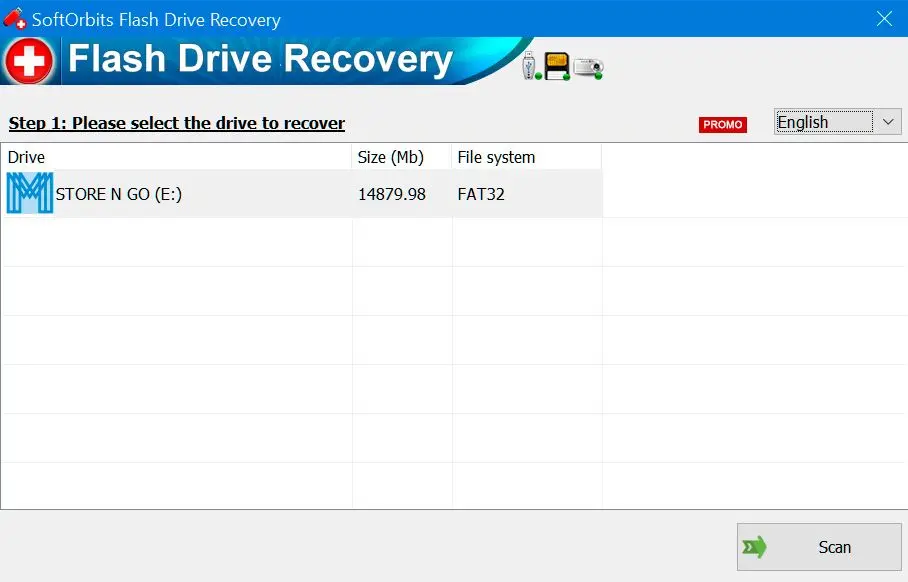
The order that works: recover your files first with Sandisk Usb Flash Drive Software download, which reads the raw sectors directly and does not care that the file system is missing. Then, with your data safe, reformat the stick (exFAT for a USB drive used across devices) to lay down a fresh file system. Our guide to SD card recovery walks through the same RAW-then-reformat flow for memory cards. The same approach applies to ADATA flash drive recovery, which follows an identical repair-vs-recovery logic.
How to remove write protection from a SanDisk USB
Work from easy to hard. Check for a physical lock switch, then clear read-only in diskpart, then a registry value. If all three fail, the controller has locked itself and the block cannot be removed.
Write protection shows up as "the disk is write-protected" when you try to copy, delete, or format. Start with cheap fixes. Some adapters and a few full-size SanDisk sticks have a tiny lock switch. Slide it off. If there is no switch, open Command Prompt and clear the read-only attribute with diskpart.
diskpartlist diskselect disk X
attributes disk clear readonly
Replace X with the SanDisk disk number from list disk. Get this wrong and the command hits the wrong drive. If diskpart reports success but the stick is still locked, try the StorageDevicePolicies registry value. Users on SanDisk's own forums walk through the same escalation for a write-protected drive.
Write protection won't clear - is the SanDisk drive dead?
A drive that ignores diskpart and the registry has usually failed its controller. You can no longer write to it, though it often still reads, so copy everything off it right now.
Here is the part the quick-fix articles skip. When none of the software tricks work, the write protection is not a Windows setting. It is the flash controller switching to read-only as a last-ditch protection because its memory is wearing out. A long Tom's Hardware forum thread documents drive after drive where this lock is permanent and no utility removes it.
That sounds like bad news, and for the drive it is. For your files it is the opposite. A read-only stick still mounts and still reads, so this is your window to copy the data off, manually or with a recovery scan, before the controller fails completely. Treat the first write-protect error as a warning light, not a puzzle to beat.
SanDisk USB not recognized by Windows at all
Rule out the cheap causes first. Try a different port. Then a different cable, then a different PC. If the drive never lights up and never appears in Disk Management, the controller is likely gone and only a lab can help.
"Not recognized" covers a range, so narrow it down. If the drive shows in Disk Management but has no letter, assign one or it may be RAW (see above). If it shows as "No Media" with zero size, the controller has usually failed. If nothing appears at all, swap the port and cable, then try another computer. A surprising number of "dead" sticks are really just dead front-panel USB header.
Picture the interview folder you needed by Monday morning sitting on a stick that will not mount. The instinct is to keep replugging it, but repeated power cycles stress a dying drive. Test it once on a second PC, and if it still will not appear, stop. More attempts only lower a recovery lab's odds. Our USB recovery walkthrough covers the same detection checks for other brands.
Run chkdsk and Windows Error Checking on a SanDisk drive
chkdsk fixes logical errors on a drive Windows can still read. Run it only after your files are copied somewhere else. On an already failing drive it can make corruption worse.
When the SanDisk drive still mounts but throws read errors or odd file behavior, chkdsk and the Windows Error Checking button (drive Properties, Tools tab) can repair the file system. Open an admin Command Prompt and run it against the drive letter.
chkdsk X: /f
The /f flag fixes file-system errors; adding /r also hunts bad sectors but takes much longer. The catch, spelled out in Microsoft's chkdsk reference: it moves and rewrites data while it works, which a healthy drive shrugs off but a failing one may not survive. That is why recovery comes first and chkdsk second. For a side-by-side look at the recovery and repair options that handle this, see our guide to the best USB flash drive repair tools.
Restore a SanDisk USB to its full capacity
A 256 GB stick that shows 32 GB usually has a leftover partition, or it is a counterfeit. diskpart clean rebuilds the real size; a fake-capacity drive never will, because the space was never there.
Capacity loss has two very different causes. The honest one: a partition or a failed format left the drive showing a fraction of its size. In Command Prompt, diskpart clean wipes the partition table so you can create a fresh full-size partition. This erases the drive, so recover anything you need first. It only drops the partition table, though - the data underneath stays readable until something overwrites it, so if the stick is leaving your hands, finish with a secure erase pass. Microsoft's community has a clear walkthrough for restoring full capacity with diskpart.
The dishonest one: a counterfeit drive flashed to report 256 GB while holding 32 GB of real memory. No tool fixes that, because the storage does not exist. Writing past the real limit silently corrupts files. A capacity-test utility like h2testw tells the two cases apart before you trust the stick again.
Can you update SanDisk USB firmware with SanDisk Dashboard or MPTool?
For a USB flash drive, no. SanDisk Dashboard supports SSDs, not USB sticks, and generic Sandisk pendrive repair tool are controller-specific, so the wrong one bricks the drive for good.
Chasing firmware is the most common dead end in the whole search. People look for a "SanDisk USB firmware update tool" expecting an official fix, but SanDisk's Dashboard utility manages SanDisk and WD SSDs. Sandisk usb repair tool does not list USB flash drives at all.
What is left are MPTool or "mass production" utilities, made for specific memory controllers by the chip vendors, not by SanDisk. They can sometimes revive a stick, but they reformat at the controller level and erase everything, and matching the exact controller is guesswork. Flash the wrong one and the drive is permanently bricked. For a USB stick, recovery plus a normal reformat is almost always the safer call than chasing firmware.
Is there an online Sandisk Pendrive Repair Tool?
No real one exists. A website cannot reach the raw sectors of a physical USB drive, and uploading recovered files to a stranger's server is a privacy risk. Repair and recovery both happen locally on your PC.
Searches for an "online" Sandisk usb repair tool are common, and it is worth being clear: a browser tab has no low-level access to a USB device plugged into your machine. The pages that rank for those terms are either ads for downloadable software or thin link farms. Anything that genuinely repairs a file system or recovers files needs direct, block-level access to the device, which only an installed program gets.
There is a privacy angle too. The files on a damaged SanDisk drive are often personal, things like photos, documents, and scans. Handing those to an unknown upload server is the real risk. Greyed out, or "processing in the cloud"? That is a reason to walk away, not to hand over your photos.
Pitfalls when repairing a SanDisk USB drive
Most permanently lost SanDisk data comes from three moves. People format before recovering. They run chkdsk on a RAW or failing drive, or buy a Sandisk usb firmware update tool for the wrong controller.
The "you need to format" prompt and quick how-to articles both push the format button first. On a r/datarecovery thread, people repeatedly arrive after formatting and ask how to undo it. Recover first; format is a one-way door.
Writing recovered data onto the drive you are rescuing overwrites the sectors still holding other lost files. Always recover to a separate disk.
chkdsk assumes a readable file system and rewrites data as it goes. On a RAW drive it will not even run, as Microsoft's own answers confirm; on a failing one it can finish the job corruption started.
Flashing controller firmware that does not match the chip is the fastest way to turn a recoverable stick into a paperweight. SanDisk does not publish one for USB drives for a reason.
As one r/DataHoarder thread describes, SanDisk drives flip to read-only as they fail. That first lock is your cue to copy data off, not to spend a day fighting diskpart.
SoftOrbits Flash Drive Recovery
Sources